VectorStyler
    • Categories
    • Unread
    • Recent
    • Tags
    • Popular
    • Register
    • Login

    Vertical text in PDF is not proper

    Scheduled Pinned Locked Moved Resolved Issues
    13 Posts 3 Posters 17.4k Views 3 Watching
    Loading More Posts
    • Oldest to Newest
    • Newest to Oldest
    • Most Votes
    Reply
    • Reply as topic
    Log in to reply
    This topic has been deleted. Only users with topic management privileges can see it.
    • A Offline
      ash-f @VectorStyler
      last edited by ash-f

      @vectoradmin PDF exported by VS.

      1 Reply Last reply Reply Quote 1
      • 861475_VctSt8 Away
        861475_VctSt @ash-f
        last edited by

        @ash-f
        @vectoradmin

        (1.0.062 by MacOS X10.15.7)
        In my environment, they do not happen. (Of course, this is a working screen.)
        This issue should be resolved in ver. 1.0.023.
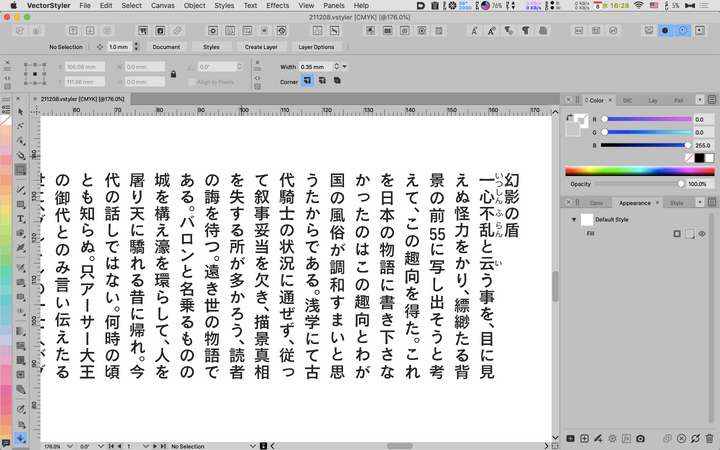
        0_1638948558432_2021-12-08 16.28.38.png

        LIc. 0 OS10.15.8
        MacBook Air (13-inch, Mid 2012) / Intel Core i5, 8GB / Intel HD Graphics 4000
        LIc. 1 OS13.6.7
        MacBook Pro (14-inch, 2023) / Apple M2 Pro, 16GB / Apple GPU

        A 1 Reply Last reply Reply Quote 0
        • A Offline
          ash-f @861475_VctSt
          last edited by ash-f

          @861475_VctSt It's not about a problem in VectorStyler.
          Export the artwork as PDF and open it in Acrobat or Preview.

          UPDATE: I just tested on Mac and it's not even shown or opened.

          861475_VctSt8 1 Reply Last reply Reply Quote 0
          • 861475_VctSt8 Away
            861475_VctSt @ash-f
            last edited by

            @ash-f
            @vectoradmin

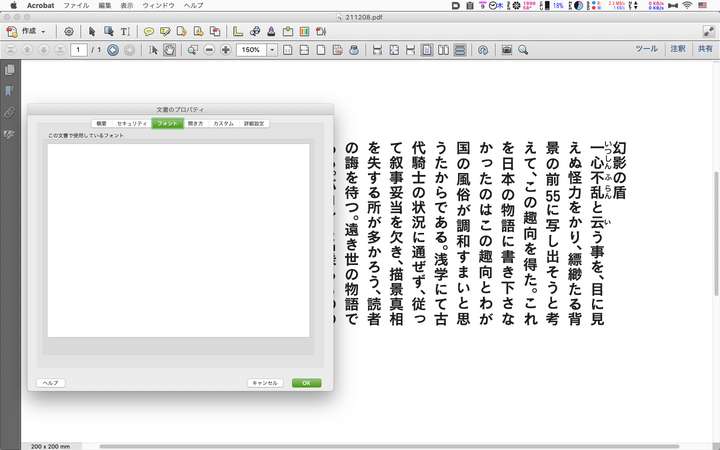
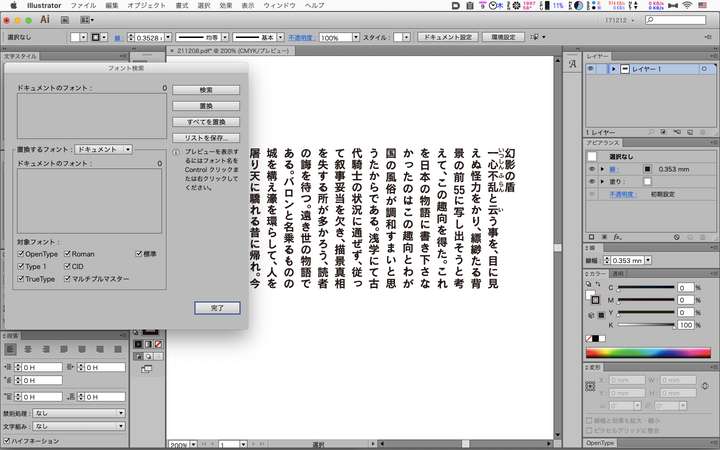
            I don't have that problem in my environment, nor have I been able to reproduce it.
            I have opened it in Acrobat and Illustrator.
            The problem doesn't occur because all the shapes that VS exports are pathified.
            (However, I have another problem where I can't embed a subset without pathing it.)

            Acrobat
            0_1639026855055_211209-1.png

            Illustrator
            0_1639026876543_211209-2.png

            LIc. 0 OS10.15.8
            MacBook Air (13-inch, Mid 2012) / Intel Core i5, 8GB / Intel HD Graphics 4000
            LIc. 1 OS13.6.7
            MacBook Pro (14-inch, 2023) / Apple M2 Pro, 16GB / Apple GPU

            A 1 Reply Last reply Reply Quote 0
            • A Offline
              ash-f @861475_VctSt
              last edited by ash-f

              @861475_VctSt It could depend on the font used.
              Have you tried Yu Gothic?

              Acrobat can't open a pdf KozGo or Noto Sans used on Windows.

              VectorStylerV 1 Reply Last reply Reply Quote 0
              • VectorStylerV Offline
                VectorStyler @ash-f
                last edited by

                @ash-f I opened a bug on this one, and I will try to replicate it.

                A 1 Reply Last reply Reply Quote 1
                • A Offline
                  ash-f @VectorStyler
                  last edited by

                  @vectoradmin
                  Adobe Fonts(Japanese fonts such as Kozuka, Source Han Sans/Serif ), MS Office fonts(HG, UD Digi/Biz UD), Noto Sans/Serif(CJK) and systems fonts(such as Yu Gothic/Mincho) need to be fixed first.
                  Then we should check other common Japanese fonts later.

                  1 Reply Last reply Reply Quote 1
                  • A Offline
                    ash-f
                    last edited by ash-f

                    By the way, improvement for PDF(and SVG) export quality is very important I think.
                    Unless VectorStyler is for "home use" where users can use only it or print to a personal printer, exporting artwork to PDF/SVG is unavoidable in order to share files.

                    VectorStylerV 1 Reply Last reply Reply Quote 1
                    • VectorStylerV Offline
                      VectorStyler @ash-f
                      last edited by

                      @ash-f Some CFF based fonts are not exporting correctly to PDF from VS. This is a bug.

                      1 Reply Last reply Reply Quote 0
                      • VectorStylerV Offline
                        VectorStyler @ash-f
                        last edited by

                        @ash-f Font exporting to PDF and Postscript has been significantly improved in recent versions. Let me know if this issue still occurs.


                        1 Reply Last reply Reply Quote 0
                        • First post
                          Last post