VectorStyler
    • Categories
    • Unread
    • Recent
    • Tags
    • Popular
    • Register
    • Login

    Font dropdown list glitch (Windows)

    Scheduled Pinned Locked Moved Resolved Issues
    17 Posts 4 Posters 19.7k Views 4 Watching
    Loading More Posts
    • Oldest to Newest
    • Newest to Oldest
    • Most Votes
    Reply
    • Reply as topic
    Log in to reply
    This topic has been deleted. Only users with topic management privileges can see it.
    • VectorStylerV Offline
      VectorStyler @Gremriel
      last edited by

      @Gremriel Can this still be replicated in the latest build (1.0.048) ?

      G 1 Reply Last reply Reply Quote 0
      • G Offline
        Gremriel @VectorStyler
        last edited by

        @vectoradmin

        Just tested this, and the glitch is still there, I'm afraid. Setting the dropdown list to Collections fixes the issue.
        To be honest, I don't know how I would go about troubleshooting it; I have tinkered with the idea to uninstall all my fonts, and then adding them one by one, to see if it's an issue with a particular font. Have to set aside some time for that though 🙂

        If you have any ideas how to troubleshoot, I'm happy to test it out.

        WIndows 11

        VectorStylerV 1 Reply Last reply Reply Quote 0
        • VectorStylerV Offline
          VectorStyler @Gremriel
          last edited by

          @Gremriel I don't think it is an issue caused by some font (but one can never know). I will keep it open and try to replicate it. Will return with questions if I have.

          1 Reply Last reply Reply Quote 0
          • Victor VectorV Offline
            Victor Vector
            last edited by

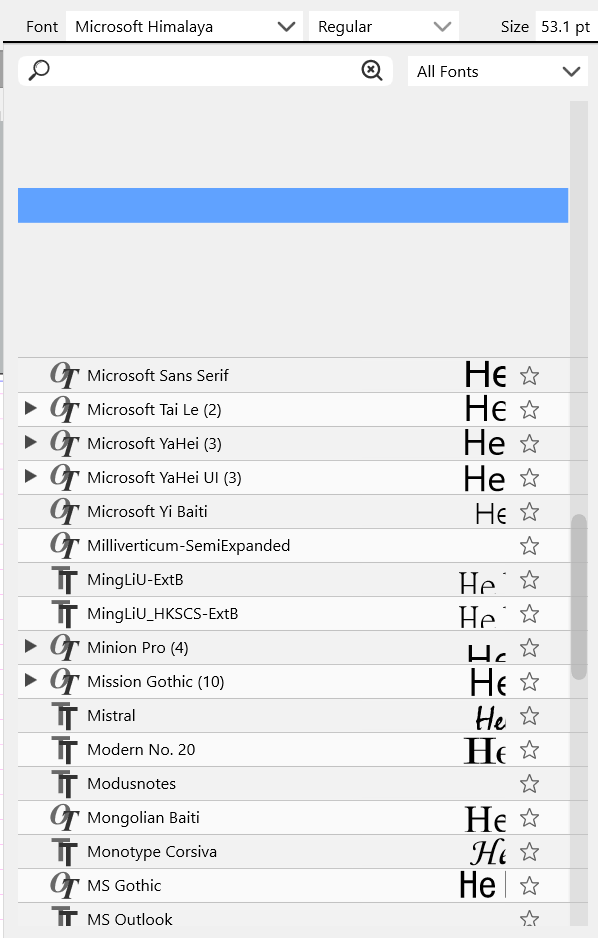
            I can confirm this bug. It also happens on my PC running Windows 11. Happens on both 4K and 1440 monitor.
            Edit >Preferences > Text Display > "Preview Fonts in Lists" toggling does not fix.

            Here is an image for visual reference:

            0_1646701801717_Font selector loses top display.png

            Devil DinosaurD VectorStylerV 2 Replies Last reply Reply Quote 0
            • Devil DinosaurD Offline
              Devil Dinosaur @Victor Vector
              last edited by

              Same on Mac Sierra here, when I click on the down arrow of the fonts list. It takes several tries before I can stay on the list and chose my font.

              Fred.
              MacBook Pro (M1) - MacOs Sonoma 14

              1 Reply Last reply Reply Quote 0
              • VectorStylerV Offline
                VectorStyler @Victor Vector
                last edited by

                @Victor-Vector This error has been reported before and I could not replicate it on Windows (nor on Mac).

                @Devil-Dinosaur if it is possible to make a short recording (we use record.it) on how to replicate this it would help a lot! Thanks!

                Devil DinosaurD 1 Reply Last reply Reply Quote 0
                • Devil DinosaurD Offline
                  Devil Dinosaur @VectorStyler
                  last edited by

                  @vectoradmin After trying again I know that this is indeed my mistake. I finally understood that I had to press the arrow button once and not keep the drop down menu button pressed. That made me confused since the menu appeared/disappeared.
                  So finally no problem by my side. 😉

                  Fred.
                  MacBook Pro (M1) - MacOs Sonoma 14

                  1 Reply Last reply Reply Quote 0
                  • VectorStylerV Offline
                    VectorStyler @Gremriel
                    last edited by

                    @Gremriel This problem should be fixed in build 1.1.024

                    G 1 Reply Last reply Reply Quote 0
                    • G Offline
                      Gremriel @VectorStyler
                      last edited by

                      @vectoradmin It's still there for me, at least the first time I open the dropdown menu. The list is empty, except two fonts at the bottom. I scroll up using the scrollbar, and the fonts appear.

                      Now, when I use the scrollbar, the font list empties again, until I reach the two fonts at the bottom. However, when I scroll the list with the scroll button on my mouse, the dropdown menu works as expected (but it takes ages to reach a font I'd like to use.

                      WIndows 11

                      VectorStylerV 1 Reply Last reply Reply Quote 0
                      • VectorStylerV Offline
                        VectorStyler @Gremriel
                        last edited by

                        @Gremriel Is the font preview alignment correct now?
                        I will keep the issue with empty list part open.

                        G 1 Reply Last reply Reply Quote 0
                        • G Offline
                          Gremriel @VectorStyler
                          last edited by

                          @vectoradmin This is what it looks for me.
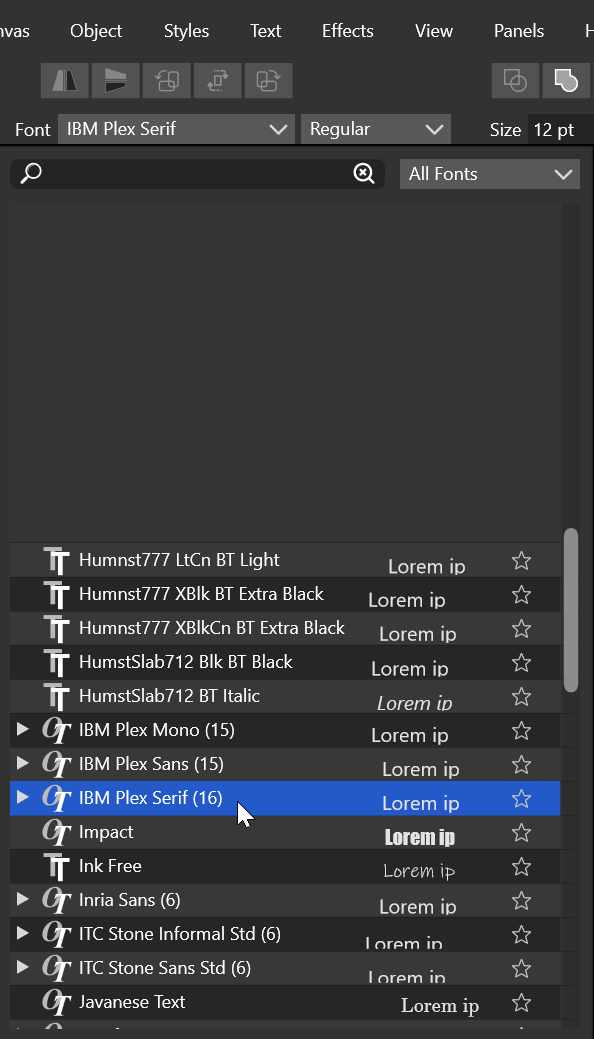
                          0_1647858647496_Font Dropdown.jpg

                          WIndows 11

                          VectorStylerV 1 Reply Last reply Reply Quote 1
                          • VectorStylerV Offline
                            VectorStyler @Gremriel
                            last edited by

                            @Gremriel This problem should be fixed in build 1.1.048

                            G 1 Reply Last reply Reply Quote 2
                            • G Offline
                              Gremriel @VectorStyler
                              last edited by Gremriel

                              @VectorStyler Thank you! How did you solve it without being able to reproduce it?

                              *edit: I saw a post where you were finally able to reproduce it.

                              WIndows 11

                              VectorStylerV 1 Reply Last reply Reply Quote 0
                              • VectorStylerV Offline
                                VectorStyler @Gremriel
                                last edited by

                                @Gremriel Yes, I was able to replicate the issue by changing the UI scaling settings in the preferences.

                                1 Reply Last reply Reply Quote 0
                                • First post
                                  Last post