VectorStyler
    • Categories
    • Unread
    • Recent
    • Tags
    • Popular
    • Register
    • Login

    New file, 1st object drawn: impossible to change the stroke before deselecting

    Scheduled Pinned Locked Moved VectorStyler 1.1 Bugs
    2 Posts 2 Posters 3.6k Views 3 Watching
    Loading More Posts
    • Oldest to Newest
    • Newest to Oldest
    • Most Votes
    Reply
    • Reply as topic
    Log in to reply
    This topic has been deleted. Only users with topic management privileges can see it.
    • B Offline
      B-Vs-V
      last edited by

      Hi,
      I don't know if it's a bug but after drawing an object, I couldn't change the stroke parameters; I had to deselect the object and then the modifications could be made (it already happened to me on W10).
      Also for the nodes: I drew a 1st object and wanted to change the tangents with the modifier keys but impossible. I had to double-click on a node first and then I could modify all the others (and those of a second object).

      Great for the line thickness control so far ; it works very well (not yet tried with the brush). However, , after modifying the tangent control points, I can have some strange artefacts.
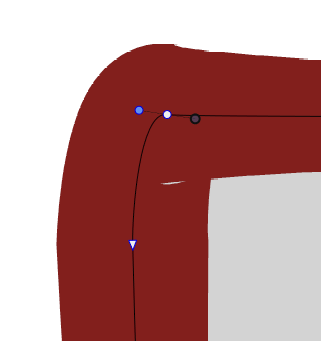
      0_1637568799495_a8ba0f34-29a6-49d1-83bb-f05fdb0d73ed-image.png
      Cheers,
      Patrick

      W11 Pro 25H2 - 12th Gen Intel(R) i7-12700K 3.61 GHz - RAM 64 Go - NVIDIA GF GTX 4070 Ti - Intuos - Dell UP3216Q / Eizo ColorEdge
      W11 Pro 25H2 - 12th Gen Intel(R) i7-12700KF 3.60 GHz -RAM 64 Go - NVIDIA GF GTX 3080 - IntuosPro- ProArt PA329C

      VectorStylerV 1 Reply Last reply Reply Quote 0
      • VectorStylerV Offline
        VectorStyler @B-Vs-V
        last edited by

        @PatrickM Tried to replicate this, but could not. If there are some steps, or a short recording (we use https://recordit.co/) it might help.

        1 Reply Last reply Reply Quote 0
        • First post
          Last post