VectorStyler
    • Categories
    • Unread
    • Recent
    • Tags
    • Popular
    • Register
    • Login

    Text in Non Displayable Font is Not able to be switched

    Scheduled Pinned Locked Moved Resolved Issues
    3 Posts 2 Posters 4.4k Views 1 Watching
    Loading More Posts
    • Oldest to Newest
    • Newest to Oldest
    • Most Votes
    Reply
    • Reply as topic
    Log in to reply
    This topic has been deleted. Only users with topic management privileges can see it.
    • BoldlineB Offline
      Boldline
      last edited by

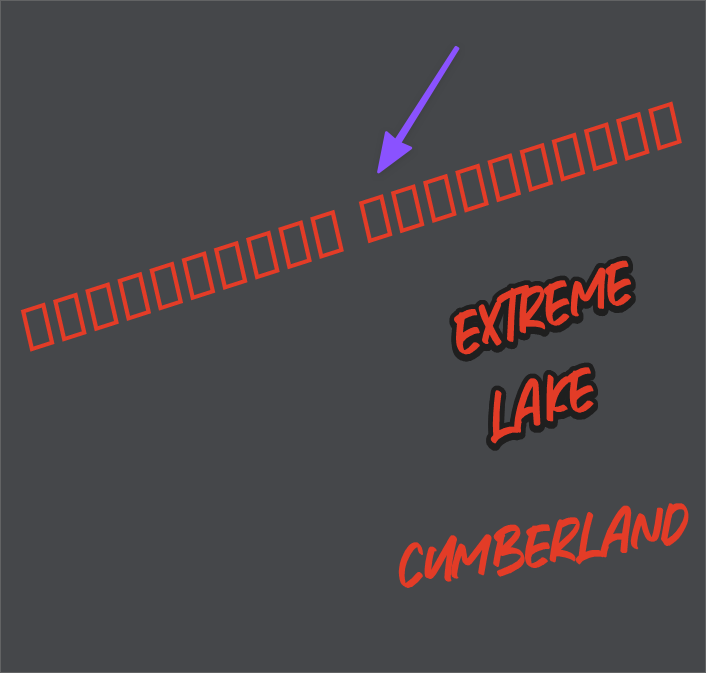
      I noticed that if I have a line of live text and I am scrolling through the fonts, if I land on one that is not recognized by VS (where it gives the rectangle filler shapes), I am unable to click on it again to switch it to another font. I've seen this occur both before and after a VS reboot. Does this happen to anyone else?
      0_1640392606827_7abd1e51-c9c8-4ff3-8112-fc364bc2cc62-image.png

      🍎 macOS Tahoe 26.2, Mac mini (M1, 2020), Chip Apple M1, Memory 16 GB
      Cintiq 27QHD Display and LG Ultra HD Display

      BoldlineB VectorStylerV 2 Replies Last reply Reply Quote 0
      • BoldlineB Offline
        Boldline @Boldline
        last edited by

        UPDATE:
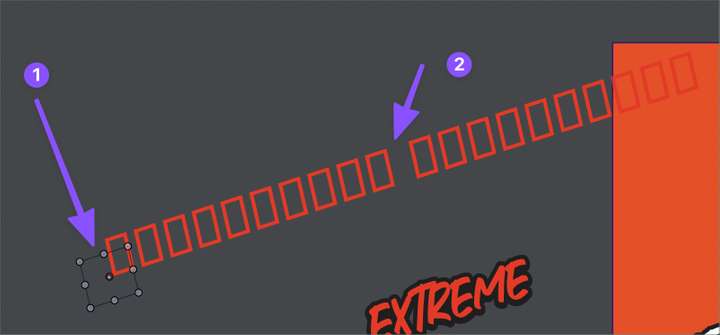
        I realized if I go to the layer the text is on and click the select-circle, it selects the "text" where I have placed the #1. So it made sense then, that when I clicked on the rectangles (#2), there was nothing to click on, hence it seemed locked or stuck.
        0_1640392878023_defd15fa-3a86-45cc-8f15-96fddd518d4c-image.png

        🍎 macOS Tahoe 26.2, Mac mini (M1, 2020), Chip Apple M1, Memory 16 GB
        Cintiq 27QHD Display and LG Ultra HD Display

        1 Reply Last reply Reply Quote 0
        • VectorStylerV Offline
          VectorStyler @Boldline
          last edited by

          @Boldline This issue should be fixed in the new build 1.1.002 (beta)

          1 Reply Last reply Reply Quote 0
          • First post
            Last post
