VectorStyler
    • Categories
    • Unread
    • Recent
    • Tags
    • Popular
    • Register
    • Login

    It seems i have a "Save As" problem.

    Scheduled Pinned Locked Moved Resolved Issues
    10 Posts 3 Posters 8.5k Views 3 Watching
    Loading More Posts
    • Oldest to Newest
    • Newest to Oldest
    • Most Votes
    Reply
    • Reply as topic
    Log in to reply
    This topic has been deleted. Only users with topic management privileges can see it.
    • S Offline
      Subpath
      last edited by Subpath

      Here on Win 10, VectorStyler 1.1.0002 beta.

      Can save a file only once, when "Save as" is in play.
      After "Save as" on all further attempts I get stuck with this message:
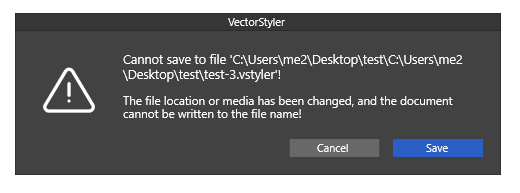
      0_1640772122308_Save-Message.png
      x
      x
      Pressing "Save" on the Message Box, doesnt help either.
      x
      x

      I try a few other save methods.

      I am not 100% shure in this case:
      If my first save is a "Save" then all following
      saves with "Save" ?

      Because on time of many trys i got one empty File
      all others are fine.

      x
      x
      This case work:
      If my first save is a "Incrementale Save" then
      all following saves with "Incrementale Save" work.

      Win 11
      CPU: AMD Ryzen 5 9600X, 6-core.
      GPU: Nvidia Geforce RTX 5070.

      VectorStylerV 2 Replies Last reply Reply Quote 0
      • VectorStylerV Offline
        VectorStyler @Subpath
        last edited by

        @Subpath Replicated. This is a regression in the new build.

        1 Reply Last reply Reply Quote 1
        • VectorStylerV Offline
          VectorStyler @Subpath
          last edited by

          @Subpath A new build is up, fixing this issue.

          S 1 Reply Last reply Reply Quote 0
          • S Offline
            Subpath @VectorStyler
            last edited by

            @vectoradmin

            Installed 1.1.003. But unfortunalty the Fix make things
            more worse.
            VS did not Save anything now, not on Save, Save as
            or Incremental Save.

            Win 11
            CPU: AMD Ryzen 5 9600X, 6-core.
            GPU: Nvidia Geforce RTX 5070.

            1 Reply Last reply Reply Quote 1
            • S Offline
              Subpath
              last edited by

              Export dit also not work

              Win 11
              CPU: AMD Ryzen 5 9600X, 6-core.
              GPU: Nvidia Geforce RTX 5070.

              VectorStylerV 1 Reply Last reply Reply Quote 1
              • encartE Offline
                encart
                last edited by

                Same here

                MacBook Air M4 24Gb, Tahoe 26.2

                1 Reply Last reply Reply Quote 0
                • VectorStylerV Offline
                  VectorStyler @Subpath
                  last edited by

                  @Subpath Will fix this ASAP.

                  1 Reply Last reply Reply Quote 1
                  • S Offline
                    Subpath
                    last edited by

                    To make it a little more clear.
                    Everthings seems to work,
                    but no File is created in either case.

                    Win 11
                    CPU: AMD Ryzen 5 9600X, 6-core.
                    GPU: Nvidia Geforce RTX 5070.

                    VectorStylerV 1 Reply Last reply Reply Quote 1
                    • VectorStylerV Offline
                      VectorStyler @Subpath
                      last edited by

                      @Subpath @encart Uploaded a fix. Check for Update on Windows should update.

                      S 1 Reply Last reply Reply Quote 2
                      • S Offline
                        Subpath @VectorStyler
                        last edited by

                        @vectoradmin

                        Great, thanks.
                        Intalled and tested, seems every case work fine now.

                        Win 11
                        CPU: AMD Ryzen 5 9600X, 6-core.
                        GPU: Nvidia Geforce RTX 5070.

                        1 Reply Last reply Reply Quote 1
                        • First post
                          Last post