Opening existing VS files in full main artboard view
-
When opening saved VS files, could it default to opening at full artboard view? Each time I open an existing VS file, it opens it off to the side, showing part of the artboard and zoomed in. I almost always want to see the entire design right away when I open a file
🍎 macOS Tahoe 26.2, Mac mini (M1, 2020), Chip Apple M1, Memory 16 GB
Cintiq 27QHD Display and LG Ultra HD Display -
Optional please - I like returning immidiately to the often minimal area of my document where I spend days working on fine details - but with a minimum size requirement before this happens, please. It is not suitable for small artboards. Icons and logos. I think Microsoft Word also defaults to positioning the cursor where you made your last edit before quitting.
It is not only will small documents that default can be an issue. If your document is a horisontal poster - has dimensions like 10:2 or more wider than that - such a default would be counter productive and remind me of Serif Software

Affinity Photo defaults to fit to screen - a remarkable usability and workflow disaster when an artboard or image is small, especially an icon or small web image. Their "fix" was late and also remarkably half-assed. Adding insult to injury Photo fits the image to screen after many operations. The more you crop, the more you scream in horror.
I have several image editing/viewing programs with "Scale up small images to fit" settings or even "Don't upscale images smaller than" percent value (of screen size) setting.
Affinity Designer has viewpoints that the above average curious person can find and utilize to save custom viewpoints - for example the document zoomed into a certain tiny area - but of course with a yet to be fixed bug after 4 years. At least.
 When Serif fixes that issue in ten years time I will enjoy working with viewpoints in AD. I happens often that I get enough of an area and work somewhere else to get some variation. Saving viewpoints can also work like simple notes; "beautify this object" or whatever.
VS doesn't have anything similar to viewpoints, right?
🍏 macOS Sequoia Apple Silicon
-
@Ingolf Viewpoints are a cool idea - I could see use for that even in my own work. The position I find VS defaults to when I open files is not helpful at all - it's half on the artboard and half off - maybe it's related to where I have stored extra stuff off past the artboard edges?
-
@Boldline said in Opening existing VS files in full main artboard view:
@Ingolf Viewpoints are a cool idea - I could see use for that even in my own work. The position I find VS defaults to when I open files is not helpful at all - it's half on the artboard and half off - maybe it's related to where I have stored extra stuff off past the artboard edges?
That may very well be; I only have objects inside the artboard area and Vectorstyler returns me to the exact spot and zoom level where I was last, when I reopen a file.
-
Here is an example of an existing VS file I opened just now. The light gray rectangle is the only artboard. I do not believe this was the last position I was in when I saved the file as most files open in this same position.
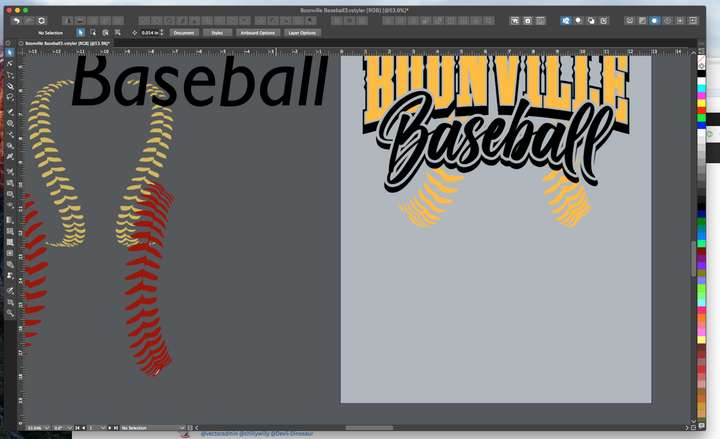
I was wondering if it related to items positioned off the artboard, but there is stuff on either side
here is a full screen shot of the same file after I zoomed out:
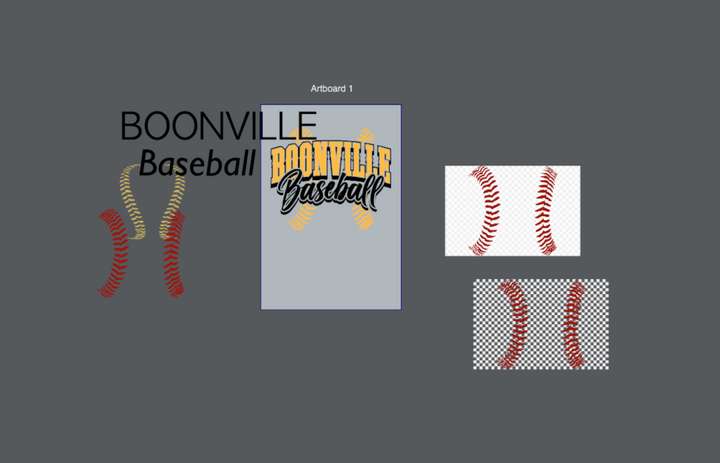
-
@Boldline Currently, VS saves the last viewpoint of the file, so when opened next time (on the same screen) it should have the same viewpoint. Maybe an option could be added to have a "view all artboards" or "view last artboard" after opening?
-
@Ingolf I'd like to know more about this "viewpoint" feature and how it could work best in VS?
-
@vectoradmin said in Opening existing VS files in full main artboard view:
@Ingolf I'd like to know more about this "viewpoint" feature and how it could work best in VS?
It think it would fit nicely into the navigation panel next to the zoom percentage. Similar to in AD.
But please please with sugar on top, if you should ever add it, when adding a viewpoint the software should ask for a name immediately. I have to select rename just after creating viewpoints and other items in Affinity Designer. Every. Single. Time.
And to avoid customers never finding it. I don't recommend hiding any of it in the panel menu.
-
@Ingolf Added this to the backlog
-
@vectoradmin said in Opening existing VS files in full main artboard view:
Maybe an option could be added to have a "view all artboards" or "view last artboard" after opening?
This would be a great addition to VS - the option to decide how you want files to open
-
Here the CorelDraw Way to save Views.
And CorelDraw assigns names automatically
to the views. No need to do this yourself.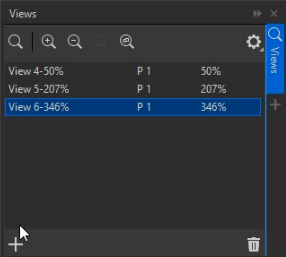
-
@Subpath But I need my own label for each viewpoint. Affinity also adds generic names automatically that I can't use for a thing later or now.
I need precise labels to know where the view takes me in a complex drawing. Many of these user interface choices are made from simple thinking, simple scenarios.
That dialog is full of percentages. That is designed by an engineer. I need info about what the viewpoints shows me, where it goes to. The percentage would never really matter to me.
@vectoradmin I would prefer that it behaved like when saving snapshots. Pop up with name suggestion (could be zoom percentage) - enter if user is okay with that name, and that would also mean consistant behavior across features.
-
In Corel it is no problem to rename your View
according to your needs.I don't like the way via dropdown menus, to save a view.
Like in Affinity Designer. -
@Subpath said in Opening existing VS files in full main artboard view:
@Ingolf
In Corel it is no problem to rename your View
according to your needs.I know, but I never use and never used the proposed generic name in AD or Corel so it is a problem for me that I have to rename every viewpoint I create.
When it pops up with a suggestion (like snapshots do already) it requires just hitting ENTER to accept it. Not a big deal and easy to figure out as a user.
Renaming is a additional proces that is breaks creating a viewpoint into two actions - the second requiring a lot more. It is simply bad UI design.


