VectorStyler
    • Categories
    • Unread
    • Recent
    • Tags
    • Popular
    • Register
    • Login

    Shape Builder not detecting consistently the intersections
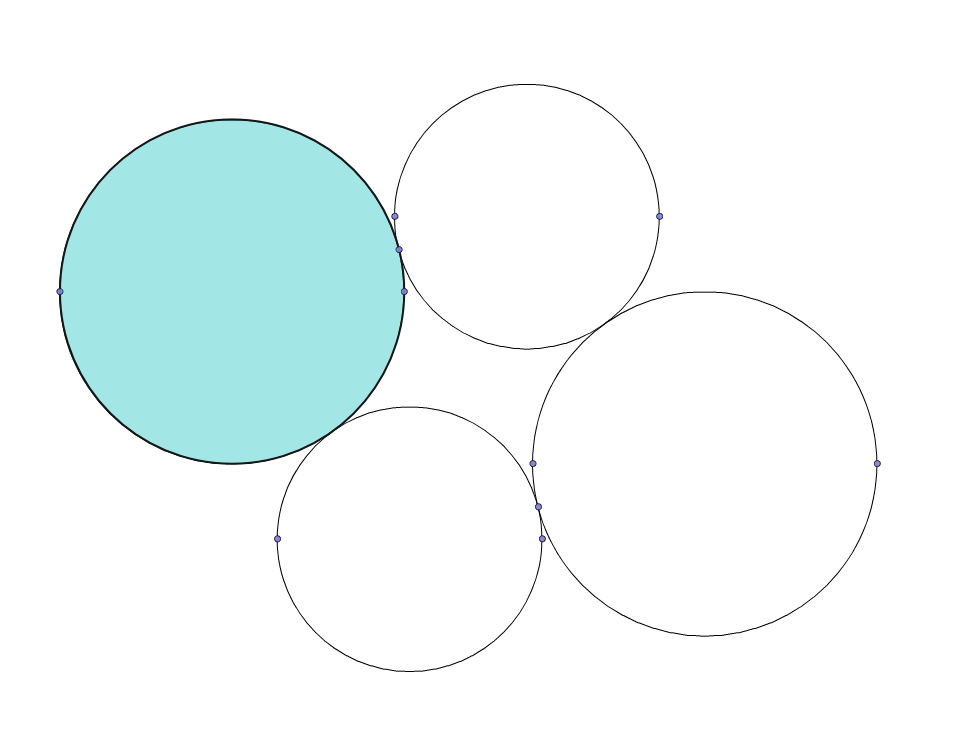
    Scheduled Pinned Locked Moved VectorStyler 1.1 Bugs
    13 Posts 4 Posters 14.1k Views 4 Watching
    Loading More Posts
    • Oldest to Newest
    • Newest to Oldest
    • Most Votes
    Reply
    • Reply as topic
    Log in to reply
    This topic has been deleted. Only users with topic management privileges can see it.
    • A Offline
      abn5x @VectorStyler
      last edited by

      @VectorStyler Sure, here you go!

      0_1653585418025_issue.vstyler

      1 Reply Last reply Reply Quote 1
      • A Offline
        abn5x @VectorStyler
        last edited by abn5x

        @VectorStyler btw, the exact same shapes, do intersect correctly in Illustrator
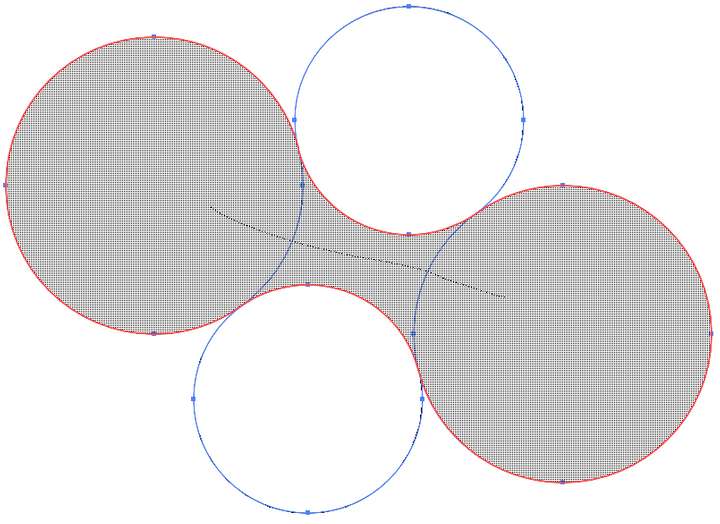
        0_1653585617372_a2b19d42-8e89-4a60-b4e2-aa9e9548291a-image.png

        1 Reply Last reply Reply Quote 1
        • S Offline
          Subpath
          last edited by Subpath

          @abn5x

          Hi

          I tried a little and it seems that it works,
          if the space in the middle is not empty.

          I put a circle (could be any Shape i think)
          in the middle and then it works here.
          (win 10)
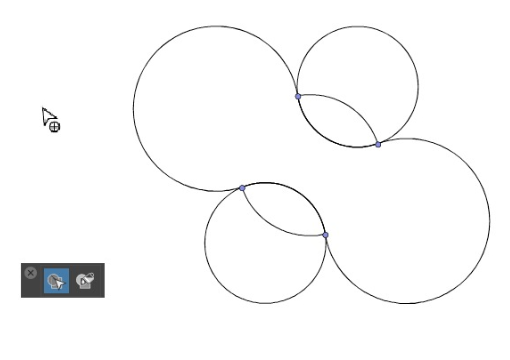
          See Video here:

          0_1653589864750_ShapeBuilder-1.png

          Win 11
          CPU: AMD Ryzen 5 9600X, 6-core.
          GPU: Nvidia Geforce RTX 5070.

          A 1 Reply Last reply Reply Quote 1
          • A Offline
            abn5x @Subpath
            last edited by

            @Subpath Heya, it only works because the inner circle you created, makes intersection points, try making it a little bit bigger than where the tangents of the original circles are, and you'll see what I mean 🙂

            S 1 Reply Last reply Reply Quote 1
            • S Offline
              Subpath @abn5x
              last edited by Subpath

              @abn5x

              I don't quite understand what you mean. I think the translation doesnt works so well.
              English is not my first language. So a picture of what you mean might be helpful.

              But I can tell from my attempts that it doesn't work without the shape in the middle.

              I guess you meant something like that
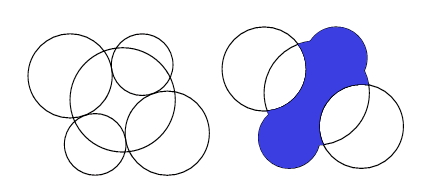
              0_1653594948752_Shape-Builder-2.png

              Win 11
              CPU: AMD Ryzen 5 9600X, 6-core.
              GPU: Nvidia Geforce RTX 5070.

              b77B 1 Reply Last reply Reply Quote 0
              • b77B Offline
                b77 @Subpath
                last edited by b77

                @Subpath The Shape Builder tool is supposed to create a shape from the two opposite circles and the empty space between all four without having to draw any other shape in the middle.

                MacBook Pro (Intel) running Monterey 12.6.4

                S 1 Reply Last reply Reply Quote 1
                • S Offline
                  Subpath @b77
                  last edited by Subpath

                  ...The Shape Builder tool is supposed to create a shape from the two opposite circles and the empty space
                  between all four without having to draw any other shape in the middle....

                  Thanks, @b77, that's how I understood the Shape Builder too, but I wasn't quite sure.

                  And I thought the find with this shape in the middle might be helpful for @VectorStyler to find the problem.
                  And in the meantime as a kind of workaround for users.

                  Win 11
                  CPU: AMD Ryzen 5 9600X, 6-core.
                  GPU: Nvidia Geforce RTX 5070.

                  1 Reply Last reply Reply Quote 2
                  • VectorStylerV Offline
                    VectorStyler @abn5x
                    last edited by

                    @abn5x The issue can be replicated here also. The problem is that some pairs of those circles are at a very small distance. If you set the stroke width to zero, and zoom in at where the shapes supposed to intersect, there is a very small gap.

                    Nevertheless, this should work, and I opened a bug to find a solution for these cases.

                    A b77B 2 Replies Last reply Reply Quote 1
                    • A Offline
                      abn5x @VectorStyler
                      last edited by

                      @VectorStyler Yeah, I know that there is some micro-space between some circle pairs, that's why I thought that by playing with the settings, I could make shape builder think there's an intersection in some tolerance range. But for my life I couldn't find any xD

                      VectorStylerV 1 Reply Last reply Reply Quote 0
                      • VectorStylerV Offline
                        VectorStyler @abn5x
                        last edited by

                        @abn5x This is a bug (or more precisely a missing feature) of the shape builder. Will try to fix it.

                        1 Reply Last reply Reply Quote 0
                        • b77B Offline
                          b77 @VectorStyler
                          last edited by

                          @VectorStyler said in Shape Builder not detecting consistently the intersections:

                          If you set the stroke width to zero, and zoom in at where the shapes supposed to intersect, there is a very small gap.

                          I would just switch to Outline Mode (Cmd-Y) to check things like these.

                          MacBook Pro (Intel) running Monterey 12.6.4

                          1 Reply Last reply Reply Quote 1
                          • First post
                            Last post
