VectorStyler
    • Categories
    • Unread
    • Recent
    • Tags
    • Popular
    • Register
    • Login

    editing nodes on one side of design negatively affects nodes on opposite side
    Scheduled Pinned Locked Moved VectorStyler 1.1 Bugs
    18 Posts 4 Posters 15.1k Views 3 Watching
    Loading More Posts
    • Oldest to Newest
    • Newest to Oldest
    • Most Votes
    Reply
    • Reply as topic
    Log in to reply
    This topic has been deleted. Only users with topic management privileges can see it.
    • BoldlineB Online
      Boldline @Subpath
      last edited by

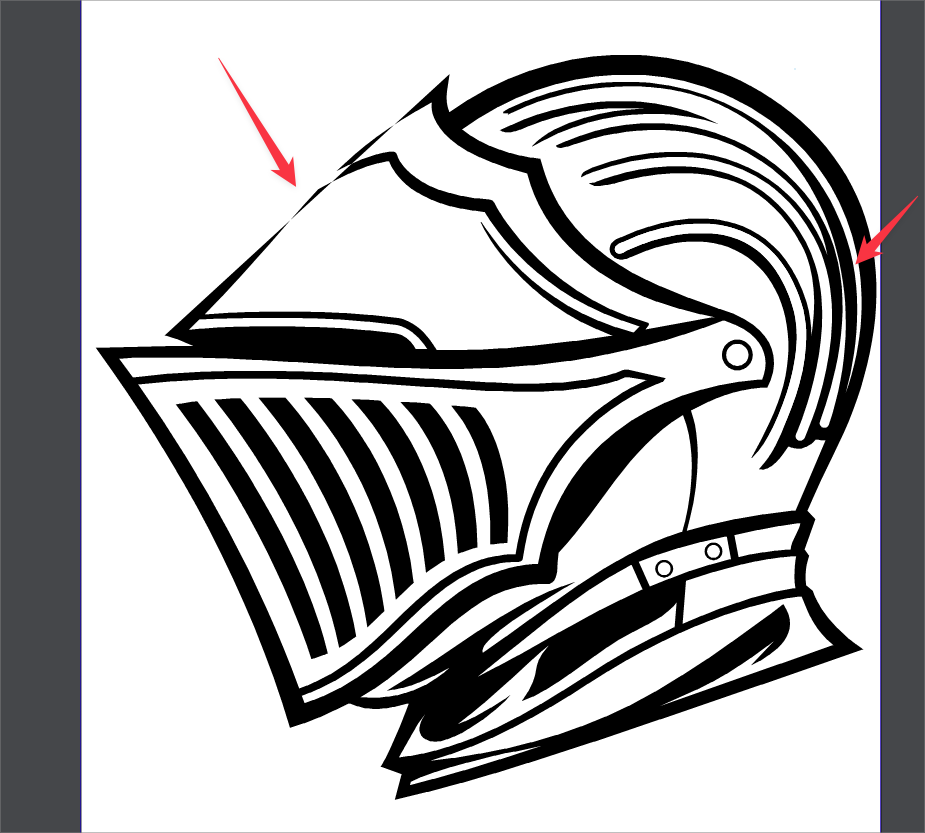
      @Subpath @b77 I appreciate you both experimenting with it. I probably did not explain it well enough. The issue is the kink on the right side... when you delete the extra nodes making the kink on the right side, it negatively affects the left side as a result. right side issue causes left side bad result. I think you were both doing it in reverse.

      🍎 macOS Tahoe 26.2, Mac mini (M1, 2020), Chip Apple M1, Memory 16 GB
      Cintiq 27QHD Display and LG Ultra HD Display

      b77B 1 Reply Last reply Reply Quote 0
      • b77B Offline
        b77 @Boldline
        last edited by

        @Boldline Got it. Yes, replicated here. 👍

        MacBook Pro (Intel) running Monterey 12.6.4

        BoldlineB VectorStylerV 2 Replies Last reply Reply Quote 1
        • BoldlineB Online
          Boldline @b77
          last edited by

          @b77 thanks for checking that and confirming.

          🍎 macOS Tahoe 26.2, Mac mini (M1, 2020), Chip Apple M1, Memory 16 GB
          Cintiq 27QHD Display and LG Ultra HD Display

          b77B 1 Reply Last reply Reply Quote 0
          • b77B Offline
            b77 @Boldline
            last edited by b77

            @Boldline OK, if you zoom real close and delete just the very small separate shape
            and then delete the other nodes of the bump, the path on the other side is left intact:

            Quick video here: https://recordit.co/Vm3AFgwxN3

            MacBook Pro (Intel) running Monterey 12.6.4

            BoldlineB 1 Reply Last reply Reply Quote 0
            • BoldlineB Online
              Boldline @b77
              last edited by

              @b77 interesting. I wonder what causes that to affect the other section like that

              🍎 macOS Tahoe 26.2, Mac mini (M1, 2020), Chip Apple M1, Memory 16 GB
              Cintiq 27QHD Display and LG Ultra HD Display

              1 Reply Last reply Reply Quote 0
              • VectorStylerV Offline
                VectorStyler @b77
                last edited by

                @b77 said in editing nodes on one side of design negatively affects nodes on opposite side:

                @Boldline Got it. Yes, replicated here. 👍

                What are the steps to replicate?

                b77B 1 Reply Last reply Reply Quote 0
                • b77B Offline
                  b77 @VectorStyler
                  last edited by b77

                  @VectorStyler

                  Steps to replicate the issue:

                  • open the file;
                  • undo once to get the bump back;
                  • zoom in on the right side;
                  • select the few nodes of the kink/bump;
                  • press Delete.

                  Video here: https://recordit.co/fHbd07MUDW

                  ––––––––––––––––––––––
                  Steps to avoid the issue:

                  • undo one to get the bump back;
                  • zoom real close;
                  • delete just the very small separate shape
                  • then delete the other nodes of the bump.

                  Video here: https://recordit.co/Vm3AFgwxN3

                  MacBook Pro (Intel) running Monterey 12.6.4

                  VectorStylerV 1 Reply Last reply Reply Quote 0
                  • VectorStylerV Offline
                    VectorStyler @b77
                    last edited by

                    @b77 still cannot replicate. I think the problem is with the selection.
                    After undo, there are 25 selected nodes, but if I try to select in that small area, I only select 9.

                    I think this could be some settings issue, as it might impact how selections are made.

                    b77B 1 Reply Last reply Reply Quote 0
                    • b77B Offline
                      b77 @VectorStyler
                      last edited by b77

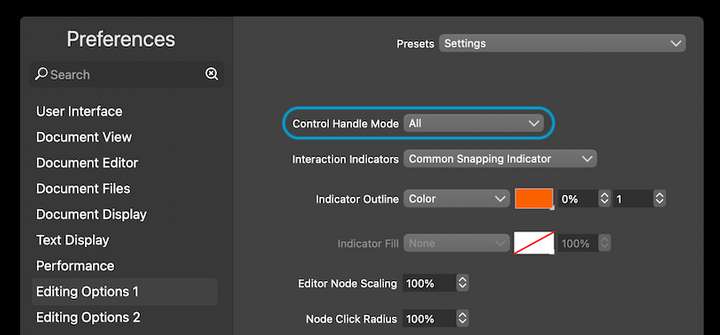
                      @VectorStyler Boldline said it happens if 'Control Handle Mode' is set to All:
                      0_1670545797643_Screenshot 2022-12-09 at 02.25.35.png

                      MacBook Pro (Intel) running Monterey 12.6.4

                      VectorStylerV 1 Reply Last reply Reply Quote 2
                      • VectorStylerV Offline
                        VectorStyler @b77
                        last edited by

                        @b77 Replicated!

                        1 Reply Last reply Reply Quote 1
                        • S Offline
                          Subpath
                          last edited by

                          @Boldline

                          I think I understood very well what you meant and did it the way you described. Also found the small separate part.

                          After another test this morning, I was able to reproduce your problem a few times.

                          The strange thing is that it depends on the way in which
                          you delete these nodes.

                          Win 11
                          CPU: AMD Ryzen 5 9600X, 6-core.
                          GPU: Nvidia Geforce RTX 5070.

                          VectorStylerV 1 Reply Last reply Reply Quote 1
                          • VectorStylerV Offline
                            VectorStyler @Subpath
                            last edited by

                            @Subpath @Boldline @b77 The root cause of this problem was identified, and the fix will be in the next build.

                            When using the "All" mode in "Control Handle Mode", the selection made with the box selection will include control points also.
                            And this is not handled correctly by the delete node command.

                            S 1 Reply Last reply Reply Quote 2
                            • S Offline
                              Subpath @VectorStyler
                              last edited by

                              @VectorStyler , thanks for the info

                              Win 11
                              CPU: AMD Ryzen 5 9600X, 6-core.
                              GPU: Nvidia Geforce RTX 5070.

                              BoldlineB 1 Reply Last reply Reply Quote 0
                              • BoldlineB Online
                                Boldline @Subpath
                                last edited by

                                @Subpath Thanks for testing it and helping solve the problem. These are the hard ones to catch because they don't happen all the time or in the same manner. Glad it's been identified by @VectorStyler and will get fixed in the next build. Good team win!

                                🍎 macOS Tahoe 26.2, Mac mini (M1, 2020), Chip Apple M1, Memory 16 GB
                                Cintiq 27QHD Display and LG Ultra HD Display

                                S 1 Reply Last reply Reply Quote 2
                                • S Offline
                                  Subpath @Boldline
                                  last edited by Subpath

                                  @Boldline

                                  your welcome, its always also interesting for me

                                  Win 11
                                  CPU: AMD Ryzen 5 9600X, 6-core.
                                  GPU: Nvidia Geforce RTX 5070.

                                  1 Reply Last reply Reply Quote 0
                                  • First post
                                    Last post
