Distortion of Spirals and Polygonal Spirals
-
There is distortion at the centre of shapes drawn with the Spiral tool, if the Decay is set lower than 100%, as visible in this example set at Decay = 50%.
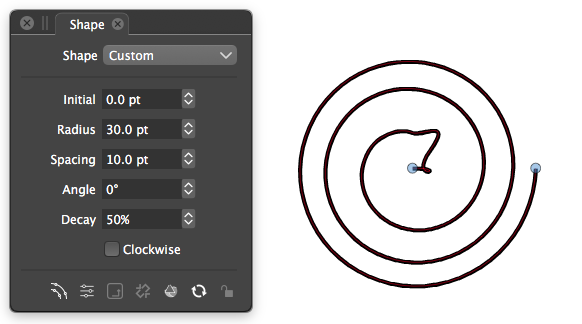
Converting to curves reveals that the control points on the penultimate node are misplaced.Something similar is happening with the Polygonal Spirals tool.
At some settings the spiral is irregular with unevenly spaced nodes, and has a misplaced final outside node.
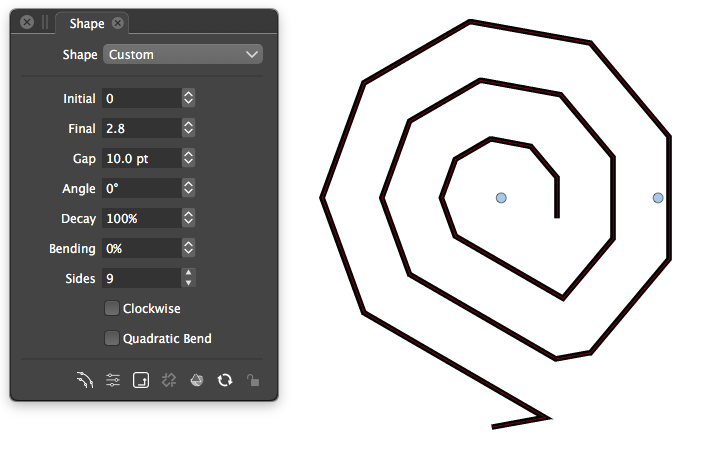
-
@Raven Yes, this can be replicated with the Spiral shape.
For a workaround, set the "Initial" value to a bit larger than 0 pt.Polygonal spiral issue is also replicated.
I will try to find a solution for these.
-
@VectorStyler Thanks for 1.1.73 fixing the distortion at the centre of Circular Spirals and the outer of Polygonal Spirals.
Polygonal Spirals are uneven. The radius of each node (distance from the spiral centre) ought to smoothly increase from node to node. Instead, the path seems to follow a constant radius, and then after each revolution it abruptly jumps out to the next radius for the next revolution, etc.
The example below on the left shows that the left side segments become longer than the other segments.
It also means that the nodes are not at regular 360 / X degree intervals (where X is the number of sides).
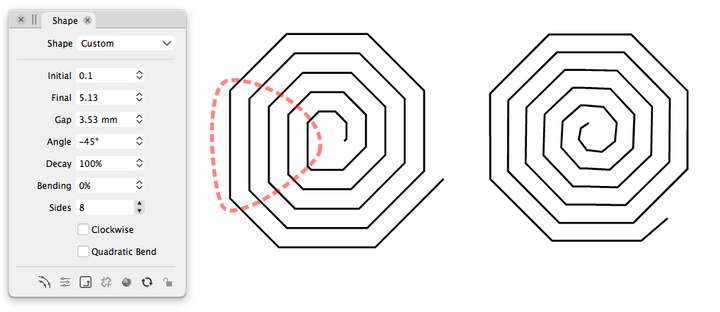
Circular Spirals don't have this issue. At right is a circular spiral that has been converted to curves and the nodes changed from cubic to line, and it is a good spiral with smoothly increasing radius and regular (45 degree) angles. Unfortunately, this trick is only useful for poly spirals that can be based on the 8 sides that circular spirals use.
Is this unavoidable, or can the algorithm be tweaked?
It may be best as a new optional attribute, to avoid the unexpected reshaping of people's existing artwork, and because some people may not want the "tilt" that this gives to inner segments. -
@Raven This is by design. The problem is that trying to increase each side smoothly will result in uneven spacing.
