VectorStyler
    • Categories
    • Unread
    • Recent
    • Tags
    • Popular
    • Register
    • Login

    Shift + Nudge Broken?

    Scheduled Pinned Locked Moved VectorStyler 1.1 Bugs
    12 Posts 3 Posters 10.4k Views 3 Watching
    Loading More Posts
    • Oldest to Newest
    • Newest to Oldest
    • Most Votes
    Reply
    • Reply as topic
    Log in to reply
    This topic has been deleted. Only users with topic management privileges can see it.
    • IgullI Offline
      Igull @b77
      last edited by

      @b77 said in Shift + Nudge Broken?:

      @Igull It works here.
      Is 'Nudge by Keyboard' in Preferences/Settings > Adjustments set to 0.1 mm?

      Yes

      The units are set to mm in Document Setup, to avoid any confusion?

      Yes 🙂

      TBH, I really never change any of my settings - I DO keep copies of the prefs/workspaces etc every time I move to a new version, so I can rollback if needed.

      Neil

      iMac 27" 2015 Catalina 32Gb, MacBook Pro 13" 2016 Monterey 8Gb, Mac Mini M2 2023 8Gb

      1 Reply Last reply Reply Quote 0
      • VectorStylerV Offline
        VectorStyler @Igull
        last edited by

        @Igull If the keyboard shortcuts were customized (for anything else), then this might be the reason for the Shift+nudge not working.
        The internal identifier of the action was changed.

        Edit the keyboard shortcut and assign again the actions to the Shift+arrow keys.

        IgullI 1 Reply Last reply Reply Quote 0
        • IgullI Offline
          Igull @VectorStyler
          last edited by

          @VectorStyler said in Shift + Nudge Broken?:

          @Igull If the keyboard shortcuts were customized (for anything else), then this might be the reason for the Shift+nudge not working.
          The internal identifier of the action was changed.

          Edit the keyboard shortcut and assign again the actions to the Shift+arrow keys.

          I've never had to do this - even from the start of VS andI've never re-assigned the command to anything else (I wouldn't want to)? I assume that these commands are built-in initially ?

          I've attached an image of what I have - I'm assuming there's an issue with the 'unknown command' (shift up/down etc) not being recognised.

          The trouble is, there doesn't seem to be an option for 'move more' ie increasing the nudge distance when hitting shift + ???
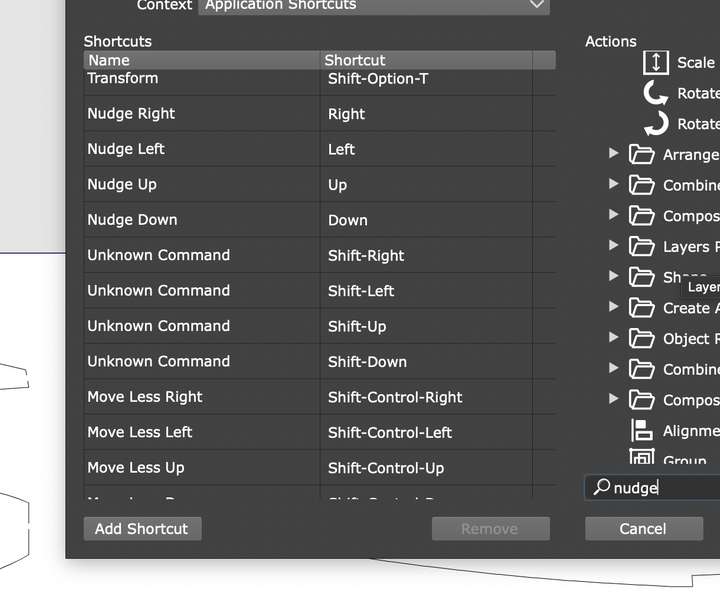
          0_1686684942278_Screenshot 2023-06-13 at 20.32.18.png

          Neil

          iMac 27" 2015 Catalina 32Gb, MacBook Pro 13" 2016 Monterey 8Gb, Mac Mini M2 2023 8Gb

          VectorStylerV 1 Reply Last reply Reply Quote 0
          • VectorStylerV Offline
            VectorStyler @Igull
            last edited by

            @Igull One thing to do is to reset the workspace in the app menu.

            IgullI 2 Replies Last reply Reply Quote 0
            • IgullI Offline
              Igull @VectorStyler
              last edited by

              @VectorStyler said in Shift + Nudge Broken?:

              @Igull One thing to do is to reset the workspace in the app menu.

              Yes, that cures it but completely screws up my carefully prepared workspace 😞

              I have all my workspaces saved, but even after loading any of them, the issue is still there now.

              The command is 'nudge more right' (left/up/down), but these commands don't seem to be available in the command set now ??

              I'm assuming that's where the issue is because if you remove the four 'nudge more' commands, you can't find them in the right hand panel anywhere to replace them ??

              Neil

              iMac 27" 2015 Catalina 32Gb, MacBook Pro 13" 2016 Monterey 8Gb, Mac Mini M2 2023 8Gb

              VectorStylerV 1 Reply Last reply Reply Quote 1
              • IgullI Offline
                Igull @VectorStyler
                last edited by

                @VectorStyler said in Shift + Nudge Broken?:

                @Igull One thing to do is to reset the workspace in the app menu.

                There's more, reloading any previously saved workspaces doesn't work either, after resetting the workspace, none (most) of my saved settings are gone `:-(

                Neil

                iMac 27" 2015 Catalina 32Gb, MacBook Pro 13" 2016 Monterey 8Gb, Mac Mini M2 2023 8Gb

                1 Reply Last reply Reply Quote 0
                • VectorStylerV Offline
                  VectorStyler @Igull
                  last edited by

                  @Igull I will open a bug on this one. Will try to get it fixed in the next build.

                  b77B IgullI 2 Replies Last reply Reply Quote 0
                  • b77B Offline
                    b77 @VectorStyler
                    last edited by b77

                    @VectorStyler

                    Is the loading of workspaces going to fix the loading of the custom workspaces (and icons) here?

                    https://www.vectorstyler.com/forum/topic/3131/a-set-of-new-icons-for-the-context-panel

                    MacBook Pro (Intel) running Monterey 12.6.4

                    VectorStylerV 1 Reply Last reply Reply Quote 0
                    • VectorStylerV Offline
                      VectorStyler @b77
                      last edited by

                      @b77 said in Shift + Nudge Broken?:

                      Is the loading of workspaces going to fix the loading of the custom workspaces (and icons) here?

                      It may restore to default. But it will not fix the reported issues.

                      1 Reply Last reply Reply Quote 0
                      • IgullI Offline
                        Igull @VectorStyler
                        last edited by

                        @VectorStyler said in Shift + Nudge Broken?:

                        @Igull I will open a bug on this one. Will try to get it fixed in the next build.

                        👍

                        Neil

                        iMac 27" 2015 Catalina 32Gb, MacBook Pro 13" 2016 Monterey 8Gb, Mac Mini M2 2023 8Gb

                        1 Reply Last reply Reply Quote 0
                        • First post
                          Last post
