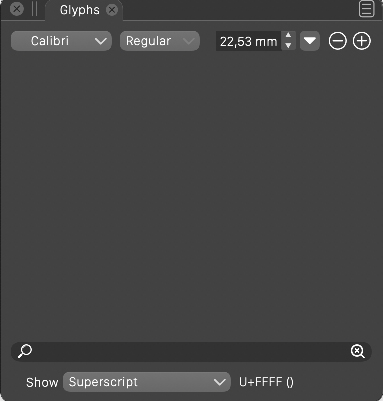
Glyphs panel: glyph categories are not shown for certain fonts
-
@Arde In the "Show" field (at the bottom of the panel), select the "All Glyphs" mode. Are the glyphs shown in that case?
The Calibri I have on mac does have some subscript alternates, so this might still be a bug.
Are the glyphs shown if the panel is closed and reopened? -
@vectoradmin said in Glyphs panel: glyph categories are not shown for certain fonts:
In the "Show" field (at the bottom of the panel), select the "All Glyphs" mode. Are the glyphs shown in that case?
Yes, they are. The panel is empty only if I choose any of the sub categories. It is font specific so if I use e.g. Helvetica Now (OpenType PS flavor), I can see the list of glyphs in all sub categories (as long as there are glyphs in those). Some fonts also seem to list glyphs (that is, e.g. 6 glyph slots appear as if something were listed, but all slots are just empty).
When I view e.g. Callbri Regular Supercript (sups) using InDesign, I get the following:
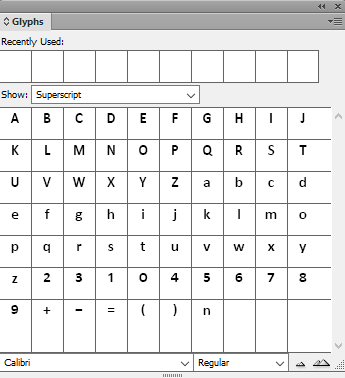
...but just a black board when viewing the same in VS (both Win and macOS; note though that the Calibri I installed is the Windows font so I am not sure if it is the same that you have -- this is a huge font that has over 6,000 glyphs).
-
@Arde it looks like those alternates are not detected by VS. I add this as a bug to the backlog.
-
Related to this, even for fonts like Helvetica Now Text, for which glyph categories are shown, only certain categories (those related to OpenType features, but these, too, are shown only partially so e.g. Stylistic Sets are not listed) are shown. But regular Unicode blocks are missing (including character set based categories like Basic Latin and Latin 1, Greek, etc., and common categories like Symbols, Currency, Math Symbols, Numbers, etc.)
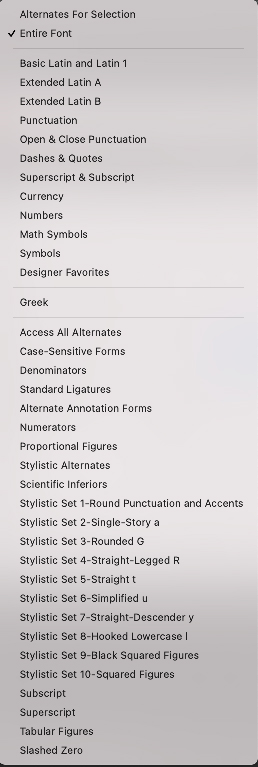
This is how Photoshop shows categories for Helvetica Now Text (just an example, the same applies to any font that has similar categories):
...and this is how VectorStyler currents shows them (both macOS and Windows versions):
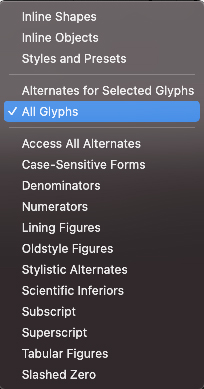
Is this by design or do you plan to include also the regular glyph categories and this just has not been implemented yet?
-
@Arde This looks like a bug. It could be that some of the OpenType categories are not detected correctly. I plan to fix it.
-
@Arde This has been improved in the new build (1.0.022). I tested it with multiple OpenType fonts that were not working properly before. Let me know if there are any issues.
-
@vectoradmin said in Glyphs panel: glyph categories are not shown for certain fonts:
Let me know if there are any issues.
Thanks. I can see that e.g. glyphs of Calibri get listed But I still cannot see the regular Unicode blocks listed. Perhaps this is by design? Basically listing the OpenType features as categories is more useful.
-
@Arde The regular unicode blocks were not there originally, but this should be easy to add. Will be in the next build
-
@vectoradmin Thanks, now they are there -- great!
-
@Arde In the Glyphs panel menu, the Unicode Blocks menu item has some options to reveal other blocks.
-
@vectoradmin said in Glyphs panel: glyph categories are not shown for certain fonts:
@Arde In the Glyphs panel menu, the Unicode Blocks menu item has some options to reveal other blocks
Wow, the features of this app are just incredible!
