VectorStyler
    • Categories
    • Unread
    • Recent
    • Tags
    • Popular
    • Register
    • Login

    Glitches in Transform tab

    Scheduled Pinned Locked Moved Resolved 1.2 bugs
    8 Posts 2 Posters 7.7k Views 2 Watching
    Loading More Posts
    • Oldest to Newest
    • Newest to Oldest
    • Most Votes
    Reply
    • Reply as topic
    Log in to reply
    This topic has been deleted. Only users with topic management privileges can see it.
    • RaaskotR Offline
      Raaskot
      last edited by

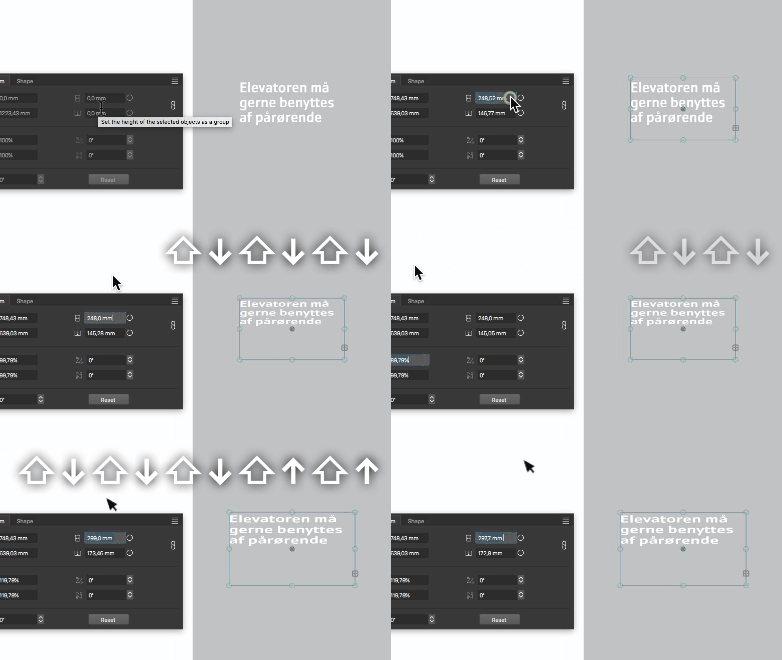
      The transform tab needs a serious overhaul. The dropdown options appear confusing, redundant and the values manipulation either doesn't apply or applies distorted to object.

      0_1723794809901_Transform-tab-troubles.vstyler
      alt text

      VectorStylerV 1 Reply Last reply Reply Quote 0
      • VectorStylerV Offline
        VectorStyler @Raaskot
        last edited by

        @Raaskot

        values manipulation either doesn't apply or applies distorted to object.

        Not clear what is the issue.
        All I can see from the recording that the width or horizontal scale values are changed and the proportional option seems to be on.

        RaaskotR 1 Reply Last reply Reply Quote 1
        • RaaskotR Offline
          Raaskot @VectorStyler
          last edited by Raaskot

          @VectorStyler
          Sorry, I was unclear:

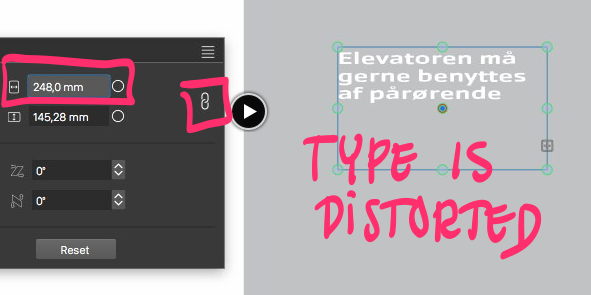
          1. type is distorted when changing x-values (proportional on)
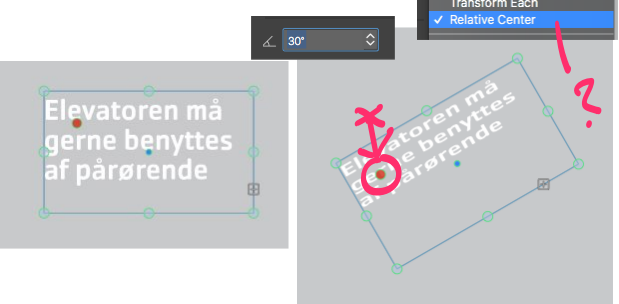
          2. cannot make rotate values respect altered centerpoint
          0_1723797835562_6b5a0baf-ccbd-4fe0-afb7-15096183345a-billede.png

          0_1723798346273_4f421c83-5eb1-4a83-8f4c-42de312959bb-billede.png

          VectorStylerV 2 Replies Last reply Reply Quote 1
          • VectorStylerV Offline
            VectorStyler @Raaskot
            last edited by

            @Raaskot I will try to replicate and fix these.

            1 Reply Last reply Reply Quote 1
            • VectorStylerV Offline
              VectorStyler @Raaskot
              last edited by

              @Raaskot I'm trying to replicate this with default text frame attributes, but here the type is not distorted.
              Can you send me the file shown in that example? Thanks!

              RaaskotR 1 Reply Last reply Reply Quote 1
              • RaaskotR Offline
                Raaskot @VectorStyler
                last edited by

                @VectorStyler
                The file is attached in OP.

                Regards, raaskot

                VectorStylerV 1 Reply Last reply Reply Quote 1
                • VectorStylerV Offline
                  VectorStyler @Raaskot
                  last edited by

                  @Raaskot The text frame has multiple other transforms already applied, and this causes the text distortion.
                  Use the Effects -> Remove All Shape Effects command to clear these.

                  For point (2), the pivot point is used in the transform panel only if the transform pivot selection is disabled in the upper-left pivot knob, this can be done by clicking on the selected pivot knob.

                  RaaskotR 1 Reply Last reply Reply Quote 1
                  • RaaskotR Offline
                    Raaskot @VectorStyler
                    last edited by

                    @VectorStyler
                    "other transforms already applied" -- makes sense, thank you😊
                    Yet one should expect transformation always applies to the latest effect layer/state in the stack only (retaining the objects current visible appearance).

                    "... the transform pivot selection is disabled". Cool, very helpful. Got it.
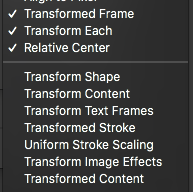
                    Though I must confess, that the options in the rightclick-dropdwn confuses me with combinated layer groups and textframes. As occasional user (and user of other vectordrawing programs) one have to click and try quite a lot to get the right setup ie. when rotating shapes.

                    0_1724313856157_387c8c6d-e16a-45ee-8b05-15a0efa88ecb-billede.png

                    1 Reply Last reply Reply Quote 1
                    • First post
                      Last post