Mouse Wheel variable scroll rate
-
It's hard to explain, but I recorded audio so you could hear the mouse wheel. It takes several rotations to increment the numeric field for the Transform panel, for example. It's laborious and certainly easier to just input the values directly. The Stroke panel on the other hand is responsive to every click-turn of the wheel. However other fields are behaving like the Transform panel:
https://1drv.ms/u/s!AuWHX0h5bAoRipgO4-SSTtYD25rWxg?e=C1dkBg
There's also another minor issue that isn't worth starting a new thread over, but was found when capturing video for this. Basically, if I select/activate a field for keyboard input, it isn't deactivated when clicking outside of it inside the panel. It's even possible to use the scroll wheel on other fields while other fields are open for input. It should disable input on the other field while with others so that the user 1) knows for sure what the interface expects to respond to (ie they didn't select wrong) 2) it keeps the user focused on one task at a time and finally 3) makes the interface feel more polished
Windows 11 Build 26200.7171 (25H2)
AMD Ryzen 7 9700X with Gigabyte X870E Aorus Pro Ice
32GB RAM @ 6000MHz
PNY NVIDIA RTX 5070 Ti 16GB; Display 1: 4K @150%; Display 2: 4K @150%
Wacom Intuos Pro L (2025); Wacom Intuos Pro M; Epson ET-8550; Siser Romeo -
@debraspicher I will try to improve this. But yes, different number editor fields can configure their own change rate from the mouse wheel.
-
@VectorStyler For "change rate", is that supposed to be the increment/decrement rate or the amount of turn/clicks necessary of scrollwheel to register a change. The latter is what I'm reporting the issue one.
I included sound to show that it takes 3-4 scrollwheel "clicks" to register a shift in the number, thus it's requiring excessive scrolling to even move the numbers "a little bit" (a little bit = a few increments. It's not referring to the actual amount that is being incremented/decremented.
Windows 11 Build 26200.7171 (25H2)
AMD Ryzen 7 9700X with Gigabyte X870E Aorus Pro Ice
32GB RAM @ 6000MHz
PNY NVIDIA RTX 5070 Ti 16GB; Display 1: 4K @150%; Display 2: 4K @150%
Wacom Intuos Pro L (2025); Wacom Intuos Pro M; Epson ET-8550; Siser Romeo -
@debraspicher said in Mouse Wheel variable scroll rate:
is that supposed to be the increment/decrement rate or the amount of turn/clicks necessary of scrollwheel to register a change.
These two are related since the number is displayed with limited precision.
I tested this on Windows, and here, in the transform panel I need only one click of rotation to change the number by "1".
It might be that there is some mouse settings affecting the speed of change in the system (Windows -> Mouse Settings).I will try to improve this, but the rate (amount) of change is received by the app is determined by Windows.
-
@debraspicher In VevtorStyler -> Settings -> Number Editors, there is a Number Scrolling Speed. What is the current value there? Try changing it to larger.
-
@VectorStyler said in Mouse Wheel variable scroll rate:
@debraspicher said in Mouse Wheel variable scroll rate:
is that supposed to be the increment/decrement rate or the amount of turn/clicks necessary of scrollwheel to register a change.
These two are related since the number is displayed with limited precision.
I did check the precision to see if it was affecting a change. I even typed in something manually to see if it would show higher precision. It was showing the correct value as far as I can tell, nothing was being rounded.
I tested this on Windows, and here, in the transform panel I need only one click of rotation to change the number by "1".
It might be that there is some mouse settings affecting the speed of change in the system (Windows -> Mouse Settings).I've definitely not slowed down the scroll speed, if anything I would've sped it up lol. I did disable some things on my Logitech mouse after checking with a non-Logitech mouse to see if it was related to the mouse itself, but it was still the same issue. I can try on one of my other systems later on to see the result in behavior.
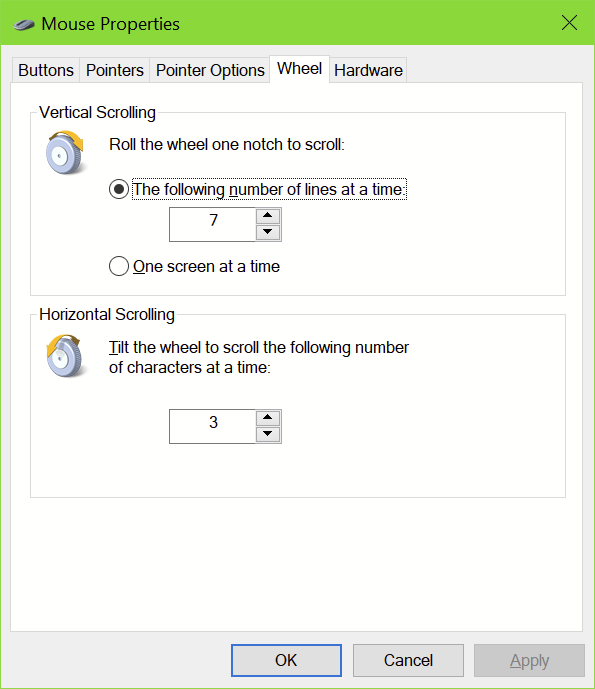
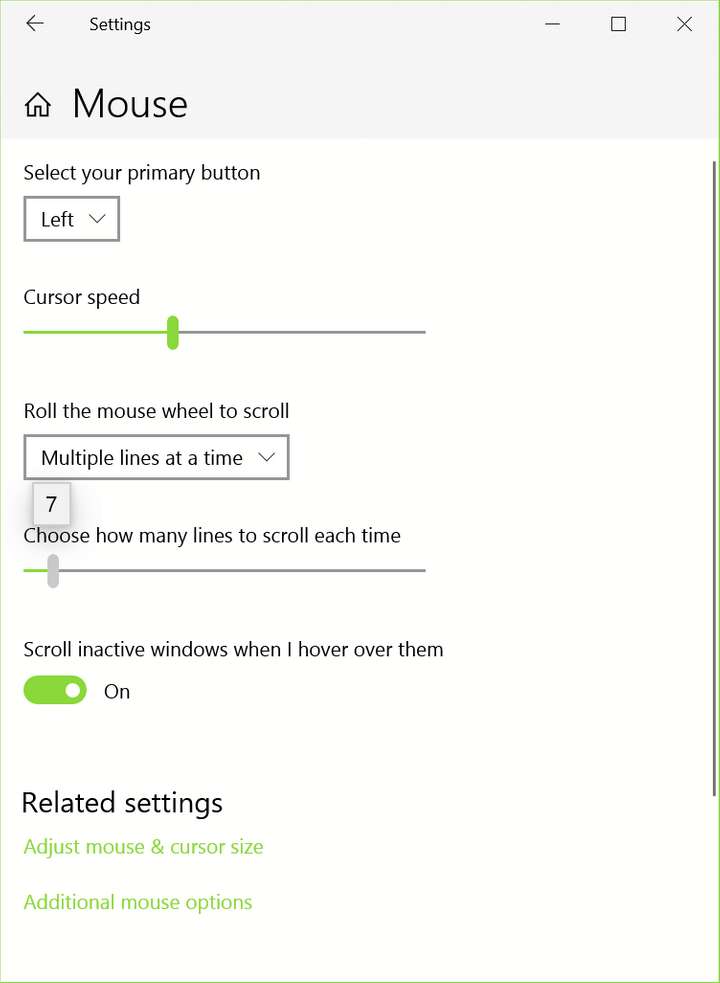
On this machine, I adjusted this panel, including changing from "pages" to "whole screen" scrolling behavior, and it didn't change how VS received input:

I tested with another mouse (wired, non-Logitech) also, same result. I don't know what it is about my system that makes it so unique for receiving input.
I will try to improve this, but the rate (amount) of change is received by the app is determined by Windows.
I can't think of any point in my history in using Windows where I would've needed to adjust scroll page speed, etc, outside of the web browser. And even then I would mostly use settings like "Smooth scrolling" before having to micromanage anything. It's always "just worked".
-
I just realized my mainroom build might be better for testing. It's still a 4K display (it's on a television), but it has reasonable hardware and even better, it's basically a very clean install of Windows 10. I don't use it for much except games and occasionally test hardware. It has the Pro version, so I can even remote into it to check a file... I'll check that soon.
-
@debraspicher
https://www.vectorstyler.com/forum/topic/3021/alt-scroll-wheel-creates-new-obcjects-while-changing-width-height-value-in-transform-panel/3
https://www.vectorstyler.com/forum/topic/1442/unpredictable-changing-the-value-by-draggingHi. I understand what you mean. I have mentioned similar problems in the past. And in fact I am still experiencing them, but I have acccpeted them.
It's just that each wheel on the mouse has this noticeable click. And this single click works like a single press of the arrow key. In VS, when scrolling through the project window, the mouse always reacts in the same way by moving it by a fixed specified value, but with number fields it is different - every few times the wheel has to make 2 such clicks to change the value. As if the application is doing the calculations and the rest from the calculations accumulate . I would like the wheel click to act like a button click, just like in other apps.


