Style picker tool not working as epected on windows
-
I'm trying to use the Style Picker tool to change the style of multiple other paths and objects. I would like to select the style from one object and then "paint" that style on to a bunch of other objects one at a time.
The documentation mentions different keys to hold in two different places:
On the Toolbox page it says : The attribute can be picked from an object by holding the Option (Mac) or Alt (Windows)
On the Editing Shapes page it says:
- Hold the Command (Mac) or Shift (Window) key and click on the object whose shape will be copied. The shape is picked from the object.
- To apply the picked shape, click on an object without holding any keys.
- Keep clicking on objects whose shape must be changed. Then use the Command (Mac) or Shift (Window) key to pick another shape.
If I start with the Style Picker tool active and no Objects selected, hold Alt and click on the Object who's style I would like to pick: it selects that object. Then without holding any keys I click on other objects: It applies the clicked object's style to the selected object. I am trying to do the opposite of this.
If I start with the Style Picker tool active and no Objects selected, hold Shift and click on the object who's style I would like to pick: Nothing appears to happen. Then without holding any keys I click on an other objects: nothing appears to happen.
Holding control seems to switch into a global selection mode, and clicking on any object selects it.
Is this a bug? A documentation problem? Conflicting hotkeys on windows?
-
I don't understand the term "paint".
The StylePicker doesn't paint.
It applies the style of one object to other objects.
.
.
I'm using Windows.Selecting Objects while using the StylePicker:
If you select the StylePicker and hold down the CTRL key,
you can temporarily switch to the Transform tool to select objects.
Which make selecting Objects while using the Stylepicker faster.When you release the CTRL key, you're taken back to the StylePicker
to apply a style.(btw. any Picker Tool have this CTRL-Key option, to be able
to select Objects faster. Only the color picker doesn't have that)
.
.
To apply a style:
First select the objects you want to receive this style.
Then pick, with the StylePicker, the object whose style you want to transfer. -
@LoginError You can enable an alternate style picker mode by checking the Select -> Options -> Alternate Style Picker option.
If this is enabled, with Shift+Click you pick the style and then with clicking you can apply the picked style.
-
@VectorStyler Ah excellent thanks, that seems to be what I'm looking for.
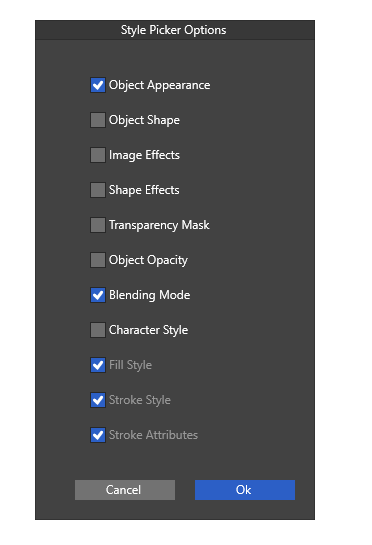
However when I try to use the Style Picker in Alternative Style Picker mode, it seems to only be applying the color of the stroke, not the brush. Additionally, it applies the color of the picked object to either the stroke or fill of the clicked object, depending on which is active in the Color Panel.
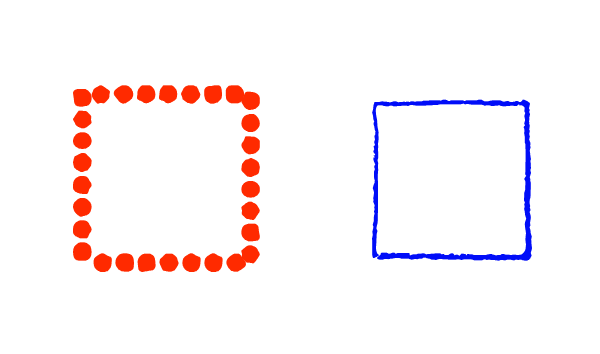
When I'm Default Style Picker mode it applies the brush and color as expected. Here I am attempting to apply the style of the left object onto the right.
The two test objects:
The result in Alternate Style Picker Mode:

The Result in Default Style Picker Mode:

My style picker settings:
-
@LoginError I opened a bug on this and will try to replicate. Just a note: there is a separate color picker tool and style picker tool. The color picker tool behaves as you described.
-
@VectorStyler Understood. I made sure that I was using the Style Picker tool and not the color picker tool.
-
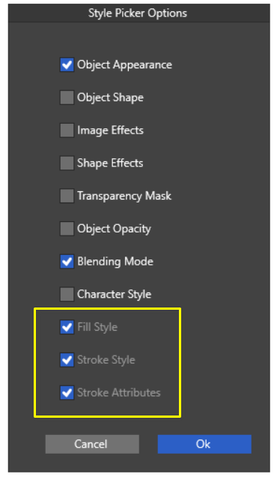
I'm a bit surprised by the settings in the yellow frame
Because you can only set these if "Object Appearance"
is deselectedSo they are inactive, but still selected?
-
@Subpath said in Style picker tool not working as epected on windows:
Because you can only set these if "Object Appearance" is deselected
the "Object Appearance" includes these.
-
@LoginError Is that a brush in the test image first column?
-
Both of the objects in the test image have brushes. The first has a scatter brush, the second has an artistic brush. The type of brush does not appear to change the behavior.
-
@LoginError I replicated (at least parts) of this error, and a fix will be in the next build.
-
@VectorStyler said in Style picker tool not working as epected on windows:
the "Object Appearance" includes these.
In that case I would recommend placing them directly underneath the "Object Appearance" checkbox and perhaps indenting them to make the connection between the items a bit more clear?
-
@LoginError The alternate mode style picker tool issues should be fixed in build 1.2.038

