VectorStyler
    • Categories
    • Unread
    • Recent
    • Tags
    • Popular
    • Register
    • Login

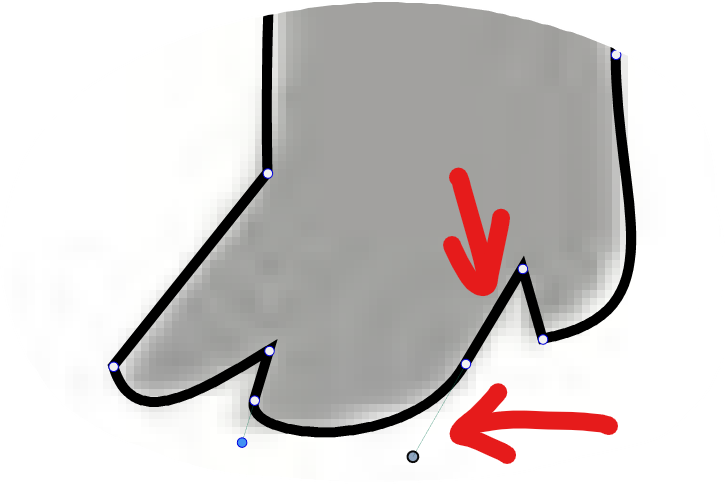
    Is there a way to know when stroke handle is aligned with stroke angle?
    Scheduled Pinned Locked Moved Implemented Features
    13 Posts 4 Posters 16.5k Views 2 Watching
    Loading More Posts
    • Oldest to Newest
    • Newest to Oldest
    • Most Votes
    Reply
    • Reply as topic
    Log in to reply
    This topic has been deleted. Only users with topic management privileges can see it.
    • b77B Offline
      b77 @Boldline
      last edited by b77

      @Boldline Not without selecting the node, AFAIK.

      But if that line is straight, you can select the node and if the Smooth or Symmetric button is on in the context menu, its Bézier handle is exactly opposite the straight segment.

      MacBook Pro (Intel) running Monterey 12.6.4

      BoldlineB 1 Reply Last reply Reply Quote 2
      • BoldlineB Online
        Boldline @b77
        last edited by

        @b77 I wonder if it would make sense to have the section of stroke and that node change color when aligned? Affinity does something like that when two lines touch - it turns yellow.
        Part of me would like something to indicate it's aligned, but I think your solution would work. I don't want to overkill the app with things lol

        🍎 macOS Tahoe 26.2, Mac mini (M1, 2020), Chip Apple M1, Memory 16 GB
        Cintiq 27QHD Display and LG Ultra HD Display

        b77B 1 Reply Last reply Reply Quote 0
        • b77B Offline
          b77 @Boldline
          last edited by b77

          But I would prefer to know if the node is cusp, smooth or symmetric without having to select it.

          Maybe the simplest solution would be using different shapes for each node type — it's been suggested already here:

          https://www.vectorstyler.com/forum/topic/515/option-to-customize-and-assign-each-node-type-a-different-shape-indicator

          Something like a circle for smooth, a square for cusp and… what else for a symmetric node? A diamond?

          …
          So if I see a round node (smooth) at the end of a straight line, I know that its handle is aligned with the angle of that segment.

          (There's also the start node — it still needs to have something like an arrow to indicate the path direction).

          MacBook Pro (Intel) running Monterey 12.6.4

          1 Reply Last reply Reply Quote 1
          • VectorStylerV Offline
            VectorStyler @Boldline
            last edited by VectorStyler

            @Boldline Select the node and make it smooth (button in context panel).

            There is a feature request to indicate node types by shape (and make it customizable), I will move it to higher priority.

            BoldlineB 2 Replies Last reply Reply Quote 2
            • BoldlineB Online
              Boldline @VectorStyler
              last edited by

              @vectoradmin I was not actively looking for this, but when I was using Affinity Designer tonight, I noticed they highlight the node when the handle is aligned perfectly with the other side. You can see it in the video here. The second one I did in the video shows the effect. I think that could work for VS as well - it's subtle but gets the job done

              🍎 macOS Tahoe 26.2, Mac mini (M1, 2020), Chip Apple M1, Memory 16 GB
              Cintiq 27QHD Display and LG Ultra HD Display

              BoldlineB 1 Reply Last reply Reply Quote 0
              • BoldlineB Online
                Boldline @VectorStyler
                last edited by

                @vectoradmin said in Is there a way to know when stroke handle is aligned with stroke angle?:

                There is a feature request to indicate node types by shape (and make it customizable)

                I think this would also be a good improvement as well. so long as the shapes used are pretty basic - circle, square, triangle?

                🍎 macOS Tahoe 26.2, Mac mini (M1, 2020), Chip Apple M1, Memory 16 GB
                Cintiq 27QHD Display and LG Ultra HD Display

                VectorStylerV 1 Reply Last reply Reply Quote 0
                • VectorStylerV Offline
                  VectorStyler @Boldline
                  last edited by

                  @Boldline There will be circle, square or triangle shapes only.

                  V 1 Reply Last reply Reply Quote 0
                  • V Offline
                    Vector-Rock @VectorStyler
                    last edited by

                    @vectoradmin

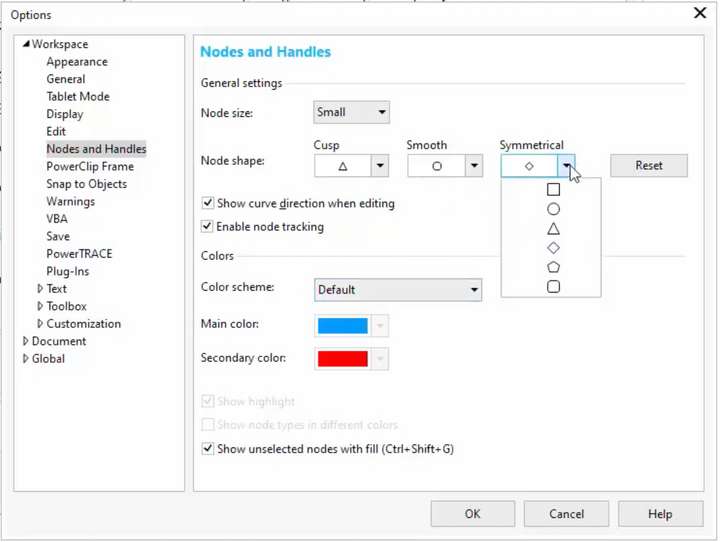
                    As mentioned in my original post, CorelDRAW offers six (6) Preset Shapes that can be assigned to Cusp, Smooth or Symmetrical in any combination:

                    • Square
                    • Circle
                    • Triangle
                    • Diamond
                    • Pentagon
                    • Square with Rounded Corners
                      .

                    0_1629360911270_CorelDRAW_Custom-Nodes-and-Handles_Screen-Shoot.png

                    .

                    Having six choices is probably overkill for most.

                    The Diamond Shape seems like it might be popular for many?

                    As @b77 mentioned, I can see people using the Diamond shape for Symmetrical. You may want to consider that as a fourth option as well. Especially considering the Triangle is used to indicate Direction of the Path and also to add Nodes to a Selection with Shift-Click. Something to ponder.

                    VectorStylerV 2 Replies Last reply Reply Quote 2
                    • VectorStylerV Offline
                      VectorStyler @Vector-Rock
                      last edited by

                      @Vector-Rock Those shape will be available when customizing.

                      1 Reply Last reply Reply Quote 0
                      • BoldlineB Online
                        Boldline @Boldline
                        last edited by

                        @Boldline said in Is there a way to know when stroke handle is aligned with stroke angle?:

                        @vectoradmin I was not actively looking for this, but when I was using Affinity Designer tonight, I noticed they highlight the node when the handle is aligned perfectly with the other side. You can see it in the video here. The second one I did in the video shows the effect. I think that could work for VS as well - it's subtle but gets the job done

                        Did you have a thought on this alignment indicator like in Affinity @vectoradmin ?
                        Or were you implying this might be dealt with when you add the customizable shapes? I liked the idea that the node would change color when the path is aligned with the opposing size (only while you were moving the line itself, not forever)

                        🍎 macOS Tahoe 26.2, Mac mini (M1, 2020), Chip Apple M1, Memory 16 GB
                        Cintiq 27QHD Display and LG Ultra HD Display

                        VectorStylerV 1 Reply Last reply Reply Quote 0
                        • VectorStylerV Offline
                          VectorStyler @Boldline
                          last edited by

                          @Boldline This will be dealt with when adding the shape customization.

                          1 Reply Last reply Reply Quote 1
                          • VectorStylerV Offline
                            VectorStyler @Vector-Rock
                            last edited by

                            @Vector-Rock Node shape customization is available now in 1.1.002 (beta)

                            1 Reply Last reply Reply Quote 0
                            • First post
                              Last post