VectorStyler
    • Categories
    • Unread
    • Recent
    • Tags
    • Popular
    • Register
    • Login

    Blend, artefact when changing gradient shape


    Scheduled Pinned Locked Moved VectorStyler 1.1 Bugs
    34 Posts 3 Posters 51.3k Views 3 Watching
    Loading More Posts
    • Oldest to Newest
    • Newest to Oldest
    • Most Votes
    Reply
    • Reply as topic
    Log in to reply
    This topic has been deleted. Only users with topic management privileges can see it.
    • S Offline
      Subpath @B-Vs-V
      last edited by

      @PatrickM

      i mentioned already a Gradient Prob
      with Gradient Mesh Editor.

      It looks somewhat similar

      Here the Link

      Win 11
      CPU: AMD Ryzen 5 9600X, 6-core.
      GPU: Nvidia Geforce RTX 5070.

      B 1 Reply Last reply Reply Quote 1
      • B Offline
        B-Vs-V @Subpath
        last edited by

        @Subpath Ha ok, thanks for the link.

        W11 Pro 25H2 - 12th Gen Intel(R) i7-12700K 3.61 GHz - RAM 64 Go - NVIDIA GF GTX 4070 Ti - Intuos - Dell UP3216Q / Eizo ColorEdge
        W11 Pro 25H2 - 12th Gen Intel(R) i7-12700KF 3.60 GHz -RAM 64 Go - NVIDIA GF GTX 3080 - IntuosPro- ProArt PA329C

        1 Reply Last reply Reply Quote 1
        • VectorStylerV Offline
          VectorStyler @B-Vs-V
          last edited by

          @PatrickM Yes, this is probably related to the mesh gradient rendering issue with GPU.If the Preferences -> Performance -> Compute Engine is set to Software, it should render correctly.

          Are these gradients along the stroke, or just regular gradient fills?

          B 2 Replies Last reply Reply Quote 0
          • B Offline
            B-Vs-V @VectorStyler
            last edited by

            @VectorStyler It is set to 'Software'. Issues with 'along' and 'across'.

            W11 Pro 25H2 - 12th Gen Intel(R) i7-12700K 3.61 GHz - RAM 64 Go - NVIDIA GF GTX 4070 Ti - Intuos - Dell UP3216Q / Eizo ColorEdge
            W11 Pro 25H2 - 12th Gen Intel(R) i7-12700KF 3.60 GHz -RAM 64 Go - NVIDIA GF GTX 3080 - IntuosPro- ProArt PA329C

            1 Reply Last reply Reply Quote 1
            • B Offline
              B-Vs-V @VectorStyler
              last edited by B-Vs-V

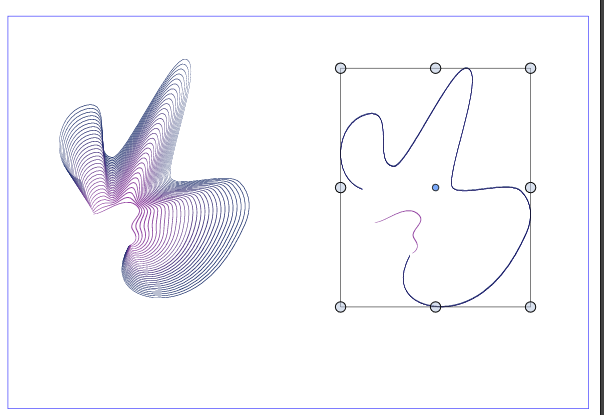
              @VectorStyler when I duplicated a blended form (alt + click & drag) and press 'shift' to keep the duplicated form horizontally, the blend(ing) disappeared.
              0_1663001995665_27ba4c7d-4f66-4029-9909-67b80be5b3f0-image.png

              Edit: the history panel is empty

              W11 Pro 25H2 - 12th Gen Intel(R) i7-12700K 3.61 GHz - RAM 64 Go - NVIDIA GF GTX 4070 Ti - Intuos - Dell UP3216Q / Eizo ColorEdge
              W11 Pro 25H2 - 12th Gen Intel(R) i7-12700KF 3.60 GHz -RAM 64 Go - NVIDIA GF GTX 3080 - IntuosPro- ProArt PA329C

              VectorStylerV 1 Reply Last reply Reply Quote 1
              • VectorStylerV Offline
                VectorStyler @B-Vs-V
                last edited by

                @PatrickM I tried to replicate this, with a basic blend case, but seems to be working here.
                If you press Command+R (Refresh) does the blend reappear?
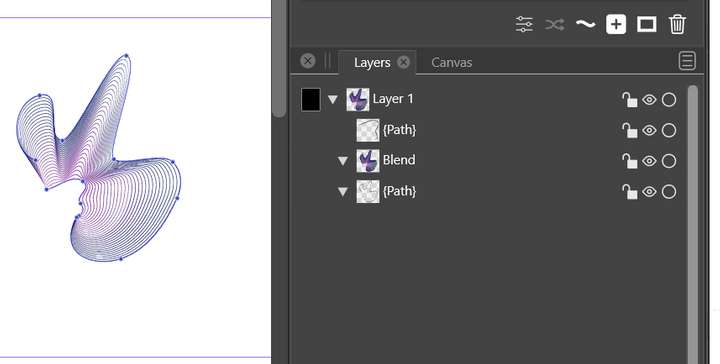
                And is the blend in a group or just the 3 objects (source / blend / target)?

                B 2 Replies Last reply Reply Quote 0
                • B Offline
                  B-Vs-V @VectorStyler
                  last edited by B-Vs-V

                  @VectorStyler It happens when you release Alt (sometimes Shift) while still pressing the left mouse button
                  0_1663002855488_debb580c-def1-444f-93d0-9143937e90ae-image.png

                  W11 Pro 25H2 - 12th Gen Intel(R) i7-12700K 3.61 GHz - RAM 64 Go - NVIDIA GF GTX 4070 Ti - Intuos - Dell UP3216Q / Eizo ColorEdge
                  W11 Pro 25H2 - 12th Gen Intel(R) i7-12700KF 3.60 GHz -RAM 64 Go - NVIDIA GF GTX 3080 - IntuosPro- ProArt PA329C

                  1 Reply Last reply Reply Quote 0
                  • B Offline
                    B-Vs-V @VectorStyler
                    last edited by

                    @VectorStyler I've sent you the file after the issue occurred by email ☺

                    W11 Pro 25H2 - 12th Gen Intel(R) i7-12700K 3.61 GHz - RAM 64 Go - NVIDIA GF GTX 4070 Ti - Intuos - Dell UP3216Q / Eizo ColorEdge
                    W11 Pro 25H2 - 12th Gen Intel(R) i7-12700KF 3.60 GHz -RAM 64 Go - NVIDIA GF GTX 3080 - IntuosPro- ProArt PA329C

                    VectorStylerV 1 Reply Last reply Reply Quote 1
                    • VectorStylerV Offline
                      VectorStyler @B-Vs-V
                      last edited by

                      @PatrickM Got it!

                      B 1 Reply Last reply Reply Quote 0
                      • B Offline
                        B-Vs-V @VectorStyler
                        last edited by

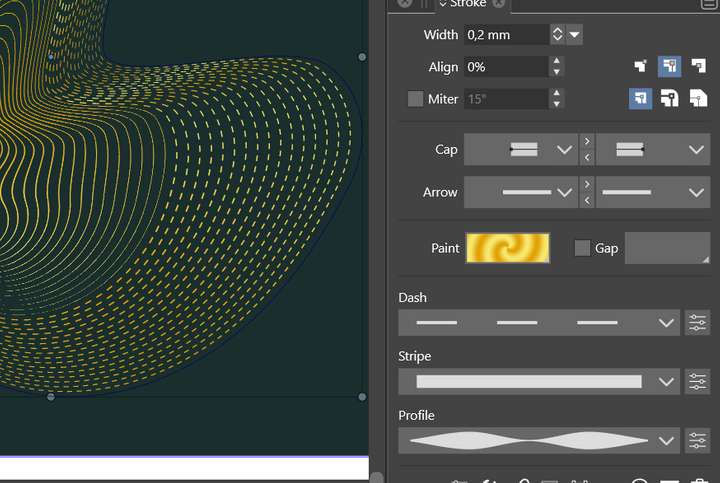
                        @VectorStyler I was "playing" with blending, stroke shape etc. Why do I get only a few dashed blended strokes/lines when I select "dash" in the stroke panel ? see below:
                        0_1663338127789_f0b2dd72-ad30-482d-a04b-a3af893c94b2-image.png

                        W11 Pro 25H2 - 12th Gen Intel(R) i7-12700K 3.61 GHz - RAM 64 Go - NVIDIA GF GTX 4070 Ti - Intuos - Dell UP3216Q / Eizo ColorEdge
                        W11 Pro 25H2 - 12th Gen Intel(R) i7-12700KF 3.60 GHz -RAM 64 Go - NVIDIA GF GTX 3080 - IntuosPro- ProArt PA329C

                        VectorStylerV 1 Reply Last reply Reply Quote 0
                        • VectorStylerV Offline
                          VectorStyler @B-Vs-V
                          last edited by

                          @PatrickM I think the dash attribute is not blending correctly. I think this might be a bug.

                          B 1 Reply Last reply Reply Quote 1
                          • B Offline
                            B-Vs-V @VectorStyler
                            last edited by

                            @VectorStyler modifying some features of the blended scheme such as the thickness of the stroke considerably slowed down VS and finally, VS did not respond and crashed the PC.

                            W11 Pro 25H2 - 12th Gen Intel(R) i7-12700K 3.61 GHz - RAM 64 Go - NVIDIA GF GTX 4070 Ti - Intuos - Dell UP3216Q / Eizo ColorEdge
                            W11 Pro 25H2 - 12th Gen Intel(R) i7-12700KF 3.60 GHz -RAM 64 Go - NVIDIA GF GTX 3080 - IntuosPro- ProArt PA329C

                            S VectorStylerV 2 Replies Last reply Reply Quote 0
                            • S Offline
                              Subpath @B-Vs-V
                              last edited by

                              @PatrickM

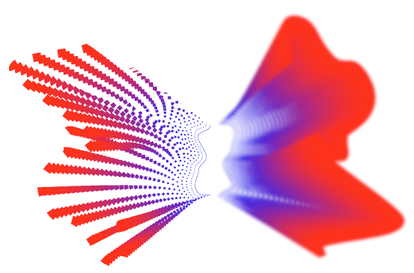
                              no problem here
                              even with a gaussian blur effect
                              0_1664571730674_blend.png

                              Win 11
                              CPU: AMD Ryzen 5 9600X, 6-core.
                              GPU: Nvidia Geforce RTX 5070.

                              1 Reply Last reply Reply Quote 1
                              • VectorStylerV Offline
                                VectorStyler @B-Vs-V
                                last edited by

                                @PatrickM said in Blend, artefact when changing gradient shape:

                                @VectorStyler modifying some features of the blended scheme such as the thickness of the stroke considerably slowed down VS and finally, VS did not respond and crashed the PC.

                                The gradient artifacts should be solved now.

                                This slowdown might be caused by something else. If you have a file, where I can change the stroke thickness to replicate this issue, please send it to me.

                                B 2 Replies Last reply Reply Quote 0
                                • B Offline
                                  B-Vs-V @VectorStyler
                                  last edited by

                                  @VectorStyler I was only using VS when the issue occurred.
                                  I think it is more the "dash" feature that is an issue because I did change this many times for the two strokes and I did get many dashed lines. Every time I did zoom in and out, all the lines/strokes were blurry for seconds before they get sharp.
                                  I did modify the thickness afterwards and VS was not responding until I got the famous app blue circle for minutes and then suddenly I got my start windows screen.
                                  It might be related to VS & my graphic cards (too much calculation for my old graphic card ?) because then when I wanted to use Photoshop, an alert inform me that it could only use the cpu.

                                  I did properly restart the pc and it was fine then (VS not tested). I've sent you the file ☺
                                  Thanks
                                  Patrick

                                  W11 Pro 25H2 - 12th Gen Intel(R) i7-12700K 3.61 GHz - RAM 64 Go - NVIDIA GF GTX 4070 Ti - Intuos - Dell UP3216Q / Eizo ColorEdge
                                  W11 Pro 25H2 - 12th Gen Intel(R) i7-12700KF 3.60 GHz -RAM 64 Go - NVIDIA GF GTX 3080 - IntuosPro- ProArt PA329C

                                  1 Reply Last reply Reply Quote 0
                                  • B Offline
                                    B-Vs-V @VectorStyler
                                    last edited by B-Vs-V

                                    @VectorStyler I can open old adobe files but I don't get what I did.

                                    I did this years ago in Adobe Illustrator :
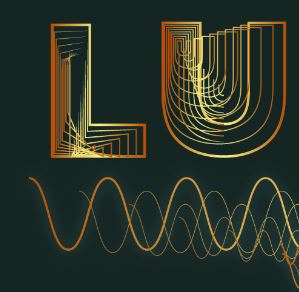
                                    0_1664603119966_AI.JPG

                                    When I open the file in VS:

                                    0_1664603145005_VS.JPG

                                    W11 Pro 25H2 - 12th Gen Intel(R) i7-12700K 3.61 GHz - RAM 64 Go - NVIDIA GF GTX 4070 Ti - Intuos - Dell UP3216Q / Eizo ColorEdge
                                    W11 Pro 25H2 - 12th Gen Intel(R) i7-12700KF 3.60 GHz -RAM 64 Go - NVIDIA GF GTX 3080 - IntuosPro- ProArt PA329C

                                    VectorStylerV 2 Replies Last reply Reply Quote 1
                                    • VectorStylerV Offline
                                      VectorStyler @B-Vs-V
                                      last edited by

                                      @PatrickM Got the file, will try to replicate it.

                                      1 Reply Last reply Reply Quote 0
                                      • VectorStylerV Offline
                                        VectorStyler @B-Vs-V
                                        last edited by

                                        @PatrickM I would need the AI file to replicate this issue. The problem occurs when importing the effects from AI.

                                        B 3 Replies Last reply Reply Quote 0
                                        • B Offline
                                          B-Vs-V @VectorStyler
                                          last edited by

                                          @VectorStyler I've sent you the Illustrator file.
                                          Thanks,
                                          Patrick

                                          W11 Pro 25H2 - 12th Gen Intel(R) i7-12700K 3.61 GHz - RAM 64 Go - NVIDIA GF GTX 4070 Ti - Intuos - Dell UP3216Q / Eizo ColorEdge
                                          W11 Pro 25H2 - 12th Gen Intel(R) i7-12700KF 3.60 GHz -RAM 64 Go - NVIDIA GF GTX 3080 - IntuosPro- ProArt PA329C

                                          1 Reply Last reply Reply Quote 0
                                          • B Offline
                                            B-Vs-V @VectorStyler
                                            last edited by

                                            @VectorStyler ... the right file this time 👍

                                            W11 Pro 25H2 - 12th Gen Intel(R) i7-12700K 3.61 GHz - RAM 64 Go - NVIDIA GF GTX 4070 Ti - Intuos - Dell UP3216Q / Eizo ColorEdge
                                            W11 Pro 25H2 - 12th Gen Intel(R) i7-12700KF 3.60 GHz -RAM 64 Go - NVIDIA GF GTX 3080 - IntuosPro- ProArt PA329C

                                            1 Reply Last reply Reply Quote 1
                                            • First post
                                              Last post