VectorStyler
    • Categories
    • Unread
    • Recent
    • Tags
    • Popular
    • Register
    • Login

    Flickering canvas on M1
    Scheduled Pinned Locked Moved Resolved Issues
    20 Posts 4 Posters 20.1k Views
    Loading More Posts
    • Oldest to Newest
    • Newest to Oldest
    • Most Votes
    Reply
    • Reply as topic
    Log in to reply
    This topic has been deleted. Only users with topic management privileges can see it.
    • F Offline
      fde101 Global Moderator
      last edited by

      Just to make sure you are aware, Apple has been investigating reports of issues like this with the M1 Mini as it seems to happen across various applications:

      https://piunikaweb.com/2021/01/08/apple-investigating-mac-mini-m1-external-display-flickering-issue-on-dark-backgrounds-no-release-date-for-fix/

      https://discussions.apple.com/thread/252106534

      https://us.forums.blizzard.com/en/wow/t/m1-display-flicker-issue-on-m1-macs-internal-and-external-displays/724003

      Thus this might not be a VectorStyler issue but rather something Apple needs to fix.

      VectorStylerV 1 Reply Last reply Reply Quote 1
      • VectorStylerV Offline
        VectorStyler @fde101
        last edited by

        @fde101 Thanks for letting us know!

        1 Reply Last reply Reply Quote 0
        • K Offline
          Kyriakos
          last edited by Kyriakos

          There are indeed several power and sync problems with the latest display driver which can cause monitors to crash and i've reported a few myself, but the artefacts in VS are visible in screenshots and recordings and only inside the canvas, this is (positive) indicator than it's not as severe of a problem.

          VectorStylerV 1 Reply Last reply Reply Quote 0
          • VectorStylerV Offline
            VectorStyler @Kyriakos
            last edited by

            @Kyriakos Could not replicate this issue yet, will keep it open.

            K 1 Reply Last reply Reply Quote 0
            • K Offline
              Kyriakos @VectorStyler
              last edited by

              @vectoradmin it seems to be fixed for all other tools except the Contour tool and i've narrowed it down to the 'Metal' document display mode. It also feels smoother and faster when set to 'Software'.
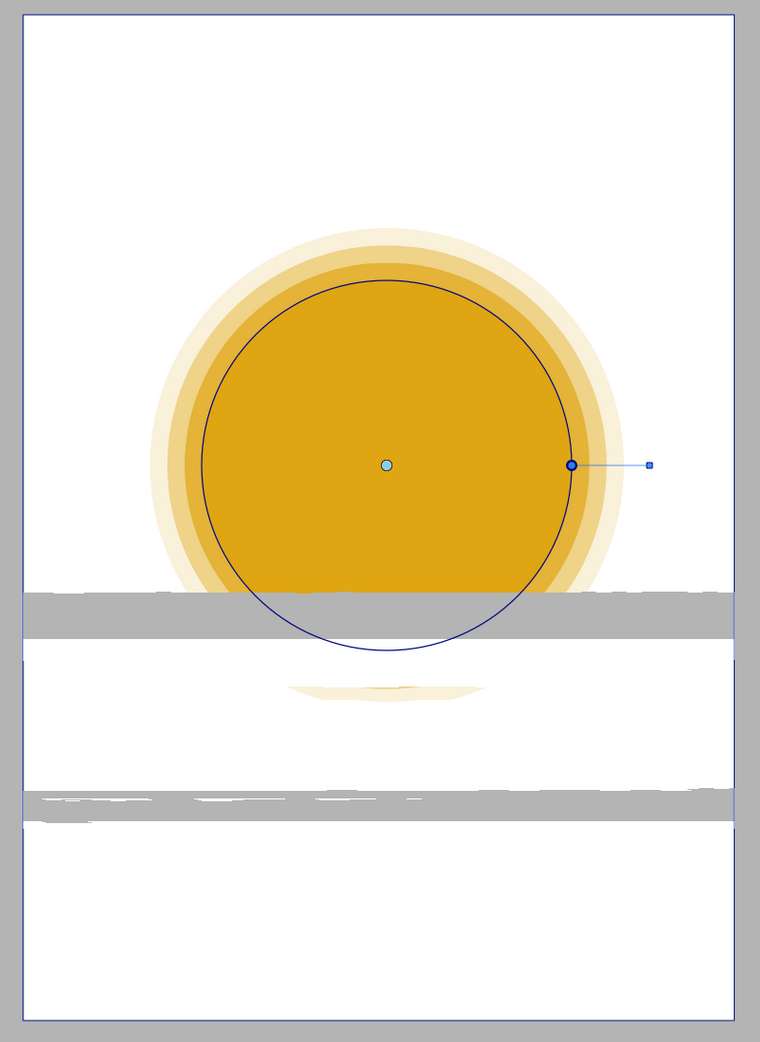
              0_1620646143029_fbab6a23-7995-4c4d-9844-faeab4310ae5-image.png

              VectorStylerV 1 Reply Last reply Reply Quote 0
              • VectorStylerV Offline
                VectorStyler @Kyriakos
                last edited by

                @Kyriakos Thanks for the info. I keep the issue open. This should not happen with Metal, and Software mode being faster is also strange (but maybe on M1 Apple made it faster with Metal).

                K 1 Reply Last reply Reply Quote 0
                • K Offline
                  Kyriakos @VectorStyler
                  last edited by

                  @vectoradmin this might be relevant, VS exhibits the same flickering when you resize the document window.

                  https://thume.ca/2019/06/19/glitchless-metal-window-resizing/

                  VectorStylerV 1 Reply Last reply Reply Quote 0
                  • VectorStylerV Offline
                    VectorStyler @Kyriakos
                    last edited by

                    @Kyriakos Thanks, I will try if it can be improved based on those comments. I do use MTKView when displaying with Metal, and on Intel Macs using Software display (basically just showing an image) is too slow.

                    K 1 Reply Last reply Reply Quote 0
                    • K Offline
                      Kyriakos @VectorStyler
                      last edited by

                      @vectoradmin it feels slower when it's jittering, when it's not everything is extremely smooth and responsive.

                      I am trying Software mode right now and the only perceivable difference for me so far is document resizing which feels quite laggy. Drawing shapes however feels as smooth as Metal, i am not perceiving any major difference.

                      VectorStylerV 1 Reply Last reply Reply Quote 0
                      • encartE Offline
                        encart
                        last edited by

                        I saw these glitches on my laptop with Win10 also. But now I can't reproduce them. They appeard when I was rotating objects.

                        MacBook Air M4 24Gb, Tahoe 26.2

                        1 Reply Last reply Reply Quote 0
                        • VectorStylerV Offline
                          VectorStyler @Kyriakos
                          last edited by

                          @Kyriakos @encart Can the flickering issue be replicated? There is a double buffering enabled for all display types now.

                          1 Reply Last reply Reply Quote 0
                          • First post
                            Last post
