update 1.1.080
-
VectorStyler 1.1.080 release notes
- Improved intersection, union and other shape operations.
- Improved shape builder and shape paint.
- Improved color palette extraction from images.
- Erasing inside combined shape.
- Use ignore background also in B/W image tracing.
- Editing the bend shape effect directly with the node tool.
- Copying very large text to the clipboard made menu opening slow.
- Fixed a crash when opening JPEG files.
- Scaling certain path shapes with the direct scaling mode enabled will position them correctly.
- Aligned stroke resets correctly after object scaling.
- Fixed a crash when creating composite shapes from cloned objects.
- Fixed noise gradient rendering in software and OpenCL modes.
- Fixed various crashes caused by cloning.
- Duplication center to be kept fixed after rotation.
- Aligning nodes to consider the node boundary and not the control points.
- Vector colorizer to include last color in the palette.
- Deselect command to work in node tool also.
- Opening the transform shape effect popup should not select the proportional mode.
- Expanding transformed shape paint object should apply the transformations correctly.
- Tracking should be reset for default text formatting style.
- Visual confirmation when snapping nodes.
- Allow recording and repeating the select similar and by attribute actions.
- Show corner tool knobs when switching from the node tool also.
- Deleting a node should keep neighboring corner types intact.
- Fixed image halftone effect editing.
- Redrawing objects with imaged rendering mode enabled while dragging.
- Allow changing gradient type when a gradient color is selected.
- Deleting a node on the blend spine should not delete the blend.
- Custom icons to display in grayed mode also.
- Adjusting transformation center in Transform modal view to update preview correctly.
- Closing a path while drawing a line to keep the starting position fixed.
- Fixed preview mode in tiling pattern modal editing.
- Layers panel option to double click for layer name editing should disable single click editing.
- Alignment key object picking to deselect on second click only.
- Separate horizontal and vertical artboard spacing option in new document setup.
- Adjusted the scrolling speed in the Glyphs panel.
- Fixed text frame options modal editor preview mode.
- Added option to allow automatic scrolling while using the transform tool.
- Right mouse click should not create artboard around selected objects.
- Inserting new nodes in open paths with all nodes selected.
- Node movement constraint while holding Shift for line segments also.
- Better path closing in pen tool.
- Improved UI scaling support for high resolution Windows display.
- Faster Layers panel icon preview updates.
- Always pass actual document file name to the printer.
- Do not duplicate selected objects while using Option+ scroll wheel in the Transform panel.
- Changing the intersecting selection mode from the Selection panel should update the settings for the current document view also.
- Editing color of external palettes will not preview in the document.
- Setting up documents in pixel units should use the selected document resolution.
- Disable local units in the Transform panel.
- Correctly update artboard size in the status info.
- Magic wand selection should use the selected tolerance values correctly.
- Use font kerning metrics correctly for fonts with both TrueType and OpenType kerning info.
- Option to snap rotation angle relative to the current angle.
-
@VectorStyler said in update 1.1.080:
Added option to allow automatic scrolling while using the transform tool.
This one did not make it into the build (by a mistake it remained in the not yet done 1.2 version).
Will make it work in the next build. -
- Visual confirmation when snapping nodes.
Thanks for this, however I'm not sure about that circle — red and small.
Any opinions from other users?
MacBook Pro (Intel) running Monterey 12.6.4
-
@b77 said in update 1.1.080:
- Visual confirmation when snapping nodes.
Thanks for this, however I'm not sure about that circle — red and small.
Any opinions from other users?
Personally I like it how it is with the new build 80 update - it's subtle and simple. Snapping overall feels much improved as well. What ideas do you have for improving the indicator?
-
Oh wow - got tied up in work this morning and only just now checked the forum seeing we've got an update - so exciting! will be another couple of hours before I can give it a try - but that list is impressive! Thank you for your hard work!
-
@b77 said in update 1.1.080:
however I'm not sure about that circle — red and small.
Is this when the node is snapped? It should also display an orange line.
-
.... Visual confirmation when snapping nodes.....
could someone post a screenshot
could not really figure out which circle
is meant or what it is about -
@Subpath Cannot make a screenshot now, but if you move a node (path editor) over a guideline (snapping enabled), then there should be an orange line over the guideline. This indicator was missing previously.
-
thanks, got it now
the "guidline" was the missing thing -
@VectorStyler said in update 1.1.080:
@b77 said in update 1.1.080:
however I'm not sure about that circle — red and small.
Is this when the node is snapped? It should also display an orange line.
Sorry for not being clear: it's when a node snaps to another node.
-
@b77 said in update 1.1.080:
it's when a node snaps to another node.
Got it! How should this be indicated with two lines (cross)?
-
@VectorStyler said in update 1.1.080:
@b77 said in update 1.1.080:it's when a node snaps to another node.
The size of the orange circle seems to me to be a bit too small.
But thats a very minor thing to me, have no problem with other
solutions.here a comparison with the closing indicator (blue circle)
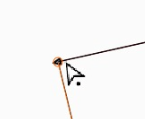
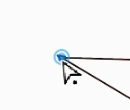
Win 11
CPU: AMD Ryzen 5 9600X, 6-core.
GPU: Nvidia Geforce RTX 5070. -
@VectorStyler said in update 1.1.080:
Better path closing in pen tool.
Really love the improvements to the pen tool! It's smooth and the path closes efficiently even when I'm using the stylus and moving quickly. It's a joy to use now. Noticed you also updated the pen tool cursor
-
@VectorStyler said in update 1.1.080:
Got it! How should this be indicated with two lines (cross)?
A filled opaque circle, slightly bigger than the node so that it covers it?
Light blue, like the indicator for closing a path?
Other opinions welcome.
MacBook Pro (Intel) running Monterey 12.6.4
-
@Subpath said in update 1.1.080:
The size of the orange circle seems to me to be a bit too small.
Well it is too small

-
I also personally recommend a few pixels (literally, 1 or 2 px) between the pen tool and closing circle. On this Mac they touch each other. Otherwise I am very satisfied with that part.
🍏 macOS Sequoia Apple Silicon
-
@b77 I'm not intentionally seeking to disagree I promise!
I can see making it similar to the blue circle close indicator in size. I like that orange represents snapping and the light blue represents nodes and paths.
I like the ring effect because it still allows me to see the node itself, it's not obscuring the node
I've not been a fan of the previous attempts to use a cross as an indicator but I'm open minded
-
@Ingolf said in update 1.1.080:
I also personally recommend a few pixels (literally, 1 or 2 px) between the pen tool and closing circle.
Do you refer to the blue closing circle or the small circle next to the pen cursor? (this could be made larger).
The blue circle can be made a bit larger if needed (yes it can be a visibility issue). The problem here is that both the pen cursor tip and the blue circle center must be exactly on the node.
-
@VectorStyler The pen tool blue circle and ring setup for the close indicator looks and feels near perfect to me right now. If it gets too large it's going to go back to looking clunky in my opinion. The current look and feel, the transparency level and the amount of magnetic pull when closing a pen tool path is perfect. I'd love to see the snapping indicator look and work the same way while retaining the orange color.
-
@VectorStyler said in update 1.1.080:
@Ingolf said in update 1.1.080:
I also personally recommend a few pixels (literally, 1 or 2 px) between the pen tool and closing circle.
Do you refer to the blue closing circle or the small circle next to the pen cursor? (this could be made larger).This is what I am referring to:




