• 1 Votes
    7 Posts
    6k Views
    M
    Thanks for the info everyone. Just to clarify; I really would like to use this to switch brushes (in several software) (so not only to have having different settings like sensitivity curves in Wacom). Looks like this Tool ID feature to switch brushes is already possible with Wacom since 2017!! And at least available in software since 5 years ago (!) as seen in this video by Aaron Rutten of 5 years ago where he literally does switch two wacom pens to switch brushes and talks about this in the video below: youtube video
  • Enhancing Workflow Efficiency in VectorStyler

    2
    1 Votes
    2 Posts
    3k Views
    VectorStylerV
    @jammessbol However, I sometimes find myself spending too much time on certain repetitive tasks. What kind of repetitive tasks? Some examples might help to find a good answer.
  • Accidentally changing a value in an input field

    6
    3 Votes
    6 Posts
    6k Views
    VectorStylerV
    @Subpath Got it. this occurs if highlighting in a field that did not have the focus. I will try to find a solution for this.
  • 1 Votes
    2 Posts
    3k Views
    VectorStylerV
    @Boldline Not currently. The outline preview will render white outboard. This can be added as an option to show the color.
  • 1 Votes
    2 Posts
    3k Views
    VectorStylerV
    @Boldline This is be easy to fix, but it will then change default behavior. Currently this is by design (default for zoom, pan and rotation). I will add an other action (maybe set to Command-0 by default) that only resets the zoom and panning to fit into screen
  • How to use this tool?

    9
    1
    1 Votes
    9 Posts
    9k Views
    VectorStylerV
    @monsterfox That tool should not be listed among the actions (something internal). The correct simplify path tool is in the toolbox (3rd tool group).
  • Questions about Puppet Warp tool

    3
    1 Votes
    3 Posts
    3k Views
    VectorStylerV
    @Yaoif Yes, it is called Elastic Warp. Can be added as a shape effect and then edited (similar editing as in Illustrator).
  • Good brush parameters for non loosing color after one stroke ?

    9
    0 Votes
    9 Posts
    8k Views
    ZATOPEKZ
    @VectorStyler
  • compatilities betwen AFFINITYDESIGNER brush and VECTORSTYLER brush ?

    3
    1 Votes
    3 Posts
    3k Views
    ZATOPEKZ
    thanks for this information
  • How do I make copy/paste overwrite text work?

    2
    0 Votes
    2 Posts
    3k Views
    VectorStylerV
    @Raaskot I opened a bug in this, will get back soon.
  • Best way to achieve this effect?

    5
    1
    0 Votes
    5 Posts
    6k Views
    W
    @VectorStyler and @Subpath, Thanks! I will try.
  • Stutter

    2
    1
    1 Votes
    2 Posts
    2k Views
    VectorStylerV
    @monsterfox I will try to find a solution for this.
  • 0 Votes
    5 Posts
    5k Views
    VectorStylerV
    @Boldline yes, this seems to be an error.
  • Adjustment layer halftone affects more than just the artboard

    2
    1
    1 Votes
    2 Posts
    3k Views
    VectorStylerV
    @Boldline It will render the whole visible (or exported) area. This is basically the whole layer, the artboards are just guides for printing / exporting (Same goes with any other drawing). Adjustment effects can be restricted to an area or any shape, by drawing an object, adding the effect ti the object (as a regular image effect) and turning the object into an adjustment layer (in Object Options)
  • How do I reset the settings of the eraser panel back to the default?

    6
    1
    1 Votes
    6 Posts
    9k Views
    VectorStylerV
    @Boldline said in How do I reset the settings of the eraser panel back to the default?: It would make more sense if "default was listed instead of it always saying "custom". I will try to change this.
  • How to use the Settings linked files

    3
    1
    1 Votes
    3 Posts
    4k Views
    BoldlineB
    @VectorStyler ok I think I understand. The file gets stored here "behind the scenes" but we look for the custom settings found inside the folder(s) where we adjust the settings file and workspace drop down buttons in the context panel. makes sense now - thank you
  • 360° Conical and Spiral gradient

    2
    1
    2 Votes
    2 Posts
    3k Views
    VectorStylerV
    @nocturnalYL There is a bug here, I will have it fixed by the next build and then it will be possible to have asymmetric color
  • Resources Panel?

    3
    1
    1 Votes
    3 Posts
    3k Views
    encartE
    @VectorStyler It appears when AltGR + Z combination is pressed in my case. I'm using polish layout.
  • Polygon tool - where?

    4
    0 Votes
    4 Posts
    4k Views
    S
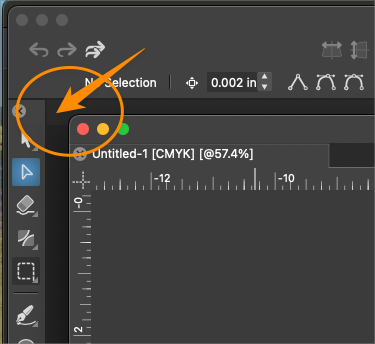
    @jsampson45 your welcome No matter what is showing here this is the "Smart Shapes" Section i.e they could be further be editied via the Shape Panel The currently selected Shape will be displayed at the bar. Note this little Triangle on right here which always mean there are some more Tools [image: 1721907071928-triangle.png]
  • "Open Recent" list empty after updating to newest build

    3
    2
    0 Votes
    3 Posts
    3k Views
    BoldlineB
    @VectorStyler Yes - after I opened a file I had used previously and then saved the updates to it and then closed it and restarted VS, it now shows in the "Open Recent" - but none of the other files listed prior to the update are there [image: 1721745840095-9a63d567-a36b-4b8b-8f41-dfdf492d50d3-bld-2024-07-23-at-10.41.46.png]