Subcategories

  • These features and ideas have been implemented in VS as suggested

    180 Topics
    1k Posts
    VectorStylerV
    @Ayo said in About the Snap feature: Wouldn't it be better to change "Snap to Visible Only" to "Snap to View Extend Only" or shorter "Snap to Viewport Only" or even shorter "Snap to View Only" ? There is a big chance of confusion with the term 'visible' which is mainly linked to the layer system. I added this to the backlog.
  • Improvement of info about path and view in finder via tabs

    13
    1 Votes
    13 Posts
    13k Views
    S
    @b77 said in Improvement of info about path and view in finder via tabs: @Subpath I posted a sortable HTML table in the thread @Ingolf mentioned: https://vectorstyler.com/forum/post/7417 Thanks, doesnt really matter that is for Mac OS would be helpful anyway
  • Symbol spray brush color variations based on random factor

    5
    3 Votes
    5 Posts
    5k Views
    IngolfI
    @VectorStyler You are quite possibly the most productive individual on the planet.
  • Switching between overlapping objects

    9
    1
    4 Votes
    9 Posts
    11k Views
    encartE
    @Ingolf I like to involve a scroll wheel if possible. I mentioned this topic once. The biggest problem is finding a free, comfortable modifier. I use the F1-F12 and numeric 0-9 keys. In my case holding down the '3' key makes the wheel move the object up / down. https://recordit.co/HG9orGdlqW
  • Inspiration for method to preview layers individually

    9
    4 Votes
    9 Posts
    11k Views
    BoldlineB
    @Ingolf @Boldline said in Inspiration for method to preview layers individually: I like the idea. If I let go on a selected layer or sublayer will it keep that item selected in the artboard?
  • Skew option on star shape tool

    7
    2
    1 Votes
    7 Posts
    7k Views
    b77B
    @Subpath is right, no need to convert to curves for this.
  • Inspiration for basic/advanced user interface

    3
    2 Votes
    3 Posts
    5k Views
    BoldlineB
    @VectorStyler Perhaps when there is the option to create panel arrangements that can be saved and switched between in VS, the initial layout upon opening the first time could be even more basic
  • Inkscape 3D tool

    1
    1
    2 Votes
    1 Posts
    4k Views
    No one has replied
  • Drag Tools into Keyboard Shortcut list

    2
    1
    2 Votes
    2 Posts
    4k Views
    VectorStylerV
    @Boldline Added this to the backlog.
  • All Picker Tools with temporally usable Transform Tool

    5
    3
    1 Votes
    5 Posts
    6k Views
    S
    @VectorStyler ...Sorry, internal terminology. All of these tools that can be used to interactively work on the canvas is an "editor".... No Problem, i could always ask . ...Meanwhile I found a way to rearrange the modifier keys, and it seems to be working now, will be in the next build.... Wow, that's some news. Thanks as always for that.
  • 0 Votes
    7 Posts
    7k Views
    BoldlineB
    @VectorStyler more thoughts on this as I use the tracking and word spacing shortcuts this weekend. It makes sense to have the word-spacing and the tracking be similar keyboard shortcuts because they'd most often be used in tandem. While holding down the control and option keys, I think I'd rather see the left and right arrow be used for the tracking and the comma and period be used for word spacing because I do far more tracking than I do word spacing adjustments. If it stays as it is, I can get used to it. I was also thinking of non-traditional future ways to accomplish things like tracking and word spacing: Someone a while back posted the idea of adding commands directly to the selection box. What about adding commands directly to a live text box as well? user would highlight the word with the text tool (maybe we expand the use and name of the text on a path edit tool?) Sort of the way the character tool currently can access individual letters and words and adjust things. the user would select the word or highlight the letters involved and click on the tracking symbol right above the text box and the highlight would change color to demonstrate it's now in tracking mode and then regular left and right keyboard keys would work to modify. Here's a mockup of the main idea: [image: 1653237001312-99e2d199-85b6-4c59-b55e-826cbce0dc31-bld-2022-05-22-at-12.29.15-resized.png] adding to this new future idea - perhaps if the highlight changed color for this part based on what tool is being used? [image: 1653241294857-42e9e1fa-82f4-4355-b73f-a70439912311-bld-2022-05-22-at-13.40.24-resized.png]
  • Toggling center point node on and off - easily

    10
    1
    1 Votes
    10 Posts
    9k Views
    BoldlineB
    @Ingolf said in Toggling center point node on and off - easily: Hence the central and easily accessible location in Affinity. Comparing this to Affinity is a little like comparing apples and oranges because Affinity lacks a lot of the tools found in VS and therefore more UI can be dedicated to more obscure features. If everything is accessible with a dedicated place right on the UI then nothing is accessible in reality because it gets crowded and overwhelming. @Ingolf - how often would you be swapping the view on and off for these selection guides/red dot, etc.? You mentioned hardly using them or needing them. I could be wrong, but it sounds like it's not likely to be a frequently toggled option even for you. The UI contextual space should be reserved for options related to the tool at hand and for quick toggle options. I occasionally would want to work with the selection guides off, and going up to the view menu to toggle it does not seem like too many steps. the view menu is an intuitive clue as to where to find the toggle for these selection guide options for new users
  • Double tapping gradient tool opens gradient panel

    3
    0 Votes
    3 Posts
    4k Views
    BoldlineB
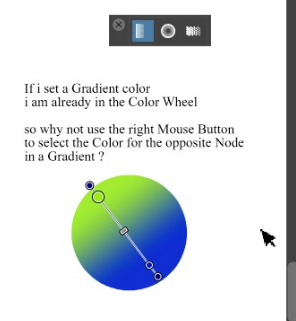
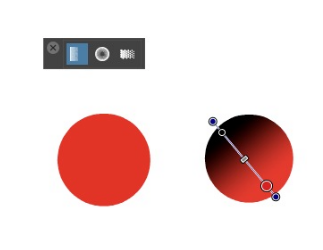
    @VectorStyler Just my opinion, but I think any place a double click on the tool in the vertical toolbar could open the related more detailed panel, would be a good thing... blend, gradient, magic wand...pattern, etc
  • Wish some kind of reset the Values Option for the Transform panels

    7
    0 Votes
    7 Posts
    7k Views
    S
    @VectorStyler Thanks for description, especially the tip with the "Shape Effect" panel
  • Default built-in 3D Stars?

    23
    1
    1 Votes
    23 Posts
    38k Views
    VectorStylerV
    @Victor-Vector said in Default built-in 3D Stars?: you may want to investigate how scale affects shape builder Will try to replicate at different size. But yes, size may affect the shape builder (and combine operations), as it affects the precision. If you have an example with the start+lines where the shape builder fails, please send it to me.
  • Reset to default panel settings for Character panel

    3
    2
    0 Votes
    3 Posts
    5k Views
    BoldlineB
    @VectorStyler I think that would make things easier for the typical user to have a total default reset option as well
  • Independent stroke on each side

    3
    0 Votes
    3 Posts
    4k Views
    J
    @VectorStyler Independent stroke option is limited to rectangle and square only. But I think You can also do it for other shapes in VS. Made this quickly what comes in my mind. [image: 1652458282146-untitled-1-resized.png]
  • Option to select which recovery files to open

    3
    4 Votes
    3 Posts
    4k Views
    BoldlineB
    @VectorStyler said in Option to select which recovery files to open: if there are problematic AI files, and possible to send by email, I will send that file over to you today. thanks for continuously improving the AI file format compatibility
  • Would like a little preview image when VS saves a file

    3
    1
    7 Votes
    3 Posts
    4k Views
    S
    @VectorStyler nice, thanks
  • Delete multiple swatches at one time from palette panel

    3
    0 Votes
    3 Posts
    4k Views
    BoldlineB
    @VectorStyler said in Delete multiple swatches at one time from palette panel: Currently deleting of multiple colors works by selecting them and clicking on the trash icon. Oh! I had forgotten to try that method. It wasn't as intuitive a thought to do in my mind, but that makes sense now that you explained it
  • 1 Votes
    3 Posts
    4k Views
    BoldlineB
    @VectorStyler said in Can the color palette bar show the name of the palette being displayed?: Maybe in a tool tip when hovering over the palette bar title or menu icon? Sure - that works. Just some way to easily reference what specific palette is loaded in the color palette bar