• 1 Votes
    4 Posts
    27 Views
    S
    The Cavalry App came with a lot of Demo files which can be found here. [image: 1779106655972-demo-files-1.png] [image: 1779106661314-demo-files-2.png]
  • Could this be made more user‑friendly?

    Questions and Support
    4
    1
    2 Votes
    4 Posts
    33 Views
    VectorStylerV
    @macos Indicator styles are customizable in Settings -> Indicator Styles In the Snapping panel menu -> Snapping Options, enable the "Show Distances" (second column, top) to show distances when the Snap to Object is enabled.
  • Cloning objects.

    Questions and Support
    6
    1 Votes
    6 Posts
    58 Views
    VectorStylerV
    How can I make clones of only the original object not the created object? Duplicate the clone
  • 2 Votes
    5 Posts
    52 Views
    VectorStylerV
    @debraspicher said in Adding More Practical Editable Parametric Shapes to VectorStyler: CSP handles this by putting them behind basically giant palettes that can be tabbed This looks like "Preset" palettes
  • vertical text

    Questions and Support
    9
    1 Votes
    9 Posts
    46 Views
    VectorStylerV
    @macos The vertical text issue is identified, and the fix will be in the next build. The issue is with the new text engine. If you set the "Text Shaper" option in Paragraph Styles to "OpenType" and then in Character Options enable the "Automatic Vertical Roman" then it should work. BTW: you need to set the "Enable East-Asian Options" in Settings
  • 0 Votes
    7 Posts
    33 Views
    BoldlineB
    @Subpath said in How to quickly copy halftone appearance to new shape?: i think the methode vectorstyler mentioned "save as preset works" best I agree that is currently the best option for getting what I was requesting. I think it's also a great solution long term if you know you're going to use it frequently or in other projects down the road. However, I also think @vectorstyler is right to add the basic copy/paste option for quick and easy one-time editing. Both options will have their due place in VS
  • TEXT enveloppe deform

    Questions and Support
    3
    1
    1 Votes
    3 Posts
    26 Views
    ZATOPEKZ
    Thanks it's work fine
  • 1 Votes
    4 Posts
    26 Views
    BoldlineB
    expounding on my earlier answer - you replied, " @VectorStyler said in option for vector halftones to generate dots beyond the object boundary, then clip them to the object shape.: The halftone approximates the object color / intensity. But what intensity is is beyond the object boundary? This is hard to know, especially for images. I was thinking of it similarly to how gradients work. With a gradient, the control line and color stops can extend outside the visible object boundary. The user can define color/intensity behavior in an unseen area, and the object simply displays the clipped result inside its shape. Could halftones have a comparable “source area” or “generation area”? The object shape would remain the visible clipping boundary, but the halftone grid/intensity field could be generated from a larger editable area, similar to how a gradient line extends beyond the object. So instead of asking VectorStyler to guess intensity outside the object, the user would explicitly define it through the halftone source/generation area. Possible model: Object shape = visible clipping boundary Halftone source area = where the dot field/intensity is generated Dots are generated across that source area Final result is clipped to the object shape This would allow partial edge dots without requiring VectorStyler to infer unknown image data outside the object. For flat fills or uniform halftones, the outside intensity could simply continue the same value. For gradients, the existing gradient behavior could define the intensity beyond the visible object. For images, this could either be disabled or require a larger image/source area. Essentially, adding a halftone generation area separate from the visible clipping shape, similar to how gradient controls can extend outside an object while the final color remains clipped to the object. [image: 1778787437691-ef25cc6e-0311-4502-b3d9-dbf90fd5a9cf-cleanshot-2026-05-14-at-15.33.06.png]
  • Potential (Small) Bug in Appearance Panel

    Bugs in VectorStyler
    4
    1 Votes
    4 Posts
    62 Views
    debraspicherD
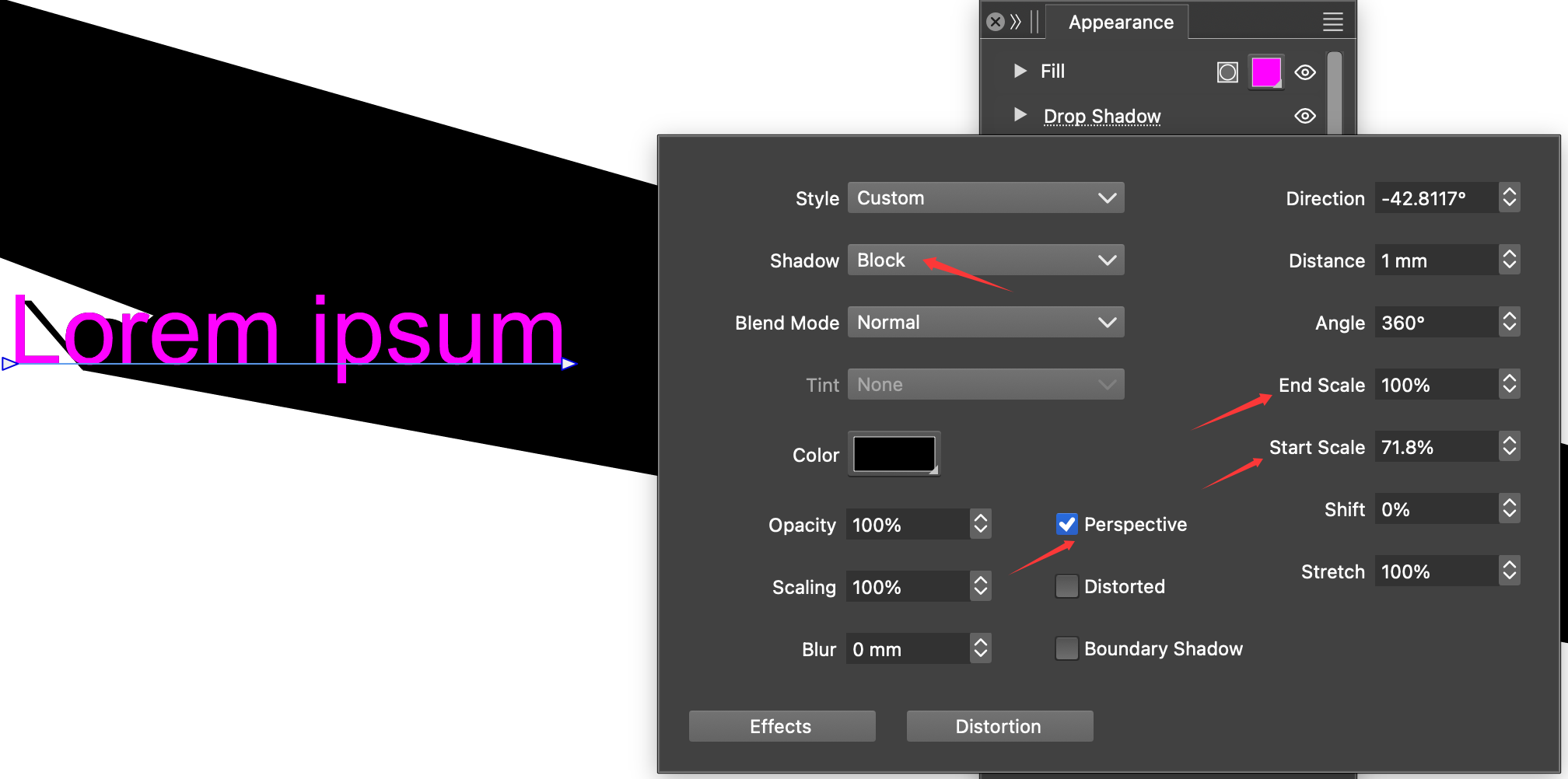
    @DreamS Yes I reported this bug during a prior version, so probably it was fixed by then. Very funky.
  • 1 Votes
    12 Posts
    100 Views
    M
    said in Redrawing screen hide toolbars and then show them again: @VectorStyler In 017 it also does the same. For some reason 018 does it but not so often. I was believen it was fixed, but at last, it did it. I know you couldnt find the casus still, but anyway i believed was good to know.
  • 1 Votes
    2 Posts
    36 Views
    VectorStylerV
    @Harry Not sure yet, have to understand first what is the technique.
  • 1 Votes
    3 Posts
    35 Views
    W
    This issue is now resolved! Thank you @VectorStyler!
  • update 1.3.018

    Announcements and News
    4
    2 Votes
    4 Posts
    62 Views
    L
    @VectorStyler No rush on this; please fix it whenever it's convenient. A crash only occurs in VectorStyler when all three conditions are met: Overprint is enabled, a Blend Mode is applied, and Overprint View is active.
  • Copy paste between VS and other applications

    Questions and Support
    6
    2 Votes
    6 Posts
    56 Views
    E
    I get the same issue with Affinity designer 2.0 and Affinity Studio When looking in clipboard at the svg of a rectangle copied from Affinity, then pasted in VS and copied to clipboard from VS, I can see a difference : Copied from Affinity : 992x525: <?xml version="1.0" encoding="UTF-8" standalone="no"?> <!DOCTYPE svg PUBLIC "-//W3C//DTD SVG 1.1//EN" "http://www.w3.org/Graphics/SVG/1.1/DTD/svg11.dtd"> <svg width="992px" height="595px" version="1.1" xmlns="http://www.w3.org/2000/svg" xmlns:xlink="http://www.w3.org/1999/xlink" xml:space="preserve" xmlns:serif="http://www.serif.com/" style="fill-rule:evenodd;clip-rule:evenodd;stroke-linejoin:round;stroke-miterlimit:2;"> <g transform="matrix(1,0,0,1,-384,-378)"> <g transform="matrix(1,0,0,1,-1176,-147)"> <rect x="1560" y="525" width="992" height="595" style="fill:rgb(235,235,235);"/> </g> </g> </svg> Copied from VS : 238x143 <?xml version="1.0" encoding="UTF-8" standalone="no" ?> <!DOCTYPE svg PUBLIC "-//W3C//DTD SVG 1.1//EN" "http://www.w3.org/Graphics/SVG/1.1/DTD/svg11.dtd"> <svg width="239" height="143" viewBox="0 0 239 143" version="1.1" xmlns="http://www.w3.org/2000/svg" xmlns:xlink="http://www.w3.org/1999/xlink" xml:space="preserve" xml:name="Untitled-1"> <defs/> <g transform="matrix(1.0 0.0 -0.0 -1.0 0.0 142.8) "> <path d="M396.1966 18.5092 L396.1966 161.3092 634.2766 161.3092 634.2766 18.5092 396.1966 18.5092 Z" transform="matrix(1.0 0.0 0.0 1.0 -396.19663361 -18.50924665) " fill="#EBEBEB" fill-rule="evenodd"/> </g> </svg>
  • 2 Votes
    13 Posts
    71 Views
    H
    @VectorStyler System: MacBook Pro M1 Pro, 16GB RAM, macOS Tahoe 26.3.1 (25D2128)
  • 4 Votes
    6 Posts
    156 Views
    M
    @Honor I also look forward to having such a feature.
  • 1 Votes
    3 Posts
    30 Views
    RidgehammerR
    @VectorStyler Thank you for looking into it, and helping me find a solution.
  • 1 Votes
    3 Posts
    43 Views
    861475_VctSt8
    @VectorStyler 1.3.017 Thanks It finally cleared up the confusion I’ve been feeling for years.
  • Right click to discontinue drawing

    Features and Ideas
    6
    2 Votes
    6 Posts
    64 Views
    W
    Thank @VectorStyler! Right clicking for the new Pen Tools is now available in VS 1.3.017 and it's working perfectly!
  • Foxit PDF Editor displays wrong info

    Resolved 1.2 bugs
    3
    1
    1 Votes
    3 Posts
    29 Views
    W
    Now fixed in VS 1.3.017. Thank you @VectorStyler!