VectorStyler
    • Categories
    • Unread
    • Recent
    • Tags
    • Popular
    • Register
    • Login

    update 1.1.082

    Scheduled Pinned Locked Moved Release notes of past builds
    17 Posts 4 Posters 1.9k Views 3 Watching
    Loading More Posts
    • Oldest to Newest
    • Newest to Oldest
    • Most Votes
    Reply
    • Reply as topic
    Log in to reply
    This topic has been deleted. Only users with topic management privileges can see it.
    • VectorStylerV Offline
      VectorStyler
      last edited by

      VectorStyler 1.1.082 release notes

      • Separate path when using the knife tool.
      • Fixed regression in eraser tool.
      • Cursor sensitivity when selecting text shapes.
      • Changed default shortcuts for node types in the node editor.
      • Added modifier (Control) for relative rotation snapping.
      • Fixed clipping blend objects into text shapes.
      • Fixed regression in offset path and stroke alignment.
      b77B 1 Reply Last reply Reply Quote 8
      • BoldlineB Online
        Boldline
        last edited by

        Thanks for the updates - all are good improvements

        🍎 macOS Tahoe 26.2, Mac mini (M1, 2020), Chip Apple M1, Memory 16 GB
        Cintiq 27QHD Display and LG Ultra HD Display

        1 Reply Last reply Reply Quote 0
        • b77B Offline
          b77 @VectorStyler
          last edited by

          • Added modifier (Control) for relative rotation snapping.

          Nice. 👍

          MacBook Pro (Intel) running Monterey 12.6.4

          IgullI 1 Reply Last reply Reply Quote 0
          • IgullI Offline
            Igull @b77
            last edited by

            @b77 said in update 1.1.082:

            • Added modifier (Control) for relative rotation snapping.

            Nice. 👍

            Sorry, I'm not seeing this working ?

            Holding shift snaps the object by 45deg , holding ctrl simply switches off the rotation snapping. Holding shift + ctrl does the same as shift.
            I assume I'm missing something, I assumed one of them would force the object to 0 deg (say) then snap every 45 (or whatever your snap angles are set to) the other would simply snap relative to the object starting angle ?

            TIA

            Neil

            iMac 27" 2015 Catalina 32Gb, MacBook Pro 13" 2016 Monterey 8Gb, Mac Mini M2 2023 8Gb

            VectorStylerV 1 Reply Last reply Reply Quote 0
            • VectorStylerV Offline
              VectorStyler @Igull
              last edited by VectorStyler

              @Igull Did you have the modifier keys customized previously?
              That could mean that the new modifier keys are not used.

              BoldlineB 1 Reply Last reply Reply Quote 0
              • BoldlineB Online
                Boldline @VectorStyler
                last edited by

                @VectorStyler I'm having the same situation as @Igull but I'm not sure I swapped around any modified keys in the past.

                🍎 macOS Tahoe 26.2, Mac mini (M1, 2020), Chip Apple M1, Memory 16 GB
                Cintiq 27QHD Display and LG Ultra HD Display

                VectorStylerV 1 Reply Last reply Reply Quote 0
                • VectorStylerV Offline
                  VectorStyler @Boldline
                  last edited by

                  @Boldline I think only a Settings Reset might tell if the modifier keys were changed.

                  BoldlineB 1 Reply Last reply Reply Quote 0
                  • BoldlineB Online
                    Boldline @VectorStyler
                    last edited by

                    @VectorStyler I reset both the settings and the workspace to defaults and using the control key is not constraining a shape's rotation in any way. Shift modifier is working. Is there something more than needs to be turned on or off?

                    🍎 macOS Tahoe 26.2, Mac mini (M1, 2020), Chip Apple M1, Memory 16 GB
                    Cintiq 27QHD Display and LG Ultra HD Display

                    VectorStylerV 1 Reply Last reply Reply Quote 0
                    • VectorStylerV Offline
                      VectorStyler @Boldline
                      last edited by

                      @Boldline The Control key thing works only when also holding the Shift key, and it should constrain the rotation relative to the current rotation of the object.

                      IgullI 1 Reply Last reply Reply Quote 0
                      • IgullI Offline
                        Igull @VectorStyler
                        last edited by

                        @VectorStyler said in update 1.1.082:

                        @Boldline The Control key thing works only when also holding the Shift key, and it should constrain the rotation relative to the current rotation of the object.

                        I tried a prefs reset with the same result. I don't need to use the control key, the shift key now rotates relative to the object's current angle, it doesn't force it to 0/90 as before. It seems that the relative rotate has been permanently installed ?

                        Neil

                        iMac 27" 2015 Catalina 32Gb, MacBook Pro 13" 2016 Monterey 8Gb, Mac Mini M2 2023 8Gb

                        b77B 1 Reply Last reply Reply Quote 0
                        • b77B Offline
                          b77 @Igull
                          last edited by b77

                          @Igull
                          When 'Relative Angle Constrain' is enabled in Prefs > Editing Options 1, only Shift is needed,
                          and pressing Ctrl-Shift rotates in 45° increments ignoring the current rotation.

                          When 'Relative Angle Constrain' is disabled, pressing Ctrl-Shift rotates in 45° increments + the
                          current angle (say, 12°).

                          MacBook Pro (Intel) running Monterey 12.6.4

                          IgullI 1 Reply Last reply Reply Quote 0
                          • IgullI Offline
                            Igull @b77
                            last edited by

                            @b77 said in update 1.1.082:

                            @Igull
                            When 'Relative Angle Constrain' is enabled in Prefs > Editing Options 1, only Shift is needed,
                            and pressing Ctrl-Shift rotates in 45° increments ignoring the current rotation.

                            When 'Relative Angle Constrain' is disabled, pressing Ctrl-Shift rotates in 45° increments + the
                            current angle (say, 12°).

                            Nope, just tried it again, always the same whether relative angle constrain is checked or not 😞

                            It always constrains relative to the current angle and never pulls the object back to 0 deg (or 45/90).

                            I did check that I was on 082 just to make sure 🙂

                            Any thoughts, I'm guessing another pref conflict ?? (although I did do a reset ).

                            Neil

                            iMac 27" 2015 Catalina 32Gb, MacBook Pro 13" 2016 Monterey 8Gb, Mac Mini M2 2023 8Gb

                            IgullI 1 Reply Last reply Reply Quote 1
                            • IgullI Offline
                              Igull @Igull
                              last edited by

                              @Igull

                              I have also just tried it on Windoze 10 on my Mac using Parallels - same results.

                              Neil

                              iMac 27" 2015 Catalina 32Gb, MacBook Pro 13" 2016 Monterey 8Gb, Mac Mini M2 2023 8Gb

                              VectorStylerV 1 Reply Last reply Reply Quote 1
                              • VectorStylerV Offline
                                VectorStyler @Igull
                                last edited by

                                @Igull I will try to replicate this issue with the angle constrain

                                IgullI 1 Reply Last reply Reply Quote 1
                                • IgullI Offline
                                  Igull @VectorStyler
                                  last edited by

                                  @VectorStyler

                                  👍

                                  Neil

                                  iMac 27" 2015 Catalina 32Gb, MacBook Pro 13" 2016 Monterey 8Gb, Mac Mini M2 2023 8Gb

                                  b77B 1 Reply Last reply Reply Quote 0
                                  • b77B Offline
                                    b77 @Igull
                                    last edited by

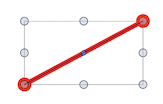
                                    @Igull Maybe the object is "rotated" inside the bounding box, which will make it look like rotating it with Ctrl-Shift doesn't work?
                                    0_1683887489983_slanted.png

                                    MacBook Pro (Intel) running Monterey 12.6.4

                                    IgullI 1 Reply Last reply Reply Quote 0
                                    • IgullI Offline
                                      Igull @b77
                                      last edited by

                                      @b77 said in update 1.1.082:

                                      @Igull Maybe the object is "rotated" inside the bounding box, which will make it look like rotating it with Ctrl-Shift doesn't work?

                                      0_1683887489983_slanted.png

                                      Ahhh, this might be the case, well done. I hadn't even considered that it was relative to the bounding box and NOT the actual vector itself - doh 😞
                                      My test was simply a bunch of lines created at odd angles - naturally, all those lines would have orthogonal bounding boxes 🙂

                                      I had (stupidly ???) assumed that VS would know if a vector was orthogonal or not and would rotate it accordingly.

                                      That's what I based my results on and obviously, that's not what the intended operation should be 🙂
                                      Understandably, if one of my test lines were some complex object, then VS wouldn't know if it were orthogonal or not.

                                      In that case, you would have to do a collision detect of some part of the object to say an orthogonal guideline to ensure orthogonality, then you would be good to go.

                                      Thanks for that !

                                      Neil

                                      iMac 27" 2015 Catalina 32Gb, MacBook Pro 13" 2016 Monterey 8Gb, Mac Mini M2 2023 8Gb

                                      1 Reply Last reply Reply Quote 2
                                      • First post
                                        Last post