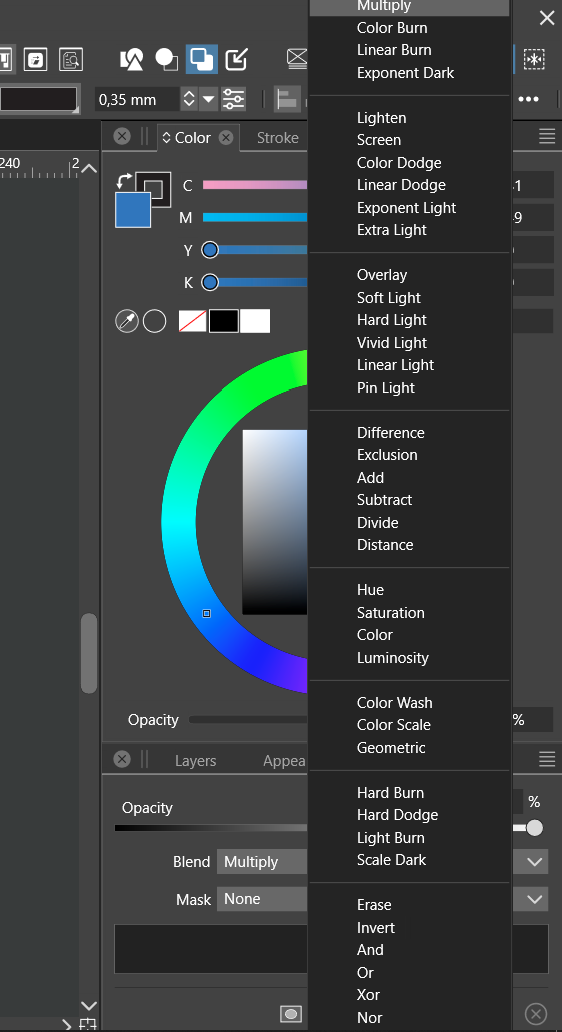
• Change blend mode back to normal is not possible

    Moved
    3
    1
    1 Votes
    3 Posts
    4k Views
    VectorStylerV
    @Harry Meanwhile as a workaround, try using the scroll wheel or the up/down keys. EDIT: the up/down key use works when the list is not open, just click on the Blend label and press the up or down keys. The scroll wheel should work by just hovering over the blend field (without opening the list).
  • 0 Votes
    10 Posts
    13k Views
    861475_VctSt8
    @VectorStyler Looks good on this issue! Seems like a difficult task. Thank you.
  • Regression. Panel Vertical Size

    Moved
    9
    1 Votes
    9 Posts
    10k Views
    861475_VctSt8
    @VectorStyler The cursor shape is The shape of the cursor when the palette size is changed fig. [image: 1694415711698-2023-09-11-15.59.02-resized.png] When I try to extend the palette upwards, Action https://recordit.co/rSlNNHr3hj It seems to happen when the pallet is fully extended to the top and bottom, It may be preventable if I'm careful.
  • Vertical color bar is not displaying the correct name of the palette

    Moved
    5
    1
    1 Votes
    5 Posts
    6k Views
    BoldlineB
    @VectorStyler Today I removed the existing custom palette and tried others and came back to the one I had there originally and now they all display correctly.
  • HSB and Gray color slider(s) cannot be dragged - is it ROUND 3 now...?

    Moved
    7
    0 Votes
    7 Posts
    8k Views
    _
    @VectorStyler I think it's best to use this opportunity and strike a more positive tone. Clearly, everyone is interested in the best quality and the fewest bugs. I doubt that anyone has any misconceptions about the difficulties and complexities of maintaining such a complex software product. At the same time, users invest time and money and expect a certain level of carefree functionality. As it currently stands, users upgrade to a new build, go about their usual business, and randomly stumble into bugs.  Speaking for myself, I have come across too many bugs to continue using VS. Paying customers should be entitled to expressions of dissatisfaction. Perhaps some form of organizational structure could better test potential releases before distribution. The entire program's functionality could be broken into function areas for individuals to test. One person would test all aspects of the pen tool, another would test all the shapes, etc. Each tool category would have a list of tasks to accomplish. For example, the instructions would read, create a rectangle, apply a red fill, apply stroke, change stroke width, and so on.  As such, there would be bite-sized tests to performed repetitively by the same individuals, who would become proficient at the task, and expand the tests if needed based on results and features. Setting this up, of course, would be a major headache, but with enough testers and effort, it could prove invaluable. Or perhaps even such a structure already exists, but could be improved. Correct me if I am wrong, but based on my experience, It does not appear that there currently exist mechanisms for adequate testing here, especially when there is so much user interaction involved.
  • There is no Display Preset item in the Preset Manager.

    Moved
    5
    1 Votes
    5 Posts
    6k Views
    VectorStylerV
    @861475_VctSt Cannot replicate this. If I create a oreset in Display Options view, the Preset Manager will have the Display Option listed in the "Preset" drop down and the preset is there. Same with Character Style presets. Could it be that the previous presets were removed while updating VS?
  • The panel stays on the desktop even when VS is minimized

    Moved
    5
    1
    0 Votes
    5 Posts
    6k Views
    S
    @VectorStyler made a Video about it, look here btw my taskbar is set to be always visible
  • Removing Gradient Mesh Color Removes Path

    Moved
    9
    1 Votes
    9 Posts
    10k Views
    VectorStylerV
    @VectorStyler said in Removing Gradient Mesh Color Removes Path: Applying the mesh to the fill should not remove the path's stroke. I will try to find a solution for this.
  • Bounding box in not align to centre

    Moved
    8
    2
    0 Votes
    8 Posts
    9k Views
    VectorStylerV
    @Jayanta-Das This can be replicated on windows with 125% screen scaling. I will try to find a fix for it.
  • 0 Votes
    2 Posts
    3k Views
    VectorStylerV
    @Boldline I added this to the backlog.
  • Snap doesn't work when bending rectangle. Regression

    Moved
    3
    0 Votes
    3 Posts
    4k Views
    VectorStylerV
    @encart Works on Mac here, I will try to replicate this on Windows.
  • 1 Votes
    6 Posts
    7k Views
    BoldlineB
    @VectorStyler said in Sometimes lock icons in layer panel cannot be edited or wrong one switches: What were the actions just before this occurred? Ugh! I didn't think to check what I had just been doing specifically in the history. I will add this to what I do when I report issues. If memory serves me correctly, I was rearranging live text and testing out different fonts and skewing them.
  • 0 Votes
    2 Posts
    3k Views
    VectorStylerV
    @encart Added this to the backlog, I will try to replicate it on Windows.
  • Compatibility issues

    Moved
    2
    1
    1 Votes
    2 Posts
    3k Views
    VectorStylerV
    @Li-Xiao Added this to the backlog.
  • Cursor Issues

    Moved
    8
    0 Votes
    8 Posts
    9k Views
    VectorStylerV
    @Igull said in Cursor Issues: multiple (6) Spaces set up I will try with those.
  • Transparency Content Mask seems to be broken

    Moved
    2
    1
    0 Votes
    2 Posts
    3k Views
    VectorStylerV
    @Subpath Added this to the backlog as a bug.
  • Color panel display bug in Area ( Vertical Area ) Text Tool

    Moved
    7
    1 Votes
    7 Posts
    8k Views
    861475_VctSt8
    @VectorStyler Look at one more example. Other tools are also suspect. The same goes for the path tools. https://recordit.co/ZBGLN173wL
  • Global Swatch tint slider not working

    Moved
    4
    1 Votes
    4 Posts
    5k Views
    W
    @William-Kansepa said in Global Swatch tint slider not working: @William-Kansepa said in Global Swatch tint slider not working: Global Swatch tint slider is not working in VS 1.1.102. Still broken in VS 1.1.103. I can confirm that the issue has been fixed in VS 1.1.104. Thank you @VectorStyler!
  • About the black defaults for each color mode

    Moved
    5
    0 Votes
    5 Posts
    6k Views
    861475_VctSt8
    @VectorStyler I further tried it on another mac. MacBook Pro Mid. 2014 os 10.14.6 Mojave CMYK: K100 RGB: 41, 41, 40 Grey: 87 I found that it depends on the machine. When I check with the ColorSync utility, Japan color corted 2011 shows Adobe as the preferred CMM. I guess it depends on whether or not Adobe products are installed on the Mac, the version of Apple color sync, and so on. Anyway, it does not seem to be a bug, so Maybe there is no need to worry.
  • Is this feature obsolete?

    Moved
    3
    2
    1 Votes
    3 Posts
    4k Views
    861475_VctSt8
    @b77 Indeed. It could be simplified and easier to use. Simplification is also a way of improvement.