Subcategories

  • These features and ideas have been implemented in VS as suggested

    180 Topics
    1k Posts
    VectorStylerV
    @Ayo said in About the Snap feature: Wouldn't it be better to change "Snap to Visible Only" to "Snap to View Extend Only" or shorter "Snap to Viewport Only" or even shorter "Snap to View Only" ? There is a big chance of confusion with the term 'visible' which is mainly linked to the layer system. I added this to the backlog.

  • Add shift modifier to magic wand to select multiple types of objects

    12
    2 Votes
    12 Posts
    11k Views
    VectorStylerV
    @Boldline This should be available in build 1.1.024
  • Path panel option to retract both handles of any selected nodes

    8
    2
    2 Votes
    8 Posts
    8k Views
    VectorStylerV
    @Boldline Clicking on the Cusp node button again, should retract both handles.
  • Could we add the ability to group guides?

    4
    0 Votes
    4 Posts
    4k Views
    VectorStylerV
    @Boldline Why not use "guide" objects for this. Draw several lines, group them, and turn them into guides with View -> Guides -> Make Guides.
  • 0 Votes
    5 Posts
    6k Views
    BoldlineB
    @vectoradmin I commonly used the AI version of workspaces to clean up the screen of floating panels. I was much more willing to detach panels and move them around as I worked ignoring I could at any point click a button and reset the workspace arrangement. Right now in VS, it takes some effort to get the main panels I use in the best configuration and I'm hesitant to drag out a panel because it means having to manually add them back in. There are also panels I don't use as much as I want to because I have to go find them, open it and arrange them each time. It's laziness on my party for sure but it's also repetitive and not efficient Thinking of new users, they may not even know what all panels are available for a certain task. Setting up defaults based on common tasks would give them a head start. I also look at swappable workspaces like an extension of the contextual menu bar. Between the customized workspace and the contextual menu bar, so many options are opened up to the user
  • Contextual Mouse/Key Tool Mod Help at the bottom of the screen

    4
    1
    0 Votes
    4 Posts
    5k Views
    VectorStylerV
    @Victor-Vector There is a related feature request for an "Info / Status" bar, I added this also.
  • 2 Votes
    2 Posts
    3k Views
    VectorStylerV
    @Boldline Added this to the backlog.
  • Hand tracing features (3/3) - Panel

    5
    1 Votes
    5 Posts
    6k Views
    BoldlineB
    I was looking at the online Illustrator user manual and found this list of panel arrangement position options. This conversation thread aside, I've been requesting panel workspace defaults and the ability to create custom workspace layouts anyway, but @Ingolf, one of the optional layouts is geared toward tracing. [image: 1647703225369-c87324c3-45a3-48ef-a17d-10ff8047149d-bld-2022-03-19-at-11.14.49-resized.png]
  • Hand tracing features (1/3) - Reference layers/objects

    20
    2 Votes
    20 Posts
    19k Views
    BoldlineB
    @Ingolf I think @b77 had a great answer in his post here an hour back. See how far you can go with actions and also what kind of custom panel arrangement would suit you and share that in the forum. Before we can fix a problem, some of us would need to see clearly the problem itself
  • Hand tracing features (2/3) -

    5
    0 Votes
    5 Posts
    6k Views
    IngolfI
    @vectoradmin said in Hand tracing features (2/3) -: @Ingolf said in Hand tracing features (2/3) -: Find Edges I guess OK. But then blur will smooth the found edges out. Yep - intended. The find edges makes some very rough edges on photos.
  • Three user stories for hand tracing features

    2
    1 Votes
    2 Posts
    3k Views
    VectorStylerV
    @Ingolf Thanks!
  • Freeform Gradient

    2
    2 Votes
    2 Posts
    3k Views
    VectorStylerV
    @Jayanta-Das Maybe further down the road
  • Incremental input option for vertices count in Star panel

    14
    1
    1 Votes
    14 Posts
    15k Views
    VectorStylerV
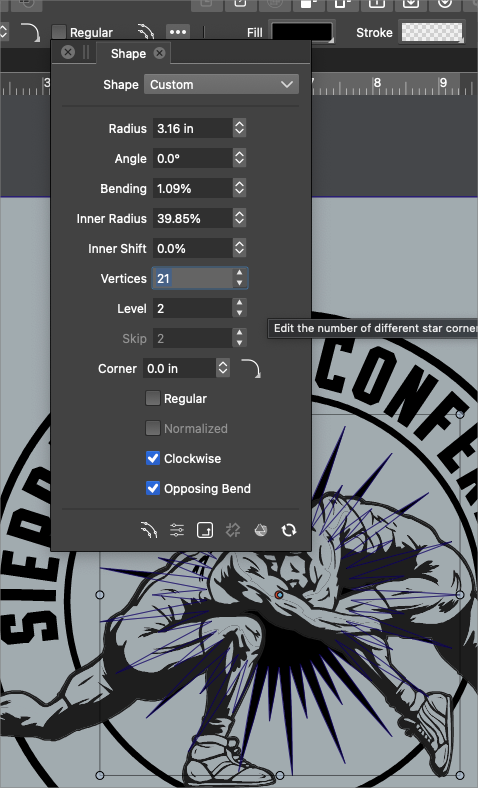
    @Devil-Dinosaur When pressing the up/down arrow button with the mouse it does open the slider, that is by design. I was referring to pressing up/down arrow keys on the keyboard. The editors where the up/down arrow buttons work as scroll buttons are a bit different: Vertices field has a popup slider. Level field has an up/down arrow for scrolling. I will try to find a way to have both of these options, the problem is that I have not yet found a good design, and adding two buttons to each field is not the way to go.
  • Idea, to maybe extend the Forum a little ?

    11
    4 Votes
    11 Posts
    12k Views
    Victor VectorV
    @Boldline Haha, I am here for all the reasons you described! I look forward to learning enough about VectorStyler to be able to fully integrate it into my graphic design production pipeline. Thanks again!
  • Using 3D to create complex forms in VS

    3
    2
    1 Votes
    3 Posts
    4k Views
    BoldlineB
    @vectoradmin thanks - I understand that. I figured this was a version 2.0 feature. I just keep sharing things as I think of them and if they help me expand on an initial idea I already shared
  • Option to add strategic nodes to shape

    5
    1
    0 Votes
    5 Posts
    5k Views
    BoldlineB
    @vectoradmin said in Option to add strategic nodes to shape: adding a node at a center is possible by selecting one of the previous node and pressing the + key. OK this works for me, I had forgotten about this option! This is a simple solution that works and does not complicate things.
  • Image Tracing Preview

    4
    0 Votes
    4 Posts
    5k Views
    J
    @Boldline Ya the tracing is not so precise, may be it is because of the image type or may be because it is in alpha. What I am asking about was live tracing. And it seem there is some other option also for color tracing, but how precise I don't know.[image: 1646154874503-screenshot-2022-03-01-222438-resized.png]
  • Locking individual and sets of tool panels

    6
    1
    0 Votes
    6 Posts
    7k Views
    VectorStylerV
    @Boldline Probably having the "workspace switching" would solve this, but workspace includes a lot more than panel states. Question: how would locked panels behave? Can they be moved? and can we cycle through various states by clicking the up/down arrow? Or would it be better to just have an easy way to capture / recall any collection of panels? [image: 1645466748757-cycle.png]
  • Spacing arrangement idea

    6
    1
    1 Votes
    6 Posts
    7k Views
    BoldlineB
    @b77 said in Spacing arrangement idea: Workspaces, or preset/custom UI configurations. In my mockup that would be a 'Typography' workspace, which let's say can display the Character/Paragraph panels in place of the Layers panel, and have the Layers panel be displayed on its own column, maybe paired with the 'Canvas and Artboards' panel. This ties in with a future addition request I had made about resetting the workspace to a default or designated arrangement similar to what is available in illustrator. Illustrator has a number of default layouts based on intended design use. There is also the option to create your own. I like the location of this option @b77's mockup and then it could potentially also be added to the view menu as we discussed in another recent thread
  • "Kill switch" option ideas

    1
    2 Votes
    1 Posts
    3k Views
    No one has replied
  • 1 Votes
    7 Posts
    7k Views
    BoldlineB
    @b77 said in Adding to the idea of masking off parts of a design for better temporary focus and efficiency: Considering all the panning and zooming that can happen when editing nodes, Yes and no - I can see your point. It would probably need to be a case where you locked in the screen and maybe had to "unlock it' to move to another section and then engage the lock again @b77 said in Adding to the idea of masking off parts of a design for better temporary focus and efficiency: On the other hand, having a simple option to lock selected nodes can be another solution — but again, if the object has 1700 nodes maybe it would not be that fast either. If you were going through locking and unlocking large portions repeatedly, then yes it might be counter-productive... but i could see locking down half the design or 3/4 - getting what you need done, unlocking and then picking another section, etc. I think whether it's just what is in the view frame that is unlocked, or the ability to go in and lock down individual nodes, there would need to be some understanding about best practices to avoid a lot of needless performance hits. @b77 said in Adding to the idea of masking off parts of a design for better temporary focus and efficiency: But I might be wrong You absolutely are! LOL