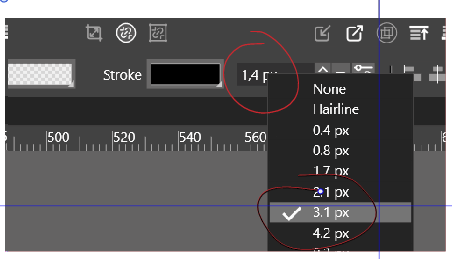
• Thickness of a line: shouldn't these two values be equal?... bug ?

    Moved
    8
    1
    0 Votes
    8 Posts
    9k Views
    VectorStylerV
    @PatrickM I opened a bug on this one, will try to replicate and fix it ASAP.
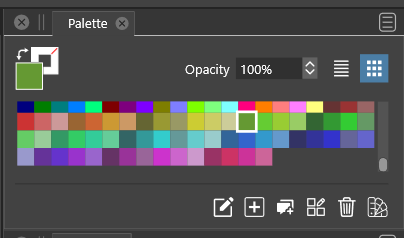
  • swap fill and stroke color

    Moved
    2
    0 Votes
    2 Posts
    3k Views
    VectorStylerV
    @Jayanta-Das Yes, this can be replicated on Windows.
  • 1 Votes
    4 Posts
    5k Views
    V
    I had another very busy week, but I've been able to do some nice work and some tests with the newest update. It works great and I had no problems, but this bug is still there.
  • New layer name and placement bugs

    Moved
    4
    1 Votes
    4 Posts
    5k Views
    V
    It's fixed. Thanks.
  • Object stays selected after moving a node bug

    Moved
    4
    0 Votes
    4 Posts
    5k Views
    V
    It's fixed. Thanks.
  • Keyboard movement and brush size bugs

    Moved
    5
    0 Votes
    5 Posts
    6k Views
    V
    It's fixed. Thanks.
  • Pattern tool

    Moved
    2
    1 Votes
    2 Posts
    4k Views
    VectorStylerV
    @Jayanta-Das Can be replicated. Will be fixed ASAP.
  • Bugs - cros hair cursor v. .64

    Moved
    12
    0 Votes
    12 Posts
    12k Views
    P
    success, after deleting all files from \ Users \ <username> \ NumericPath \ VectorStyler1.0 folder and after reinstalling version 1.1.0.64 EVERYTHING IS OK. poljand
  • Closing curve with pen tool does not work (.62)

    Moved
    6
    0 Votes
    6 Posts
    7k Views
    IngolfI
    @VectorStyler said in Closing curve with pen tool does not work (.62): @Ingolf This is a bug and probably existed in previous releases also. Enable the "Adjustments" option in the context panel to detect path closing. Fixed in .064
  • Layers - open selected during mass selection

    Moved
    3
    1
    1 Votes
    3 Posts
    4k Views
    IngolfI
    @VectorStyler said in Layers - open selected during mass selection: @Ingolf Added to the backlog. And fixed in .064
  • 0 Votes
    2 Posts
    4k Views
    VectorStylerV
    @encart In the Keyboard Shortcuts editors, select the "Shape Editing" in the Context drop down, and remove the Transform Tool for the "A" key. I will try to figure out what is the regression here, works on Mac, but not on Windows.
  • 1 Votes
    20 Posts
    19k Views
    BoldlineB
    @ncic said in Some dragging operations (drag selecting or pan/zoom navigating) not responding sometimes: @Boldline @VectorStyler Great discussion From a personal perspective i find tools that are in the same toolbar category sharing the same keyboard shortcut toggling between them a bit problematic. Its ok in less used tools as it has the benefit of saving amount of shortcuts that are taken, but tools one switches between often is where ive found it more problematic. It introduces greater risk of accidentaly activting the wrong tool and therefore also increases the demand on the user to pay attention to the interface (for instance toolbar icons or cursor icon) or more cognitive load by remembering the amount of shortcut presses done so that the correct tool is selected before an operation. This is especially demanding where the toolbar item has maybe three to four tools that share the same key. For example the brush, pencil, color replacemnt and mixer brush in Photoshop are tedious if youre jumping between pencil and brush as you have to count every time to know where you are and to skip over tools to get to where you want. Alternatively the user could find out by error after using the tool. If its the wrong one, the user has to step back a few steps to redo the correct steps. Ive also experienced this leakage of focus and energy when using Clip Studio Pro that uses this type of method of sharing a shortcut between different tools in the same category. I stay away from customizing and apps shortcuts unless i really need too but i found in CSP because of this it became necessary to set more uniqe shortcuts for the tools used to avoid the problem described above. I agree with you overall, that would be confusing if they all shared the same key shortcut. I'm not advocating for using the same shortcut key for all tools in a section, but allowing the ability to hit the specific shortcut key a second time to go back to the original tool used located elsewhere in the toolbar completely. So if I'm using the pen tool and then tap on "m", I have the magic wand tool until I click "m" again and I'm back on pen tool.
  • 1 Votes
    34 Posts
    64k Views
    ncicN
    @VectorStyler thank you
  • 0 Votes
    7 Posts
    11k Views
    BoldlineB
    @VectorStyler ok I will check what the settings were on that machine. It happened here on my main computer just now and the source is set to "selection"
  • Transform pivot point not used

    Moved
    7
    0 Votes
    7 Posts
    8k Views
    IngolfI
    One of the options that should be in the transformation panel where I would look first. I think of these panels as dashboards that I open when working with functionality.
  • Preferences .62 - No cursor in search field when clicking it

    Moved
    2
    2 Votes
    2 Posts
    3k Views
    VectorStylerV
    @Ingolf Yes, this can be replicated.
  • Image effects issues

    Moved
    4
    0 Votes
    4 Posts
    5k Views
    IngolfI
    Looks that way, thanks!
  • Scroll bar too little in palette (win)

    Moved
    4
    2
    1 Votes
    4 Posts
    5k Views
    IngolfI
    Yes fixed
  • 1 Votes
    3 Posts
    5k Views
    VectorStylerV
    @Boldline Replicated here also.
  • Preview of booleans

    Moved
    12
    0 Votes
    12 Posts
    15k Views
    IngolfI
    @VectorStyler said in Preview of booleans: @Ingolf The new build 1.1.062 fixes the boolean preview should work from the context menu and on Windows. Certainly does on macOS