VectorStyler
    • Categories
    • Unread
    • Recent
    • Tags
    • Popular
    • Register
    • Login

    Little indicator Sign "°" for Path Sketch Tool to know that a Shape is closed
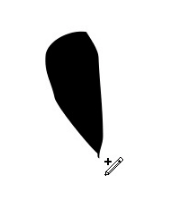
    Scheduled Pinned Locked Moved Features and Ideas
    40 Posts 5 Posters 82.9k Views 4 Watching
    Loading More Posts
    • Oldest to Newest
    • Newest to Oldest
    • Most Votes
    Reply
    • Reply as topic
    Log in to reply
    This topic has been deleted. Only users with topic management privileges can see it.
    • VectorStylerV Offline
      VectorStyler @Subpath
      last edited by

      @Subpath Would this also be needed in the Pencil tool?

      S 1 Reply Last reply Reply Quote 0
      • IngolfI Offline
        Ingolf
        last edited by Ingolf

        We have the circle indicator in the pen tool that makes some sense when you close a shape. An identical symbol in the pencil tool would also makes sense.

        But a + sign? That means add something to something. We are closing a shape.

        Doesn't that + sign mean the next click will start a new curve? Not that the shape is closed.

        🍏 macOS Sequoia Apple Silicon

        S 1 Reply Last reply Reply Quote 1
        • IngolfI Offline
          Ingolf
          last edited by

          Here we have Affinity which shows all its pointer symbols in action, there are probably too many and you like to verify by checking the help in the status bar.

          alt text

          In Affinity this symbol means "Start on new curve" while a small circle means close curve. I guess that's what it also means in Xara. It's Xara that Serif seems to be in British competition with more than anyone.

          But all in all, the symbol richness starts to necessitate the status bar.

          🍏 macOS Sequoia Apple Silicon

          S 1 Reply Last reply Reply Quote 0
          • S Offline
            Subpath @Ingolf
            last edited by

            @Ingolf

            Do not really understand the cause of the circle
            symbol on Pencil Tool. It doesnt show me if the
            Shape is close or the Nodes are just close togther.

            But i would like to have a visuell Notice that a Shape
            is closed. That only appears if a shape is closed.

            It doesnt matter also to me which symbol is used
            as a indicator.

            Win 11
            CPU: AMD Ryzen 5 9600X, 6-core.
            GPU: Nvidia Geforce RTX 5070.

            IngolfI 1 Reply Last reply Reply Quote 0
            • IngolfI Offline
              Ingolf @Subpath
              last edited by

              @Subpath said in Little indicator Sign "+" for Path Sketch Tool to know that a Shape is closed:

              @Ingolf

              Do not really understand the cause of the circle
              symbol on Pencil Tool. It doesnt show me if the
              Shape is close or the Nodes are just close togther.

              The circle means that the action will close the shape. As is the case in Affinity. Whether or not a finished shape is closed or not from there should be communicated in a status bar or elsewhere, not in the pointer.

              🍏 macOS Sequoia Apple Silicon

              S 1 Reply Last reply Reply Quote 0
              • S Offline
                Subpath @Ingolf
                last edited by Subpath

                @Ingolf said in Little indicator Sign "+" for Path Sketch Tool to know that a Shape is closed:

                I guess that's what it also means in Xara.

                In xara it is just a Indicator if a shape is closed
                with the Pen sketch tool. As the Video shows.
                There is also a little "~" sign when you cut something with the
                Sketch tool in xara.

                But as Xara cuttin is different from VS
                this "~" is not needed

                Win 11
                CPU: AMD Ryzen 5 9600X, 6-core.
                GPU: Nvidia Geforce RTX 5070.

                b77B 1 Reply Last reply Reply Quote 0
                • S Offline
                  Subpath @Ingolf
                  last edited by

                  @Ingolf said in Little indicator Sign "+" for Path Sketch Tool to know that a Shape is closed:

                  should be communicated in a status bar or elsewhere, not in the pointer.

                  sorry did not find this practical.
                  As i Paint i look on the Tool i paint with
                  and not on the Status bar. I need a few eyes
                  more to do that.

                  Win 11
                  CPU: AMD Ryzen 5 9600X, 6-core.
                  GPU: Nvidia Geforce RTX 5070.

                  IngolfI 1 Reply Last reply Reply Quote 0
                  • IngolfI Offline
                    Ingolf
                    last edited by

                    Ah, I have most programs, Xara including (just to try it, never using it, mistake) and they are partly on the wrong track.

                    • in Xara means " draw on from this node" but also "close shape" which is misleading. A circle here or some other symbol should show "hereby you close your shape".

                    alt text

                    I don't buy bad usability. Neither from Xara, despite their 500 attempts to extend the subscription of their oldware.

                    🍏 macOS Sequoia Apple Silicon

                    1 Reply Last reply Reply Quote 0
                    • b77B Offline
                      b77 @Subpath
                      last edited by b77

                      @Subpath OK, but in Xara the '+' sign is displayed on the cursor, right?

                      If a sign would be displayed where the shape gets closed (over that closing node) it would make more sense.

                      And since VS already displays a circle when you close a shape with the Pen tool, the same circle could be displayed over the node when a shape gets closed with the Path Sketch tool.

                      This is what Ingolf is saying, if I'm not mistaken.

                      MacBook Pro (Intel) running Monterey 12.6.4

                      S 1 Reply Last reply Reply Quote 0
                      • IngolfI Offline
                        Ingolf @Subpath
                        last edited by

                        @Subpath said in [Little indicator Sign "+" for Path Sketch Tool to know that a Shape is closed]

                        As i Paint i look on the Tool i paint with and not on the Status bar. I need a few eyes more to do that.

                        True, but bad design is over-communicating, and since a shape can easily be open on purpose, that's secondary information.

                        🍏 macOS Sequoia Apple Silicon

                        1 Reply Last reply Reply Quote 0
                        • S Offline
                          Subpath @VectorStyler
                          last edited by Subpath

                          @VectorStyler said in Little indicator Sign "+" for Path Sketch Tool to know that a Shape is closed:

                          @Subpath Would this also be needed in the Pencil tool?

                          Had actually only thought of the Path Sketch tool. Because there often times a shape
                          was not closed.

                          If it would also be helpful with the Pencil Tool why not.

                          Basically I just missed some kind of indicator that would show you that a Shape is closed,
                          so that you don't have to try it out first.

                          Win 11
                          CPU: AMD Ryzen 5 9600X, 6-core.
                          GPU: Nvidia Geforce RTX 5070.

                          IngolfI 1 Reply Last reply Reply Quote 0
                          • IngolfI Offline
                            Ingolf @Subpath
                            last edited by

                            @Subpath said in Little indicator Sign "+" for Path Sketch Tool to know that a Shape is closed:

                            @VectorStyler said in [Little indicator Sign "+" for Path Sketch Tool to know that a Shape is closed]
                            If it would also be helpful with the Pencil Tool why not.

                            Because the tool symbols signal an action, not a state of something else.

                            🍏 macOS Sequoia Apple Silicon

                            1 Reply Last reply Reply Quote 0
                            • S Offline
                              Subpath @b77
                              last edited by

                              @b77

                              It doesn't matter that much to me which icon is ultimately
                              used as an indicator.
                              The "+" symbol was just an example of an indicator.

                              And the small circle on the Pencil Tool would make more sense to me if it appears
                              at the moment a shape is closed or shortly before.

                              Win 11
                              CPU: AMD Ryzen 5 9600X, 6-core.
                              GPU: Nvidia Geforce RTX 5070.

                              b77B 1 Reply Last reply Reply Quote 0
                              • b77B Offline
                                b77 @Subpath
                                last edited by b77

                                @Subpath OK, got the part about '+' being used just as an example. 👍

                                But with the Path Sketch tool I see no use in adding a sign to its cursor when it gets close to intersecting or self-intersecting.

                                I do like to see an indicator over the closing node itself and after it's been closed.

                                And it's the same with the Pencil tool, I would say.

                                MacBook Pro (Intel) running Monterey 12.6.4

                                S 1 Reply Last reply Reply Quote 0
                                • S Offline
                                  Subpath
                                  last edited by Subpath

                                  @VectorStyler

                                  For your Eyes also 🙂
                                  It doesnt matter to me which Symbol for this Indicator
                                  would be used. That "+" Sign was just an Example.

                                  And two questions

                                  1
                                  Should the small circle at the pencil symbol represent a snap radius.
                                  If this were so you could we adjust this snap radius
                                  (larger/smaller) ?

                                  2
                                  A thought of mine was that this circle should maybe only appear
                                  when a shape is about to be closed.
                                  ( corelated with the snap radius)

                                  Win 11
                                  CPU: AMD Ryzen 5 9600X, 6-core.
                                  GPU: Nvidia Geforce RTX 5070.

                                  1 Reply Last reply Reply Quote 0
                                  • S Offline
                                    Subpath @b77
                                    last edited by Subpath

                                    @b77 said in Little indicator Sign "+" for Path Sketch Tool to know that a Shape is closed:

                                    adding a sign to its cursor when it gets close to intersecting or self-intersecting

                                    Do not really understand what do you mean with that.
                                    .
                                    .
                                    The Reason for my Request was, when that i draw with Path Sketch Tool
                                    and would like to get a closed Shape, i often missed the Point where the Shape is closed.
                                    Is often a kind of trial and error.

                                    So i though of an Indicator as a help.
                                    And as i saw the little Circle on the Pencil Tool
                                    i though a kind of a snap radius (adjustable)
                                    could also be nice

                                    Win 11
                                    CPU: AMD Ryzen 5 9600X, 6-core.
                                    GPU: Nvidia Geforce RTX 5070.

                                    b77B 1 Reply Last reply Reply Quote 0
                                    • b77B Offline
                                      b77 @Subpath
                                      last edited by b77

                                      @Subpath said in Little indicator Sign "+" for Path Sketch Tool to know that a Shape is closed:

                                      The Reason for my Request was, when that i draw with Path Sketch Tool
                                      and would like to get a closed Shape, i often missed the Point where the Shape is closed.
                                      Is often a kind of trial and error.

                                      So i though of an Indicator as a help.
                                      And as i saw the little Circle on the Pencil Tool
                                      i though a kind of a snap radius (adjustable)
                                      could also be nice

                                      So when the path you draw gets real close to the other endpoint, the app should auto-nudge the last node over the other and close the shape?

                                      MacBook Pro (Intel) running Monterey 12.6.4

                                      IngolfI S 2 Replies Last reply Reply Quote 0
                                      • IngolfI Offline
                                        Ingolf @b77
                                        last edited by Ingolf

                                        This is how it works in the pen tool in Vecstorstyler. Is it not what you need? With a possible option whether or not it should snap and at what distance?

                                        (The yellow circle indicates my clicks, that is from the GIF software)

                                        Pen GIF

                                        🍏 macOS Sequoia Apple Silicon

                                        1 Reply Last reply Reply Quote 0
                                        • S Offline
                                          Subpath
                                          last edited by Subpath

                                          @Ingolf

                                          Is, in my eyes, not comparable with the Pen Tool.
                                          Because when you draw with the Path Sketch or the Pencil tool
                                          you often draw a little faster. So you need a somewhat bigger snap radius.
                                          .
                                          .
                                          @b77
                                          I don't know what speaks against an (adjustable) snap radius.
                                          Made a Pic where the Circle is the double Size of the Circle
                                          used by now, but could also be a little smaller.
                                          So i think an adjust option would be nice.
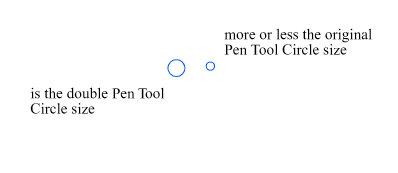
                                          0_1661354365724_Snap Circle size.png

                                          Win 11
                                          CPU: AMD Ryzen 5 9600X, 6-core.
                                          GPU: Nvidia Geforce RTX 5070.

                                          IngolfI 1 Reply Last reply Reply Quote 1
                                          • S Offline
                                            Subpath @b77
                                            last edited by Subpath

                                            @b77 said in Little indicator Sign "+" for Path Sketch Tool to know that a Shape is closed:

                                            So when the path you draw gets real close to the other endpoint, the app should auto-nudge the last node over the other and close the shape?

                                            in principle, yes
                                            this is the extended version of my original idea.

                                            Originally I just wanted an indicator that a Shape is closed.

                                            Win 11
                                            CPU: AMD Ryzen 5 9600X, 6-core.
                                            GPU: Nvidia Geforce RTX 5070.

                                            b77B 2 Replies Last reply Reply Quote 1
                                            • First post
                                              Last post