VectorStyler
    • Categories
    • Unread
    • Recent
    • Tags
    • Popular
    • Register
    • Login

    Little indicator Sign "°" for Path Sketch Tool to know that a Shape is closed
    Scheduled Pinned Locked Moved Features and Ideas
    40 Posts 5 Posters 82.9k Views 4 Watching
    Loading More Posts
    • Oldest to Newest
    • Newest to Oldest
    • Most Votes
    Reply
    • Reply as topic
    Log in to reply
    This topic has been deleted. Only users with topic management privileges can see it.
    • S Offline
      Subpath @Ingolf
      last edited by Subpath

      @Ingolf said in Little indicator Sign "+" for Path Sketch Tool to know that a Shape is closed:

      I guess that's what it also means in Xara.

      In xara it is just a Indicator if a shape is closed
      with the Pen sketch tool. As the Video shows.
      There is also a little "~" sign when you cut something with the
      Sketch tool in xara.

      But as Xara cuttin is different from VS
      this "~" is not needed

      Win 11
      CPU: AMD Ryzen 5 9600X, 6-core.
      GPU: Nvidia Geforce RTX 5070.

      b77B 1 Reply Last reply Reply Quote 0
      • S Offline
        Subpath @Ingolf
        last edited by

        @Ingolf said in Little indicator Sign "+" for Path Sketch Tool to know that a Shape is closed:

        should be communicated in a status bar or elsewhere, not in the pointer.

        sorry did not find this practical.
        As i Paint i look on the Tool i paint with
        and not on the Status bar. I need a few eyes
        more to do that.

        Win 11
        CPU: AMD Ryzen 5 9600X, 6-core.
        GPU: Nvidia Geforce RTX 5070.

        IngolfI 1 Reply Last reply Reply Quote 0
        • IngolfI Offline
          Ingolf
          last edited by

          Ah, I have most programs, Xara including (just to try it, never using it, mistake) and they are partly on the wrong track.

          • in Xara means " draw on from this node" but also "close shape" which is misleading. A circle here or some other symbol should show "hereby you close your shape".

          alt text

          I don't buy bad usability. Neither from Xara, despite their 500 attempts to extend the subscription of their oldware.

          🍏 macOS Sequoia Apple Silicon

          1 Reply Last reply Reply Quote 0
          • b77B Offline
            b77 @Subpath
            last edited by b77

            @Subpath OK, but in Xara the '+' sign is displayed on the cursor, right?

            If a sign would be displayed where the shape gets closed (over that closing node) it would make more sense.

            And since VS already displays a circle when you close a shape with the Pen tool, the same circle could be displayed over the node when a shape gets closed with the Path Sketch tool.

            This is what Ingolf is saying, if I'm not mistaken.

            MacBook Pro (Intel) running Monterey 12.6.4

            S 1 Reply Last reply Reply Quote 0
            • IngolfI Offline
              Ingolf @Subpath
              last edited by

              @Subpath said in [Little indicator Sign "+" for Path Sketch Tool to know that a Shape is closed]

              As i Paint i look on the Tool i paint with and not on the Status bar. I need a few eyes more to do that.

              True, but bad design is over-communicating, and since a shape can easily be open on purpose, that's secondary information.

              🍏 macOS Sequoia Apple Silicon

              1 Reply Last reply Reply Quote 0
              • S Offline
                Subpath @VectorStyler
                last edited by Subpath

                @VectorStyler said in Little indicator Sign "+" for Path Sketch Tool to know that a Shape is closed:

                @Subpath Would this also be needed in the Pencil tool?

                Had actually only thought of the Path Sketch tool. Because there often times a shape
                was not closed.

                If it would also be helpful with the Pencil Tool why not.

                Basically I just missed some kind of indicator that would show you that a Shape is closed,
                so that you don't have to try it out first.

                Win 11
                CPU: AMD Ryzen 5 9600X, 6-core.
                GPU: Nvidia Geforce RTX 5070.

                IngolfI 1 Reply Last reply Reply Quote 0
                • IngolfI Offline
                  Ingolf @Subpath
                  last edited by

                  @Subpath said in Little indicator Sign "+" for Path Sketch Tool to know that a Shape is closed:

                  @VectorStyler said in [Little indicator Sign "+" for Path Sketch Tool to know that a Shape is closed]
                  If it would also be helpful with the Pencil Tool why not.

                  Because the tool symbols signal an action, not a state of something else.

                  🍏 macOS Sequoia Apple Silicon

                  1 Reply Last reply Reply Quote 0
                  • S Offline
                    Subpath @b77
                    last edited by

                    @b77

                    It doesn't matter that much to me which icon is ultimately
                    used as an indicator.
                    The "+" symbol was just an example of an indicator.

                    And the small circle on the Pencil Tool would make more sense to me if it appears
                    at the moment a shape is closed or shortly before.

                    Win 11
                    CPU: AMD Ryzen 5 9600X, 6-core.
                    GPU: Nvidia Geforce RTX 5070.

                    b77B 1 Reply Last reply Reply Quote 0
                    • b77B Offline
                      b77 @Subpath
                      last edited by b77

                      @Subpath OK, got the part about '+' being used just as an example. 👍

                      But with the Path Sketch tool I see no use in adding a sign to its cursor when it gets close to intersecting or self-intersecting.

                      I do like to see an indicator over the closing node itself and after it's been closed.

                      And it's the same with the Pencil tool, I would say.

                      MacBook Pro (Intel) running Monterey 12.6.4

                      S 1 Reply Last reply Reply Quote 0
                      • S Offline
                        Subpath
                        last edited by Subpath

                        @VectorStyler

                        For your Eyes also 🙂
                        It doesnt matter to me which Symbol for this Indicator
                        would be used. That "+" Sign was just an Example.

                        And two questions

                        1
                        Should the small circle at the pencil symbol represent a snap radius.
                        If this were so you could we adjust this snap radius
                        (larger/smaller) ?

                        2
                        A thought of mine was that this circle should maybe only appear
                        when a shape is about to be closed.
                        ( corelated with the snap radius)

                        Win 11
                        CPU: AMD Ryzen 5 9600X, 6-core.
                        GPU: Nvidia Geforce RTX 5070.

                        1 Reply Last reply Reply Quote 0
                        • S Offline
                          Subpath @b77
                          last edited by Subpath

                          @b77 said in Little indicator Sign "+" for Path Sketch Tool to know that a Shape is closed:

                          adding a sign to its cursor when it gets close to intersecting or self-intersecting

                          Do not really understand what do you mean with that.
                          .
                          .
                          The Reason for my Request was, when that i draw with Path Sketch Tool
                          and would like to get a closed Shape, i often missed the Point where the Shape is closed.
                          Is often a kind of trial and error.

                          So i though of an Indicator as a help.
                          And as i saw the little Circle on the Pencil Tool
                          i though a kind of a snap radius (adjustable)
                          could also be nice

                          Win 11
                          CPU: AMD Ryzen 5 9600X, 6-core.
                          GPU: Nvidia Geforce RTX 5070.

                          b77B 1 Reply Last reply Reply Quote 0
                          • b77B Offline
                            b77 @Subpath
                            last edited by b77

                            @Subpath said in Little indicator Sign "+" for Path Sketch Tool to know that a Shape is closed:

                            The Reason for my Request was, when that i draw with Path Sketch Tool
                            and would like to get a closed Shape, i often missed the Point where the Shape is closed.
                            Is often a kind of trial and error.

                            So i though of an Indicator as a help.
                            And as i saw the little Circle on the Pencil Tool
                            i though a kind of a snap radius (adjustable)
                            could also be nice

                            So when the path you draw gets real close to the other endpoint, the app should auto-nudge the last node over the other and close the shape?

                            MacBook Pro (Intel) running Monterey 12.6.4

                            IngolfI S 2 Replies Last reply Reply Quote 0
                            • IngolfI Offline
                              Ingolf @b77
                              last edited by Ingolf

                              This is how it works in the pen tool in Vecstorstyler. Is it not what you need? With a possible option whether or not it should snap and at what distance?

                              (The yellow circle indicates my clicks, that is from the GIF software)

                              Pen GIF

                              🍏 macOS Sequoia Apple Silicon

                              1 Reply Last reply Reply Quote 0
                              • S Offline
                                Subpath
                                last edited by Subpath

                                @Ingolf

                                Is, in my eyes, not comparable with the Pen Tool.
                                Because when you draw with the Path Sketch or the Pencil tool
                                you often draw a little faster. So you need a somewhat bigger snap radius.
                                .
                                .
                                @b77
                                I don't know what speaks against an (adjustable) snap radius.
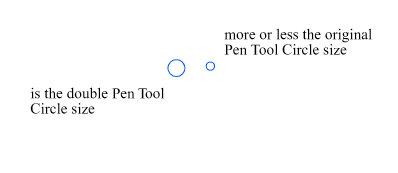
                                Made a Pic where the Circle is the double Size of the Circle
                                used by now, but could also be a little smaller.
                                So i think an adjust option would be nice.
                                0_1661354365724_Snap Circle size.png

                                Win 11
                                CPU: AMD Ryzen 5 9600X, 6-core.
                                GPU: Nvidia Geforce RTX 5070.

                                IngolfI 1 Reply Last reply Reply Quote 1
                                • S Offline
                                  Subpath @b77
                                  last edited by Subpath

                                  @b77 said in Little indicator Sign "+" for Path Sketch Tool to know that a Shape is closed:

                                  So when the path you draw gets real close to the other endpoint, the app should auto-nudge the last node over the other and close the shape?

                                  in principle, yes
                                  this is the extended version of my original idea.

                                  Originally I just wanted an indicator that a Shape is closed.

                                  Win 11
                                  CPU: AMD Ryzen 5 9600X, 6-core.
                                  GPU: Nvidia Geforce RTX 5070.

                                  b77B 2 Replies Last reply Reply Quote 1
                                  • IngolfI Offline
                                    Ingolf @Subpath
                                    last edited by

                                    @Subpath said in Little indicator Sign "+" for Path Sketch Tool to know that a Shape is closed:

                                    @Ingolf

                                    Is, in my eyes, not comparable with the Pen Tool.
                                    Because when you draw with the Path Sketch or the Pencil tool
                                    you often draw a little faster. So you need a somewhat bigger snap radius.
                                    .
                                    .
                                    @b77
                                    I don't know what speaks against an (adjustable) snap radius.
                                    Made a Pic where the Circle is the double Size of the Circle
                                    used by now, but could also be a little smaller.
                                    So i think an adjust option would be nice.

                                    I requested it in the pen tool so I understand now and agree. A "Snap when closing" (with better tooltip) and a snap radius setting in a context sensitive toolbar would make perfect sense to me. Even shorter label would be fine.

                                    🍏 macOS Sequoia Apple Silicon

                                    1 Reply Last reply Reply Quote 0
                                    • b77B Offline
                                      b77 @Subpath
                                      last edited by

                                      @Subpath Nothing against a 'close' indicator and snap radius either. 👍
                                      It's just that your first screen capture from Xara showed the indicator on the cursor, not on the shape where it should be IMO.

                                      MacBook Pro (Intel) running Monterey 12.6.4

                                      S 1 Reply Last reply Reply Quote 2
                                      • b77B Offline
                                        b77 @Subpath
                                        last edited by b77

                                        @Subpath Btw, the Path Sketch tool allows you to redraw the last stroke if you press Option/Alt.

                                        MacBook Pro (Intel) running Monterey 12.6.4

                                        S 1 Reply Last reply Reply Quote 2
                                        • S Offline
                                          Subpath @b77
                                          last edited by

                                          @b77 said in Little indicator Sign "+" for Path Sketch Tool to know that a Shape is closed:

                                          @Subpath Btw, the Path Sketch tool allows you to redraw the last stroke if you press Option/Alt.

                                          interesting, could you tell me a little more in detail
                                          how this work ? Could not figure it out by myself.

                                          Win 11
                                          CPU: AMD Ryzen 5 9600X, 6-core.
                                          GPU: Nvidia Geforce RTX 5070.

                                          b77B 1 Reply Last reply Reply Quote 0
                                          • b77B Offline
                                            b77 @Subpath
                                            last edited by b77

                                            @Subpath After you draw a stroke and it's not exactly what you want (let's say, it didn't intersect the object you wanted or it didn't self-intersect), hold down Option/Alt and draw it again.

                                            MacBook Pro (Intel) running Monterey 12.6.4

                                            S 1 Reply Last reply Reply Quote 1
                                            • First post
                                              Last post