• Type leading

    16
    0 Votes
    16 Posts
    16k Views
    VectorStylerV
    @electroplated what does units refer to Units are for the various number fields (stroke width, etc) in the UI, when the document is active. Different documents can have different units. Of course, a specific number field may set its own unit. What does canvas margin actually It is just an additional space around a canvas (not the artboard). Typically this can be left to the default value, but if "Large Canvas" is disabled, it may be useful to set it to something else. (large canvas is also known as infinite canvas in other apps). BTW: the canvas is the workspace on which artboards are placed. And a VS document may contain multiple canvases (here it gets complicated a bit ) text greeking The default greeking is now smaller. Some greeking is needed, if there is a lot of text and zoomed out to is faster to display. keyboard shrtct for show/hide grid Will add one in the next build. BTW: shortcuts can be customized. NO way to show hidden characters I added this to the backlog as a feature request. having problems pasting in a texture Is this on Windows or Mac? One way to get a file into VS is to just drag & drop onto the canvas.
  • @vectorstyler why the name change ?

    3
    0 Votes
    3 Posts
    5k Views
    b77B
    @vectorstyler A small problem is that if I want to mention you in a thread where you didn't post, the 'vectorstyler' name is way down the list: [image: 1652084598016-dzx.png] Maybe capitalizing the name (VectorStyler or VECTORSTYLER) will solve this.
  • Would you share your workflow optimization?

    12
    1
    2 Votes
    12 Posts
    14k Views
    S
    @Victor-Vector The Affinity Designers Symbols drew my attention to symmetry and patterning. Symbols is still the best feature in AD in my eyes. x x I can only recommend to have a look at the possibilities of the Shape Panel in VS. It gives you a much finer control over shapes and everything remains editable! Try Square Star, Gear and Line Grid, you will be amazed at the shapes variety. And all this can be combined with clipping and clones. VS offers really a lot for someone who like to play with symmetrical Designs.
  • Noise transparency in appearence

    3
    1
    0 Votes
    3 Posts
    5k Views
    J
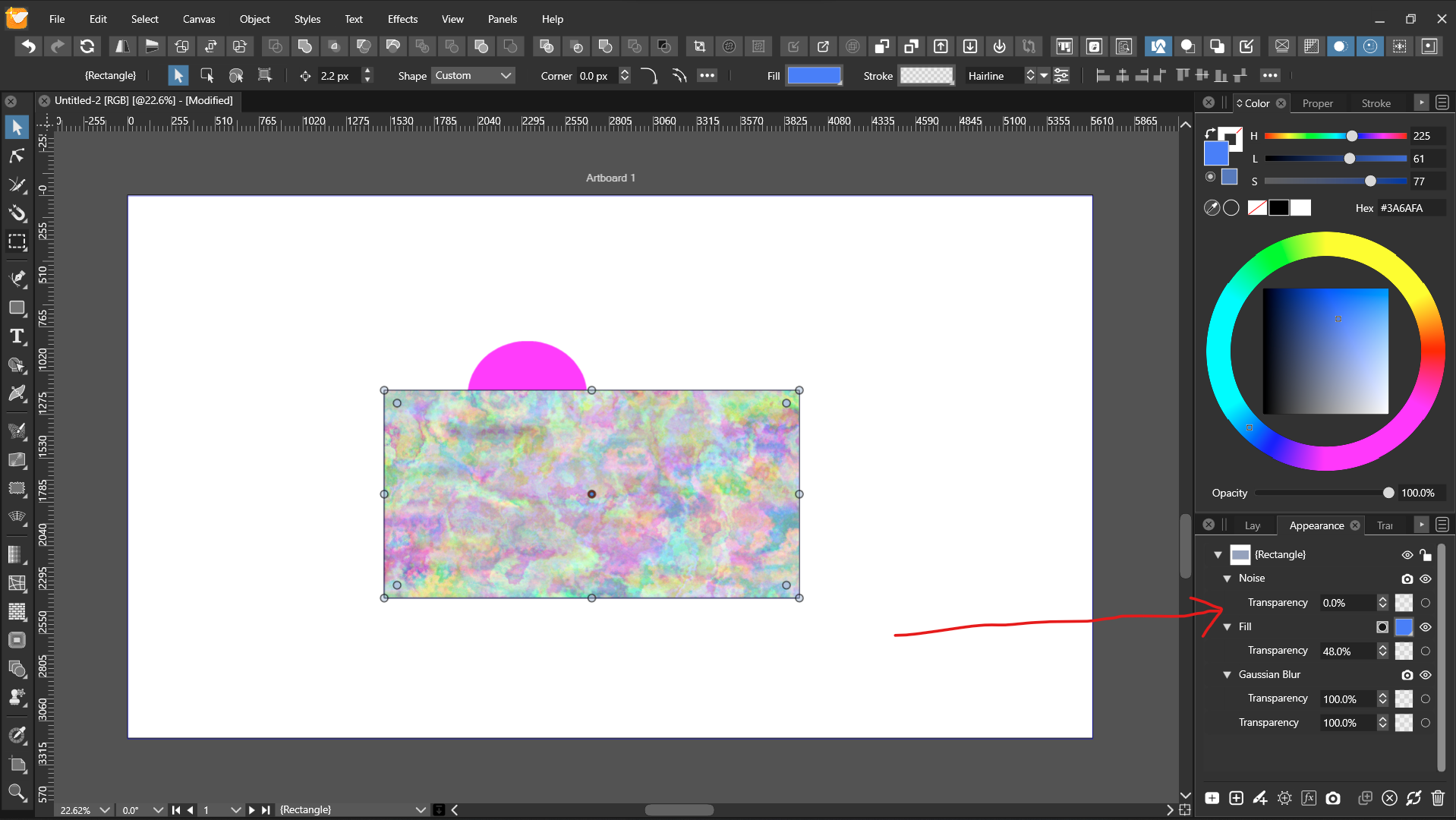
    @vectoradmin thanks got it.
  • Is there any way to organize recordit gifs?

    7
    0 Votes
    7 Posts
    8k Views
    S
    @b77 said in Is there any way to organize recordit gifs?: @Subpath On the Mac any file can be tagged. I guess something similar is available on Windows, so I would download them and use tagging. Btw, clicking on the X button in Recordit's list lets you delete those you don't need from their server. Thanks, i know that the x-button delete them. I think i will look if could organize them via Links on Windows.
  • Alt modifier key for lasso selection

    5
    0 Votes
    5 Posts
    7k Views
    J
    @vectoradmin Yes, I did but it select all. Here is the recording. When I select lasso tool it works. But when I use Alt modifier it select all the objects.
  • German blog-review of Vectorstyler

    3
    6 Votes
    3 Posts
    5k Views
    A
    Its really interesting, Thankyou so much for sharing the link
  • Getting used to the lock keyboard shortcut

    1
    1 Votes
    1 Posts
    4k Views
    No one has replied
  • The Evolution of VectorStyler?

    9
    8 Votes
    9 Posts
    11k Views
    S
    @Boldline , I'm just trying to be realistic
  • Helping explain new features that we suggest and get added

    3
    2 Votes
    3 Posts
    4k Views
    BoldlineB
    @Victor-Vector I think the best place would be the tutorials section ultimately. Maybe we go to the build announcement and copy and paste the related sentence line @vectoradmin posted and mention the build number and then be sure we paste the tip in the tutorials section. I'm going to go back in and find some of the ones added over the last few builds that I was a part of and add those to the tutorials section. If we include the build info and quote the related text from @vectoradmin used in that build description, it should be easy to go reference if needed. I'm open to ideas and thoughts for improving it.
  • Repeat last action (any simpler way?)

    9
    0 Votes
    9 Posts
    12k Views
    B
    @vectoradmin said in Repeat last action (any simpler way?): @PatrickM Panels -> Presets -> Recent Actions Thanks. I didn't look there
  • VS app icon / VS file icon

    1
    1
    4 Votes
    1 Posts
    3k Views
    No one has replied
  • Gap Tool - best use case?

    5
    1
    0 Votes
    5 Posts
    6k Views
    Victor VectorV
    @vectoradmin Ah, thanks for teaching me about that proportional option. It would have taken me a while to find that. @b77 I can see how it would be handy for text boxes. Seems like it really shines when the text boxes and images are already lined up in columns or rows and you wish to move the whole gap between a number of elements. Like @vectoradmin said, good for a desktop publishing workflow. Cool! I appreciate your perspectives, thank you.
  • Inspiration: Inkscape vs Affinity Designer review

    18
    3 Votes
    18 Posts
    31k Views
    IngolfI
    Also related when speaking of b-spline and spiro, the good old Bezigon tool from Macromedia Freehand: Bezigon demo (YouTube) Can also be found in the free to try Gravit Designer that as I understand is created by former Freehand users: Perhaps the bezigon tool is better explained here: Gravit Designer basics. Bezigon tool (YouTube) Explained in documentation (Gravit Designer homepage) Bezigon tool in Gravit Designer (Facebook video)
  • Repeater obsession

    3
    2
    7 Votes
    3 Posts
    4k Views
    b77B
    @Boldline said in Repeater obession: Most designs I do, we're trying to keep the number of ink colors down to a minimum and so doing patterns is one way to add more with less, so to speak. Great tip
  • Sharing a Success- exported separations perfectly

    4
    1
    5 Votes
    4 Posts
    6k Views
    S
    @Boldline said in Sharing a Success- exported separations perfectly: @Subpath Thank you! It's so much fun to see a definitive victorious result and to know it came from the dedication and hard work we all have put in our own ways and of course, @vectoradmin in a MASSIVE way. Looking back to early last year, VS was not close to being something I could use full time. I could do parts of things and enjoy the many features, but never take projects to completion. Now I can do so much more - including many full designs. There's always more to improve upon but that makes me excited to see what the next year holds. I'm grateful you share your ideas and observations as well. We all have the same goal to see VS continue to develop and be more and more amazing. I appreciate your contributions to that end goal. Having robust conversations even when we occasionally disagree can be a good thing! We're all respectful of each other, even when we have times of disagreement and that makes this group special. Agree 100% with you and if i see ho far VS is coming, even in that short time that i know VS. Then the Future seems nothing than promising. Best wishes.
  • 1 Votes
    2 Posts
    3k Views
    VectorStylerV
    @Boldline yes, I think this can be clarified. But the idea remains the same: first object repeats, second and third are for start / end. And a fourth can be used as a spacer.
  • No new Version in the Apple-Store

    15
    0 Votes
    15 Posts
    16k Views
    S
    @Wurstkäs @vectoradmin sleeps well only when the updates are delivered
  • Contex Menu bar icons

    17
    2
    0 Votes
    17 Posts
    18k Views
    J
    Fixed in build 1.1.016.
  • Dimension of artboard in Document setup

    3
    2
    1 Votes
    3 Posts
    5k Views
    J
    @vectoradmin Yes doing that for now. Thank you.