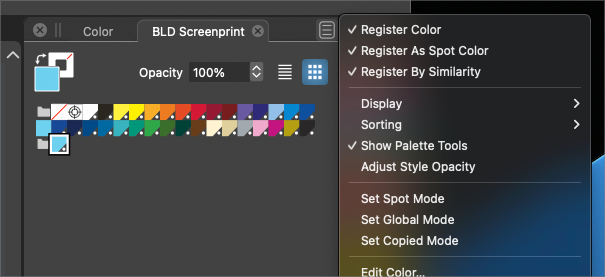
• Colorize: Randomize dose not included the last color in palette

    3
    0 Votes
    3 Posts
    3k Views
    M
    In this case, it should be a random deselected but it could be anything, a new selection mode or a new tool or command but it is not high priority. Thanks
  • "Reselect" tool purpose?

    10
    0 Votes
    10 Posts
    8k Views
    L
    @Boldline Agree, no need to make it an entirely new option. It would in essence be a Reselection of the last Deselected / Dropped regular selection set. Regardless of how the Selection set was established. So Reselect would be active from a "No Selection" status. It would act like "Undoing" a Deselection, as @b77 described.. /Lars
  • Align does not always seem to do the right thing

    4
    0 Votes
    4 Posts
    4k Views
    VectorStylerV
    @Boldline Can be replicated here also, it is a bug.
  • Status bar show wrong information.

    2
    1
    0 Votes
    2 Posts
    2k Views
    VectorStylerV
    @mtinra This seems to be a bug, and can be replicated here also. Added it to the backlog.
  • Weird behavior when repeating duplicate with a rotated object.

    7
    3
    0 Votes
    7 Posts
    7k Views
    VectorStylerV
    @syllie said in Weird behavior when repeating duplicate with a rotated object.: But I believe the behaviour is not correct. I agree, this looks like a bug, added it to the backlog.
  • Context panel: how to reorganize

    5
    1
    0 Votes
    5 Posts
    5k Views
    B
    @Subpath @Boldline Thank you both for your replies. I'm on W & it is under View > Customize...
  • Setup new document in pexels unit, got the wrong artboard size

    2
    0 Votes
    2 Posts
    3k Views
    VectorStylerV
    @mtinra Added this to the backlog.
  • Second chance for pick a key object in alignment

    5
    0 Votes
    5 Posts
    5k Views
    BoldlineB
    @mtinra said in Second chance for pick a key object in alignment: Sorry for flooding the board. Feel free to post as many ideas, bugs and questions as you have on the forum. I have personally benefited from many questions and answers as well as the suggestions others have brought up over the time I've been using Vectorstyler. What I appreciate most is the way the developer, @VectorStyler truly listens to the ideas presented and considers their implementation as well as fast turnaround on bug reports and the like.
  • Click on layer widget should not active layers rename

    2
    1 Votes
    2 Posts
    3k Views
    VectorStylerV
    @mtinra Yes, there is a small bug here when, clicking on the layer name after clicking away should not start editing. The way it was intended is that if the layer name is clicked again (not yet a double click) then it should open for editing. This will be fixed ASAP. As for the double click editing: that can be enabled using the Layer panel menu Panel Options command, with the Double Click Renames checkbox (bottom-right).
  • Wrong object position when pasting on new layer

    10
    1 Votes
    10 Posts
    8k Views
    M
    @b77 for me if I put back the old files, it go wrong again. It may has somthing else on my machine to trigger the problem
  • Question about saving symbols

    5
    0 Votes
    5 Posts
    4k Views
    VectorStylerV
    @visualrevolt said in Question about saving symbols: I would like to see something similar to AD. When you drag and drop symbol it stays in the library. These are called presets in VectorStyler. You can create a symbol preset using the Presets panel. And these will be available in other documents also.
  • Questions about creating and using a new color palette

    3
    1
    0 Votes
    3 Posts
    5k Views
    S
    @VectorStyler thank you for the guidance will follow your advice
  • Live paint/shape paint

    16
    0 Votes
    16 Posts
    13k Views
    S
    @Sarah-Austen said in Live paint/shape paint: @Subpath any news/progress on the bug? these are questions for @VectorStyler (he already answered ) I am just a normal user like you
  • Printing paper orientation

    2
    1 Votes
    2 Posts
    3k Views
    VectorStylerV
    @Harry This seems to be a bug, added it to the backlog.
  • Clarifying settings

    5
    1
    0 Votes
    5 Posts
    5k Views
    b77B
    @Boldline said in Clarifying settings: There's also a setting on that sets my rotation of an object to designated amounts. it feels like the snapping it on but it's not... If I take an object and grab a corner with the transform tool and try to rotate it, it's not a smooth rotation. I hope that makes sense Is it Prefs > Editing Options 1 > Angle Constraint? This value is for rotating with Shift.
  • Repeater : what do I do wrong ?

    51
    9
    0 Votes
    51 Posts
    124k Views
    B
    @VectorStyler as I found it easier to define a symbol through the Symbol panel, I understand why I could rarely get the expected results... a somewhat tricky bug [image: 1676979766796-95ee532b-7cdf-40c5-81c5-1191fa52985b-image-resized.png]
  • Align Object Size command is also moving the objects

    2
    1
    1 Votes
    2 Posts
    3k Views
    VectorStylerV
    @Raven Added this to the backlog. Looks the there is a problem with the scaling center.
  • Problem Viewing or Setting UISTYLER MODE To Light Mode

    8
    0 Votes
    8 Posts
    7k Views
    S
    @VectorStyler i do not use a high DPI screen therefore I have never heard of such a possibility but will have a look around
  • How to turn off default grid on new projects

    2
    1
    0 Votes
    2 Posts
    3k Views
    VectorStylerV
    @Boldline That document settings changes the grid color only. Currently, the grid visibility is not persistent to the next new document, but it has been in the past. Which means, that a visible Grid mode is stored in the settings.xml files and it is always on. The only way to turn it off for default is to start with the new settings file (or remove from an existing one, but there is no UI for that).
  • 0 Votes
    21 Posts
    27k Views
    b77B
    @William-Kansepa Thanks. Maybe 'Embed Linked File' is the right word for this instead of 'Expand'. Besides that, it should help both AI and AD users make the connection. (I'm also not sure the Styles menu is the right location for it)