Subcategories

  • These features and ideas have been implemented in VS as suggested

    180 Topics
    1k Posts
    VectorStylerV
    @Ayo said in About the Snap feature: Wouldn't it be better to change "Snap to Visible Only" to "Snap to View Extend Only" or shorter "Snap to Viewport Only" or even shorter "Snap to View Only" ? There is a big chance of confusion with the term 'visible' which is mainly linked to the layer system. I added this to the backlog.
  • A specific panel for text styles

    5
    0 Votes
    5 Posts
    5k Views
    VectorStylerV
    @Pat Yes, I think these could go into the Panels -> Text submenu.
  • 0 Votes
    2 Posts
    3k Views
    VectorStylerV
    @Boldline Yes, this is doable, and already exists in a different form. Select multiple palette files in Finder and drag&drop over the VS window.
  • Would it be possible to move B&W colours...

    2
    1
    3 Votes
    2 Posts
    3k Views
    VectorStylerV
    @Pat Added to the backlog.
  • Ideas for expanding the eraser tool capability

    4
    3 Votes
    4 Posts
    4k Views
    b77B
    @VectorStyler Please make sure it snaps to points, grid, guidelines, whatever is enabled in the Snapping panel.
  • Colour hex code: why is it necessary to type #?

    6
    1
    1 Votes
    6 Posts
    6k Views
    VectorStylerV
    @Pat said in Colour hex code: why is it necessary to type #?: @VectorStyler Thank you (was wondering whether it was on purpose in VS). It is on purpose, and I have to figure out a good solution. The main role of this field is to be able to copy/paste hex colors, and that always comes with the # mark. But plain input should not need the # mark. So I think the best solution would be to allow plain input without the # mark, but once confirmed, the # is added to the start.
  • Clicking Artboard tool on grouped art creates new exact size artboard

    6
    4 Votes
    6 Posts
    6k Views
    BoldlineB
    @VectorStyler said in Clicking Artboard tool on grouped art creates new exact size artboard: The click will not work if there is an artboard underneath. I agree - there would need to not be an artboard underneath in order for it to work. I like the dual option of double-clicking on the unselected item to create the perfect artboard fit and also what @b77 suggested with selecting multiple items and getting artboards for each at one time
  • Command shortcut keys toggle

    6
    0 Votes
    6 Posts
    7k Views
    b77B
    @Blunieb Control (Win) or Command (Mac) indeed does that also but it's temporary toggle — when you release the key you're back to the active tool.
  • Splitting up a shape

    3
    1 Votes
    3 Posts
    3k Views
    VectorStylerV
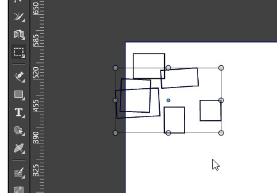
    @Boldline There is a slower version of this (more steps) in VS already: create a Grid shape (no fill, only stroke) setup the grid parameters (columns / rows) set a larger stroke width (for spacing) expand stroke of the grid. exclude the result from the other shape.
  • Screen visibility Mode

    3
    1
    1 Votes
    3 Posts
    3k Views
    BoldlineB
    @VectorStyler Terrific! this would really be handy. In my head I was thinking it could be toggled easily by a button on the upper right corner. that way it could be easy to access. Ideally, keyboard shortcuts alone would not return it to all panels in view state. once we have three-four keyboard shortcut ability, that could be added there is space is an issue on the main UI
  • New View -Option to pop out

    3
    1
    1 Votes
    3 Posts
    3k Views
    BoldlineB
    @VectorStyler said in New View -Option to pop out: Bit not clear what "view in panel" produce? These views contain a document that is editable in that view. And this cannot be created in a panel. View in tab and view in window should suffice. That makes sense why a panel option would not work. The idea i was thinking was that it was more of a look-in rather than a full fledged editable copy and that it could sit overtop the design like panels do. so if you were working on the main design, the smaller copy could be placed wherever you wanted to view it for reference and it would not get lost behind the main open tab file. the option to set the new view in a new window should work just fine for this - i'll just put it on a second screen. or i'll utilize the view options to place them side by side, etc...
  • Improving Brush Presets Panel

    6
    0 Votes
    6 Posts
    6k Views
    VectorStylerV
    @Boldline said in Improving Brush Presets Panel: The brush shape selector in the contextual menu panel at the top seems to list all the brush presets - but it does not divide them up. The list could also potentially become very long the more brushes you add to the brush preset panel. Yes, this can be a problem. I will try to improve these panels.
  • Repeaters Future Add-ons

    4
    1
    1 Votes
    4 Posts
    5k Views
    VectorStylerV
    @mspacemedia said in Repeaters Future Add-ons: to fill then have a best fit mode to calculate the space for each element? This feature is not yet implemented. And it probably will come only after 1.2 Bit it is possible to arrange multiple shapes, or symbols using random positioning.
  • Search options added within palette panels

    2
    1
    1 Votes
    2 Posts
    3k Views
    VectorStylerV
    @Boldline Added this to the backlog of features.
  • Modifier option to manually edit/rotate the transform bounding box

    8
    1
    1 Votes
    8 Posts
    9k Views
    BoldlineB
    @VectorStyler said in Modifier option to manually edit/rotate the transform bounding box: But I do not want to create too much expectations, and I will improve the 1.1 in the meanwhile continuously. There is always some lessons to learn from recent events What? Come on now, I was expecting a vague but trendy hype video complete with added glitches and special effects and mysterious music with a closeup of @VectorStyler 's face to be released any day now! Seriously though, I'm as anxious as everyone here to begin testing out VS1.2 but I appreciate the honesty concerning the timetable and I'd rather skip the hype if there's nothing but fluff and no filler behind the smoke. As @Jayanta-Das mentioned, fixing existing bugs and improvement is more welcomed. I'm sure we all have a few specific bugs or functionality issues we've reported over the last few months that we'd rather see fixed as soon as possible over new features and the hype of a new big update. Speaking for myself, there are a few bugs/limitations that hamper my productivity and keep me from being able to use VS fully and without other vector software. Selfishly, I would prefer those get fixed more than any major update. lol. To his credit, @VectorStyler has been methodically fixing them. I use VS for almost everything I do that is vector related nowadays - which is a far cry from the limited use a year and a half ago. Thank you @VectorStyler, for building VS on a solid foundation and know that we're behind you 100%
  • Path brush tool with active brush and profile

    3
    1 Votes
    3 Posts
    3k Views
    J
    @VectorStyler Yes make it so that it work with profile.
  • Corner rounding algorithm

    28
    0 Votes
    28 Posts
    40k Views
    IgullI
    @VectorStyler said in Corner rounding algorithm: @Igull The problem in this example with the corner is the retracted handles. If the control point overlaps the node, then the corner at that node cannot be edited. I will try to fix this ASAP. Didn't we have an issue with something similar earlier this year - bounding box showing when editing using the shape editor ? Neil
  • Visual spacing between live text option - - editable

    4
    1
    1 Votes
    4 Posts
    4k Views
    VectorStylerV
    @Boldline Interesting idea, added to the list of features for the future.
  • Indicator of when parametric shape edit is flush with original edge

    4
    2
    0 Votes
    4 Posts
    4k Views
    BoldlineB
    @VectorStyler said in Indicator of when parametric shape edit is flush with original edge: @Boldline Added this to the backlog, to have snapping. That would be terrific! thank you
  • Drag font from font manager onto live type to convert to that font

    15
    1 Votes
    15 Posts
    14k Views
    BoldlineB
    @VectorStyler said in Drag font from font manager onto live type to convert to that font: @Boldline Added this to the backlog for future support. BTW: if you drag a font file (from Finder) onto a selected text in VS, it will use that font for the text, even when the font is not installed. I checked this not only on Finder, but also in Cocoatech's Pathfinder program that I use as a finder replacement and it worked there as well - I did notice I had to sometimes wait and let it hover over the text for a couple seconds before it converted.
  • Second method to expand blends besides the blend panel ?

    3
    1
    0 Votes
    3 Posts
    3k Views
    BoldlineB
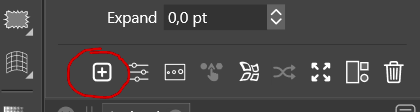
    @VectorStyler Yes! I "knew" that section was there, but I got into the habit of using the shortcut "control-b" and was not thinking of that expand blend already being there. I got used to most things I needed being in that same area and forgot the blend options were in another. I need to train my brain to look there. my fault - thank you!