VectorStyler
    • Categories
    • Unread
    • Recent
    • Tags
    • Popular
    • Register
    • Login
    1. Home
    2. Questions and Support
    Log in to post
    Load new posts
    • Recently Replied
    • Recently Created
    • Most Posts
    • Most Votes
    • Most Views
    • BoldlineB

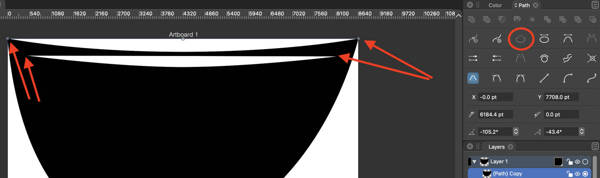
      Selecting node handles is difficult at certain zoom levels

      Watching Ignoring Scheduled Pinned Locked Moved
      5
      0 Votes
      5 Posts
      6k Views
      VectorStylerV
      @Boldline I think this could be caused by the curve control point being too close to the node.
    • BoldlineB

      Option to not auto connect nearby brush strokes when second stroke is made?

      Watching Ignoring Scheduled Pinned Locked Moved
      3
      0 Votes
      3 Posts
      4k Views
      VectorStylerV
      @encart @Boldline For me at least the Esc works. But there is also a Preferences -> Changing Options -> Don't Extend with Pencil that can be checked to skip extension even if selected.
    • BoldlineB

      Can split text be made to work with text boxes - not just text point?

      Watching Ignoring Scheduled Pinned Locked Moved
      3
      0 Votes
      3 Posts
      4k Views
      BoldlineB
      @vectoradmin Good question I would think point text
    • J

      Double clicking selected object query

      Watching Ignoring Scheduled Pinned Locked Moved
      3
      2
      0 Votes
      3 Posts
      5k Views
      J
      Thanks for the info, that's clever. I'm going to use that a lot now! [image: 1632825895625-screenshot-2021-09-28-at-11.40.53.png]
    • S

      New user, i stuck with a simple thing

      Watching Ignoring Scheduled Pinned Locked Moved
      27
      1
      0 Votes
      27 Posts
      49k Views
      S
      @vectoradmin , thanks a lot already downloaded
    • BoldlineB

      Drag panel from any part of top bar

      Watching Ignoring Scheduled Pinned Locked Moved
      2
      1
      0 Votes
      2 Posts
      3k Views
      VectorStylerV
      @Boldline Added to the backlog.
    • BoldlineB

      Collapsed panels stay collapsed when moved around inside VS

      Watching Ignoring Scheduled Pinned Locked Moved
      2
      0 Votes
      2 Posts
      3k Views
      VectorStylerV
      @Boldline This is in the backlog.
    • K

      Gradient Mask Editor - Reverse The Transparency Points

      Watching Ignoring Scheduled Pinned Locked Moved
      3
      0 Votes
      3 Posts
      4k Views
      K
      Thank you.
    • BoldlineB

      value of even-odd fill/winding fill

      Watching Ignoring Scheduled Pinned Locked Moved
      4
      0 Votes
      4 Posts
      5k Views
      VectorStylerV
      @Boldline AI also has this but I think the default there is Winding. Once the winding fill mode is set for a shape (Appearance panel, or Object -> Content -> Winding Fill), the new shapes will be drawn with it. I think there could be a preferences for having it on by default.
    • BoldlineB

      Controlling nodes and handles when deleting nodes to fill in a gap

      Watching Ignoring Scheduled Pinned Locked Moved
      8
      2
      0 Votes
      8 Posts
      9k Views
      VectorStylerV
      @Boldline There is an option: Prferences -> Editing Options -> Adjust Node Removal Curvature, that will not approximate the original curve when removing a node.
    • BoldlineB

      Clicking on gradient bar with shape selected transfers gradient settings to shape

      Watching Ignoring Scheduled Pinned Locked Moved
      2
      1
      0 Votes
      2 Posts
      3k Views
      VectorStylerV
      @Boldline Can be implemented, added to the backlog. Attached the file here: gradientidea1.vstyler
    • BoldlineB

      Alt/option key + click and drag creates new gradient color stop

      Watching Ignoring Scheduled Pinned Locked Moved
      2
      1
      1 Votes
      2 Posts
      3k Views
      VectorStylerV
      @Boldline Added this to the backlog.
    • BoldlineB

      Stray gradient presets outside their folder?

      Watching Ignoring Scheduled Pinned Locked Moved
      2
      2
      0 Votes
      2 Posts
      4k Views
      VectorStylerV
      @Boldline When creating new presets, these are added to the root of the group (specific to the preset type). The Panels -> Presets -> Presets panel, or the Styles -> Preset Manager view can be used to place these into folders, or to create new folders.
    • K

      Remove gradient point

      Watching Ignoring Scheduled Pinned Locked Moved
      3
      0 Votes
      3 Posts
      4k Views
      K
      Thank you.
    • BoldlineB

      Do not auto-open duplicated layers

      Watching Ignoring Scheduled Pinned Locked Moved
      2
      0 Votes
      2 Posts
      4k Views
      VectorStylerV
      @Boldline This can be replicated, added it to the backlog.
    • BoldlineB

      Show selection with transform tool/etc

      Watching Ignoring Scheduled Pinned Locked Moved
      2
      2
      0 Votes
      2 Posts
      3k Views
      b77B
      @Boldline If I understand correctly, I think you need to enable 'Show Nodes of Selected Shapes' in Preferences > Editing Options.
    • S

      Just like to mention, VS Price tag was absolutely ok for me

      Watching Ignoring Scheduled Pinned Locked Moved
      1
      3 Votes
      1 Posts
      3k Views
      No one has replied
    • S

      New user, must say how deeply impressed I am

      Watching Ignoring Scheduled Pinned Locked Moved
      2
      3 Votes
      2 Posts
      3k Views
      VectorStylerV
      @Subpath2 Thanks!
    • BoldlineB

      Can we import Affinity Designer brushes?

      Watching Ignoring Scheduled Pinned Locked Moved
      3
      0 Votes
      3 Posts
      5k Views
      S
      Hi @Boldline The Reason while you can not import Affinity Designer Brushes may also be , that only one Brush in Affinity Designer is a real Vector Brush. The others are Bitmaps along a Vector Path.
    • BoldlineB

      How do I get text to fill an existing shape?

      Watching Ignoring Scheduled Pinned Locked Moved
      15
      1
      0 Votes
      15 Posts
      18k Views
      BoldlineB
      @vectoradmin i just sent you the file and an explanation. Basically the left side of the sunglasses were initially a copy and flip of the right side. So everything on the left side will be in reverse I assume - based on other discussions in the forum about that. Maybe the solution here is I need to flip the path direction?