VectorStyler
    • Categories
    • Unread
    • Recent
    • Tags
    • Popular
    • Register
    • Login
    1. Home
    2. Popular
    Log in to post
    • All Time
    • Day
    • Week
    • Month
    • All Topics
    • New Topics
    • Watched Topics
    • Unreplied Topics

    • All categories
    • BoldlineB

      VS Review on Youtube

      Watching Ignoring Scheduled Pinned Locked Moved General Discussion
      32
      4 Votes
      32 Posts
      60k Views
      ?
      @Prevalent-Arts Everyone likes something different, I think 90% of Blender users love the fact that development happens practically in real time. That's a huge advantage of it, and maybe the same is true for VS. It's better than stalled projects like Affinity at the moment, where in the 21st century there are still no basic text warping or tracing options and we wait for no idea what, many bugs and features which do not work. In my opinion VS should be revamped a bit in terms of UI, but when I finish my week-long test I'll have the full picture. Currently I'm writing down what I like, what doesn't work and weaving it into a workflow.
    • B

      Development & integration of VS and a desktop publishing software

      Watching Ignoring Scheduled Pinned Locked Moved General Discussion
      32
      2 Votes
      32 Posts
      63k Views
      BoldlineB
      @Subpath said in Development & integration of VS and a desktop publishing software: @Boldline said in Development & integration of VS and a desktop publishing software: We could pick a topic a week or so and then always go back in and add more information as it's learned. Think it's a nice idea. But creating tutorials is work, and thats also the case with small tutorials. That's why my thoughts tend to be to just allow the recorder to run without comments for a small project. Because i think that most users would find it already helpful to simply see tools in a everyday use to get some inspiration. I understand about not having time to invest in full tutorials. What I was mainly referring to was a running discussion on a dedicated topic on the forum. Where we just add bits of helpful info
    • C

      File crashes when opening

      Watching Ignoring Scheduled Pinned Locked Moved Resolved Issues
      32
      1 Votes
      32 Posts
      70k Views
      b77B
      @coolio00111 said in File crashes when opening: Also was having some issues where I would click a text box, be able to edit the text, then if I click the text box again, the text wouldn't be able to be edited. I would have to re-open vectorstyler. If you find what causes this, don't forget to report it to the developer.
    • Victor VectorV

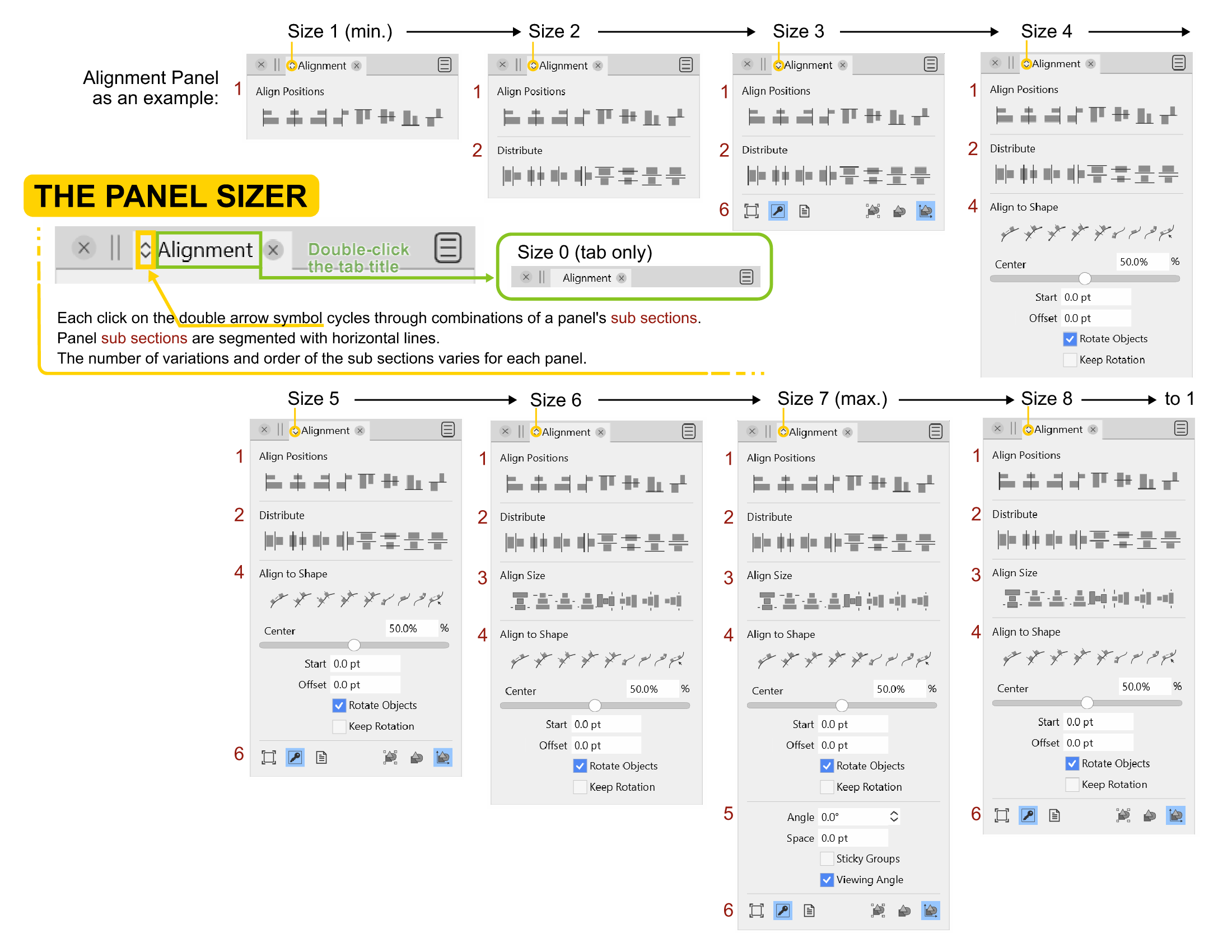
      Panel Sizing - The often overlooked customization

      Watching Ignoring Scheduled Pinned Locked Moved Tutorials reference guide
      31
      1
      4 Votes
      31 Posts
      71k Views
      Victor VectorV
      @vectoradmin said in Panel Sizing - The often overlooked customization: @Victor-Vector The problem with using the mouse wheel is that besides trackpads, on Mac the mouse scrolling is much smother that the regular mouse wheel. I think Click and Shift+Click with a tooltip, would be a simple solution. I appreciate learning about what needs to be considered for all the systems using VS. You have the best solution!
    • encartE

      High-quality artwork on the homepage

      Watching Ignoring Scheduled Pinned Locked Moved General Discussion
      31
      4 Votes
      31 Posts
      53k Views
      VectorWhizV
      @encart I have begun exploring VS in depth Oct 18 2022, which might result in some quality artwork, like I placed on my website. Much off standard stuff there, but I could do more common art, if so requested. Before I just fiddled about until VS crashed. The latest builds though, seem quite stable now; no crashing, just ran into one or two bugs. I posted a stage sequence of a realistic vector portrait, created entirely in VS in my [portfolio blog] (https://communicats.blogspot.com/2022/10/exploring-vectorstyler.html).
    • b77B

      A set of new icons for the context panel

      Watching Ignoring Scheduled Pinned Locked Moved Features and Ideas
      31
      3 Votes
      31 Posts
      43k Views
      S
      @b77 for the Quick Panel Icons i like that the Combine Icon (from Boolean) and the Composite Icon are a bit different and find the "Select and transform members of grouped Objects" Icon very well made [image: 1685559218660-members-of-a-group.png]
    • B

      Settings: retain certain values

      Watching Ignoring Scheduled Pinned Locked Moved VectorStyler 1.2 beta
      31
      1
      0 Votes
      31 Posts
      46k Views
      VectorStylerV
      @Pat said in Settings: retain certain values: Still there when I reduce some panels. I could not replicate this yet. Send me the workspace and settings files from the /resources/ folder
    • M

      About page

      Watching Ignoring Scheduled Pinned Locked Moved Questions and Support
      31
      3
      0 Votes
      31 Posts
      39k Views
      M
      @VectorStyler I don't think it's necessary. This seems like an action where there are two steps: 1. Create a new canvas, 2. Maximize the canvas display. The shortcut key operation is just for the convenience of adding a canvas. I have also set a separate shortcut key for maximizing the canvas display. I believe most people share my view. This is more in line with the actual operating habits.
    • P

      Tool option: erase up to intersection

      Watching Ignoring Scheduled Pinned Locked Moved Implemented Features
      30
      1 Votes
      30 Posts
      69k Views
      F
      Yep, looks good now. Thank you!
    • BoldlineB

      Inking Process Help

      Watching Ignoring Scheduled Pinned Locked Moved Questions and Support
      30
      0 Votes
      30 Posts
      61k Views
      BoldlineB
      Great! This would offer a solution the times users want to make use of the pressure option and still expand and divide those pressure based strokes. Thank you!
    • ?

      "...Flow text in and around any shape..."

      Watching Ignoring Scheduled Pinned Locked Moved Questions and Support
      30
      1
      0 Votes
      30 Posts
      39k Views
      ?
      @VectorStyler Don't forget the main issue, where I scale the text UP and the whole paragraph is moving down, even if it's top could still fit the shape.
    • B

      Mesh - how to...

      Watching Ignoring Scheduled Pinned Locked Moved Questions and Support
      30
      4
      0 Votes
      30 Posts
      37k Views
      VectorStylerV
      @PatrickM said in Mesh - how to...: Sorry, I don't understand quite well your reply. What I meant is that the difference between image 2 and 3 could be caused by a bug. Shouldn't a change made by the Appearance panel be independent of the selected tool Yes it is mostly, but in some cases it might affect how the tool is working. But not in this case.
    • IngolfI

      Affinity Designer v2.0

      Watching Ignoring Scheduled Pinned Locked Moved General Discussion
      30
      3 Votes
      30 Posts
      134k Views
      b77B
      @Ingolf
    • B

      Posters using VS: from blend, image effect,... to pattern etc.

      Watching Ignoring Scheduled Pinned Locked Moved Tutorials
      30
      1
      5 Votes
      30 Posts
      59k Views
      B
      I had started this with the beta version to use the new layout possibilities of 1.2 (based on margins) and show them here, but I had to stop... I'm only hoping until the next update that the issues will be fixed. On a positive note, I was able to reopen it with version 1.1 and will finish it later with 1.2. Well, WIP then & the starting point is a circle... [image: 1696507921977-pbeta-resized.jpg]
    • B

      Issue with the interface

      Watching Ignoring Scheduled Pinned Locked Moved Resolved 1.2 bugs
      30
      0 Votes
      30 Posts
      48k Views
      VectorStylerV
      @B-Vs-V The iconified panel column width can be resized (to show the name). I have to replicate the icon not opening issue.
    • S

      Extend Square Star by one Point

      Watching Ignoring Scheduled Pinned Locked Moved Features and Ideas
      29
      2
      2 Votes
      29 Posts
      43k Views
      S
      @b77 no problem
    • J

      Does this program work with Mojave?

      Watching Ignoring Scheduled Pinned Locked Moved Questions and Support
      29
      0 Votes
      29 Posts
      38k Views
      J
      @b77 Selecting with a mouse and full-size keyboard. There are no jpegs in the problem document. That was an earlier issue I'd reported. Some were grayscale, some were CMYK, some were RGB. None worked. I could only import eps files prior to the reset. Now it seems jpegs work as they ought, so I might be able to re-do the current problem file with a jpeg and see if that makes it small enough to email. Maybe some other issues are fixed as well. I'll keep an eye out. At any rate, the reset did not fix the selection issue, or the layer display issue, but using the "text on Path Anchor" option has made all those issues disappear. No idea why but good riddance! Everyone's been extremely helpful and I appreciate it.
    • BoldlineB

      Can fill swatch be set to default active in color panel?

      Watching Ignoring Scheduled Pinned Locked Moved Questions and Support
      29
      1
      0 Votes
      29 Posts
      34k Views
      b77B
      @Boldline I have nothing against the previous color assigning mode being a Prefs setting, even on by default. Regarding any possible confusion from the difference between the way assigning colors work from the color bar compared to the Color panel, I don't have a magical solution that can please everybody, except that maybe the Stroke button should become active when you right-click in the color bar, and the same with the Fill button when you left-click. But I can't say I'm certain it's how it should work. @VectorStyler Btw, the 'Color Palette' panel is more similar to the Color bar, so I think the same rule should apply (LMB assigns to Fill, RMB assigns to Stroke). Of course, if this option is enabled in Prefs.
    • AyoA

      Scaled stroke gets pseudo value

      Watching Ignoring Scheduled Pinned Locked Moved Questions and Support
      29
      1
      3 Votes
      29 Posts
      41k Views
      AyoA
      @VectorStyler said in Scaled stroke gets pseudo value: "convert to actual" Good name! If this becomes a reality in the future, we have ultimately found a solution that meets both needs
    • M

      Detail Optimizations for Version 1.3

      Watching Ignoring Scheduled Pinned Locked Moved Features and Ideas
      29
      3
      1 Votes
      29 Posts
      3k Views
      M
      @VectorStyler It’s different. The Transform dialog is for making multiple copies of a single object and applying transformations to them. In my case, I already have multiple selected objects of different sizes—these are material patterns for different shoe sizes. The logic should still follow the Move dialog: when Transform Each is checked, entering parameters should apply incremental transformations (rotation, skew, scale, etc.) to multiple objects in order from largest to smallest. This would greatly improve efficiency; otherwise, we’d have to adjust each object one by one.