Subcategories

  • These issues have been resolved and closed

    863 Topics
    5k Posts
    VectorStylerV
    @Raaskot said in Transform: Up-dwn-keys act strange on stepping values i value fields: Is it supposed to act in that way? No, this looks like a bug, but I cannot replicate it here. Could be caused by some changes in the workspace or settings.
  • Everyone makes mistakes. Help us correct ours. Let us know how to improve VectorStyler.

    10 Topics
    41 Posts
    VectorStylerV
    @jpsimmons Yes, this can be replicated and it is a bug. I will try to fix it for the next build.
  • Everyone makes mistakes. Help us correct ours. Let us know how to improve VectorStyler.

    579 Topics
    3k Posts
    G
    @VectorStyler said in Slow Typing Performance: @gotanidea I'm testing these issues with slow typing performance. The new document has no issue with speed (the old is till slow). What configuration you use for these tests? and which text is edited in the new document. I'm trying to replicate as close as possible. Can you please click the first text box ("Before rigging any character geometry ....") at the top-left region of the new document using the Text Tool, then hold the "a" key? I use: VectorStyler v1.3.001 Windows 11 Home 64-bit AMD Ryzen 7 5800H with Radeon Graphics (16 CPUs) ~3.2GHz 16384MB RAM NVIDIA GeForce RTX 3060 Laptop GPU
  • Bug reports on the 1.2 beta of VectorStyler

    282 Topics
    2k Posts
    W
    This issue has been resolved in the latest update. Thank you!
  • These bugs were posted for 1.2 and should be resolved

    228 Topics
    1k Posts
    XRAYX
    @VectorStyler Hi, this is on Windows 11 24H2 and the settings are "checked" inside of performance settings such as !"Direct Preview of Changes" or "GPU for Mesh" and "GPUfor Distortion" but don't seem to actually be working. Selecting ok seems to fix "Direct Preview of Changes" but no way to be sure about the GPU settings.
  • Trim and Join Tool generates duplicates

    2
    3
    1 Votes
    2 Posts
    2k Views
    VectorStylerV
    @Fertuffo I opened a bug on this.
  • Some questions

    2
    1
    1 Votes
    2 Posts
    2k Views
    VectorStylerV
    @monsterfox I opened a bug on these.
  • outline mode

    2
    1 Votes
    2 Posts
    2k Views
    VectorStylerV
    @monsterfox I opened a bug on this.
  • A clipping group with color information

    4
    1 Votes
    4 Posts
    3k Views
    VectorStylerV
    @monsterfox The problem is that other drawing apps do not support filled (or outlined) clipping groups. If these are not separate, then the stroke on the clipping group is also clipped (and it should not).
  • Can't expand text on path

    7
    0 Votes
    7 Posts
    5k Views
    VectorStylerV
    @Fertuffo Fixed!
  • Stroke Width "Adjust Profil with Masks" seems to be buggy

    2
    1 Votes
    2 Posts
    2k Views
    VectorStylerV
    @Subpath I opened a bug on this.
  • The cloned object causes incorrect positioning when placed on the path.

    7
    1 Votes
    7 Posts
    5k Views
    encartE
    @VectorStyler Thank you.
  • menu items : none

    2
    1
    0 Votes
    2 Posts
    2k Views
    VectorStylerV
    @B-Vs-V Fixed
  • Bug

    7
    2
    0 Votes
    7 Posts
    5k Views
    M
    @VectorStyler I don't remember the exact name, but it's an option in the selection menu that's the opposite of "Select Parent." It's definitely not called "Child."
  • Strange error

    3
    1 Votes
    3 Posts
    3k Views
    VectorStylerV
    @monsterfox said in Strange error: I can replicate all these issues. Some are bugs, other are just the result of the reference trick in VS (but I will try to improve these also). Uniformly increasing or decreasing the size of graphics with the same dimensions can result in two different outcomes. This one is not a bug. The problem here is that the last two objects are references of other previously selected objects. Now if both the reference and its source is selected and we scale these, then the source is scaled (order does not matter), which makes the reference smaller, and then the reference is scaled again. So basically the reference was scaled twice (once its content and once the link). It is easy to replicate: draw a shape, Edit -> Reference, select both and scale. Not sure what would be a solution here (no one has the reference feature), but I will think of something. When converting the graphic to a path, the size shrinks, and it only returns to normal after converting it a second time. Again a result of the reference feature. When converting a "reference" (symbol) to curves, it will not convert it, but it will remove any transforms/shape effects on it, resulting in the smaller objects. Symbols (or references) should be expanded first with Style -> Expand Symbol. The solution here would be to automatically do an Expand Symbol when doing a convert to curves. When increasing the size of a graphic without selecting the stroke, the stroke may appear thicker. Here the problem is with the "too many options" of VS. Because we can have multiple strokes per object, each stroke can set if it is scaled or not when resizing (even if the object itself turned off the Transformed Stroke option). This Stroke level object can be accessed in the Appearance panel, by selecting the Stroke item and the Transformed Content in the panel menu. When simultaneously selecting a path and the underlying image to perform a node-disconnecting operation, issues may arise with the underlying image. This one is a bug, will be fixed. Graphics that are no longer in a grouped state can still undergo an unlimited number of ungrouping operations. This is also a bug, will be fixed.

  • Replace font properties

    8
    1
    1 Votes
    8 Posts
    7k Views
    VectorStylerV
    @monsterfox The Object Shape checkbox means that the shape is copied. If the VS point text (text shape) the text itself is the "shape" of the object. This allows things like using editable text for clipping.
  • The issue of moving after removing transform

    2
    1 Votes
    2 Posts
    2k Views
    VectorStylerV
    @Li-Xiao Not really a bug, but it can be confusing. The problem is that the transform is on a group (with a single object content), and inside that group the object is moved. This transform then applies to the movement also, and removing the transform will make the movement much smaller. It is quite easy to create this scenario: create a group of 2 or more objects. transform the group (make it 2x larger). isolate the group and move one object away from the rest. select the group and remove the transform. the object that was moved further away will have some movement back. removing the other objects from the group, before removing the transform will make this "offset" more confusing.
  • Bug

    2
    1 Votes
    2 Posts
    2k Views
    VectorStylerV
    @monsterfox Yes, this was mentioned before with references and clones, but scaling and rotation of these are always centered. I have a task open for this (in the features backlog), and I will try to find a solution
  • Spelling error

    2
    1
    1 Votes
    2 Posts
    2k Views
    VectorStylerV
    @Boldline Thanks for noticing. will be fixed in the next build.
  • 'Repeater', bug ?

    6
    4
    1 Votes
    6 Posts
    4k Views
    VectorStylerV
    @B-Vs-V Set the Expand amount to 0 (this expands the shape), and enable the "Restrict Using Shape" option.
  • There is a crash issue with Repeater

    3
    1 Votes
    3 Posts
    2k Views
    L
    @VectorStyler Fixed. thanks
  • Invalid issue with the corner shape button

    10
    1 Votes
    10 Posts
    6k Views
    L
    @VectorStyler Fixed. thanks
  • two bugs

    5
    0 Votes
    5 Posts
    3k Views
    VectorStylerV
    @Li-Xiao said in two bugs: There is indeed an issue with selecting the line mode Yes, this was the key. I will try to fix this as soon as possible.
  • Symbol

    3
    1
    1 Votes
    3 Posts
    3k Views
    B
    @VectorStyler I haven't tried to reproduce the issue. As for moving the layers ,I can't see the blue destination line: it's not sufficiently marked (sorry for my terse sentence)
  • Coordinate start ikon a bit confusing

    2
    1
    1 Votes
    2 Posts
    2k Views
    VectorStylerV
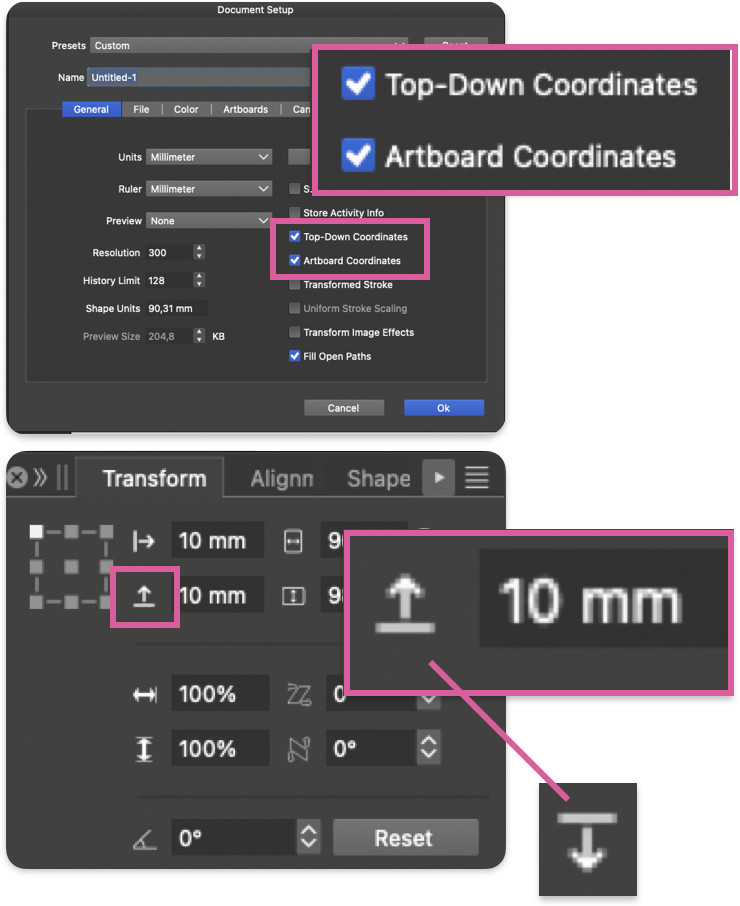
    @Raaskot Yes, this is indeed the case. The icon does not depend on the coordinate direction. I will think of a solution.