• 0 Votes
    4 Posts
    4k Views
    VectorStylerV
    @Boldline Use the "Isolate Inside" (double click) to edit the content of a group. I changed the order of the selection (members first) for the next build (it is just a resource flag), lets see how it will work.
  • How to convert pattern to shapes?

    3
    1 Votes
    3 Posts
    4k Views
    M
    Thanks for the quick response. Ah, I did try that but silly me; I didn't see that what was generated was actually a group with all vectors inside. Sorry for that. Nice to see it's possible. Have a nice weekend!
  • Regarding the issue with the applied effect of the Repeater

    5
    0 Votes
    5 Posts
    5k Views
    L
    @VectorStyler Understood. If there could be a simulated expansion, it would solve this problem by preserving the non-destructive effects and applying the final effect to gradient content after the Repeater.
  • Adding white noise to a specific color in a color gradient

    22
    4
    0 Votes
    22 Posts
    29k Views
    B
    @VectorStyler Thank you That's what I was doing but had forgotten about this single/double click... hence my lack of understanding.
  • Setting default styles for created paths and shapes?

    5
    0 Votes
    5 Posts
    5k Views
    VectorStylerV
    @LoginError said in Setting default styles for created paths and shapes?: Is there any way to update the default style when that option is unchecked? Just select a color on the color panel, or a gradient in the gradient panel (without an object being selected). A style selected in the Styles panel is not going to be used as a default regardless of settings.
  • Saving objects as "assets"

    4
    0 Votes
    4 Posts
    4k Views
    VectorStylerV
    @Pat Copy-paste from AD goes through PDF, and that means the flattening of attributes like multiple fills, strokes. Gradient may go through if linear of circular. But noise will become image as there is no noise attribute in PDF. The internal format of Affinity is not known, so VS cannot import that. But VS can import Adobe Illustrator assets.
  • User interface is huge

    4
    1 Votes
    4 Posts
    4k Views
    VectorStylerV
    @Nephilim983 Thanks for the description. I will try to create a similar setup to replicate this issue.
  • How do I reset the gap between the dashes (dots) to even spacing?

    5
    1
    1 Votes
    5 Posts
    7k Views
    BoldlineB
    thank you for the video, I must have some other setting wrong elsewhere because when I do those steps, I still get the odd spacing. here is a video of my attempt I will try on my other computer and see if I have the same issue so I know if it's a setting here on the first machine that I have wrong UPDATE: I see where the issue lies - I was going back to another setting in the dash dropdown and that was resetting the number of spaces again. Thank you for your help!
  • How do I convert a text frame into a shape?

    2
    1
    0 Votes
    2 Posts
    3k Views
    VectorStylerV
    @Boldline In the Appearance panel, select the Text Frame item and delete it with the Appearance panel delete button. In VS an object with a shape can contain various content types, these are Fill, Stroke, Adjustment Effects, but also Image content or Text Frame. These can be added to any object with a shape, even after it is created (example: flow some text in an existing shape).
  • How to decouple path brush/eraser settings in VS 1.2?

    2
    0 Votes
    2 Posts
    3k Views
    VectorStylerV
    @Boldline Try the "Shared Brush Options" in the Drawing section.
  • Centering Lines

    3
    0 Votes
    3 Posts
    3k Views
    P
    Yes and Thanks...
  • Widen Text on Path

    7
    1
    0 Votes
    7 Posts
    6k Views
    BoldlineB
    @VectorStyler sorry for the many back and forth in the thread. I see the arrow now, I was attempting to use the wrong one (the iconify one). I'm a little slow today. That said, the option you circled in your screenshot worked perfectly. Thank you for your help!
  • Change of color in text on path is not possible ...

    6
    0 Votes
    6 Posts
    5k Views
    RaaskotR
    @VectorStyler Ah, wonderful. Now I got it .. also I must activate fill-button i "Appearances" [image: 1710332059569-678828c1-d362-4d82-9312-57ce0fb56199-billede.png]
  • 0 Votes
    5 Posts
    6k Views
    S
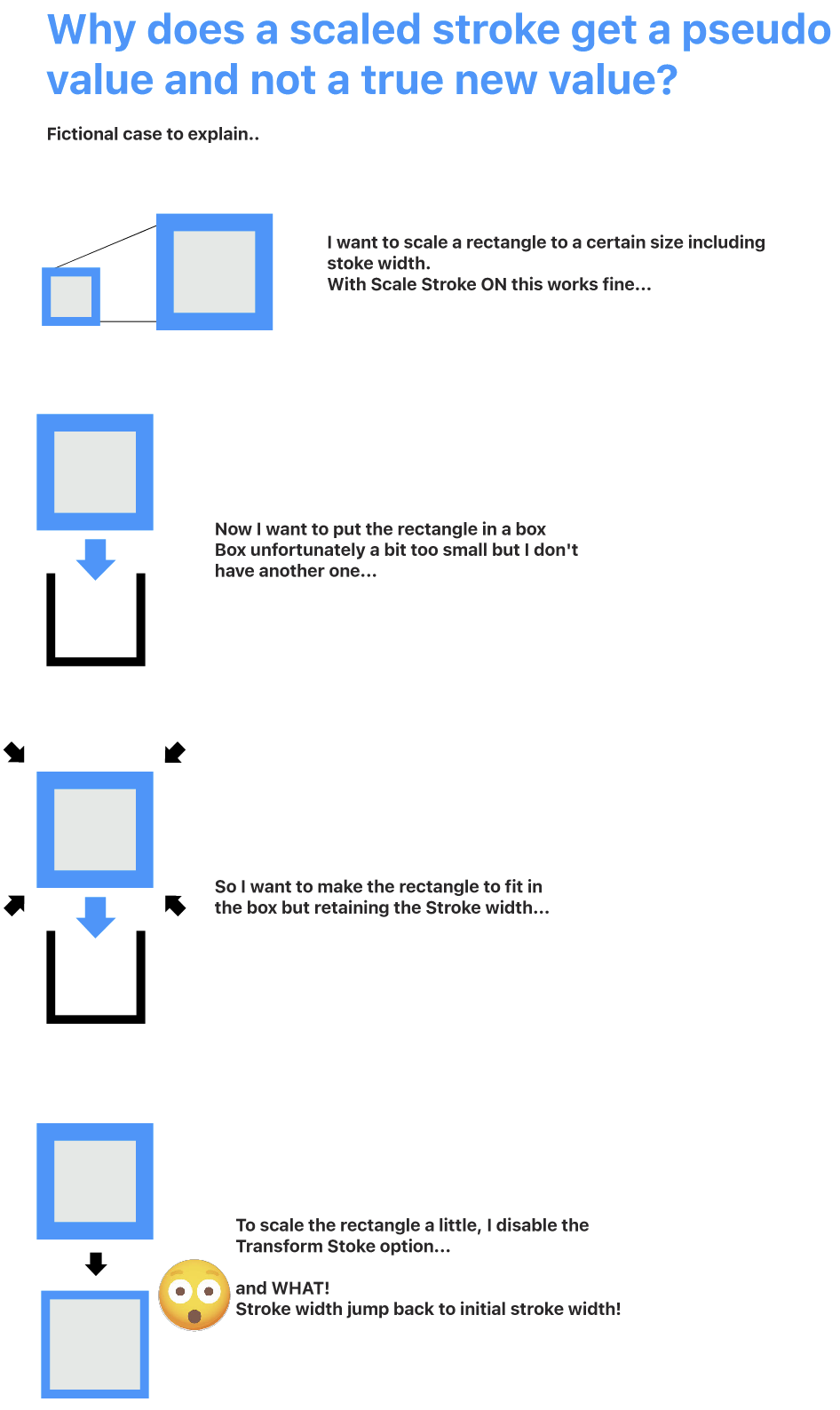
    @Boldline changing only the setting in "Layer Option" is working here [image: 1710308881227-stroke-scaling.png]
  • Find/Replace: How to swap a text symbol with a line break?

    6
    1
    0 Votes
    6 Posts
    7k Views
    RaaskotR
    @Subpath Nope, but many thanks anyway [image: 1709904124539-1c2e6579-2413-4126-8cb0-608484552d17-billede-resized.png]
  • How to confine text in multiple lines on a path?

    5
    1
    0 Votes
    5 Posts
    6k Views
    RaaskotR
    @VectorStyler Cool, thanks! [image: 1709746459602-05a38e63-c739-4b38-abd6-05314c0d44a7-billede.png]
  • Two quick questions

    3
    0 Votes
    3 Posts
    3k Views
    S
    Hi @LoginError and welcome to the VS forum You can find tutorials from me in the tutorial section of the forum. They deal with symmetrical graphics in different ways and also show some tips and tricks. In my experiments with symmetrical graphics I mostly use clones, maybe because I'm more used to them :). Anyway, maybe you'll find something helpful. Have fun with VectorStyler
  • Creating a Transparency Group - how to do that?

    5
    1
    0 Votes
    5 Posts
    6k Views
    RaaskotR
    @VectorStyler Follows ... 0_1709374497017_transparent-masking-issue.vstyler
  • Question about the stroke width

    2
    0 Votes
    2 Posts
    3k Views
    VectorStylerV
    @Yaoif Yes, but first you have to set the width profile to asymmetric. This can be done by unchecking the Symmetric box in the width profile editor (accessed from the stroke panel), or the third button in the Stroke Width panel icon row.
  • 0 Votes
    5 Posts
    5k Views
    VectorStylerV
    @Boldline You can also drag the shape over the clipping group in the Layers panel and it will place inside.