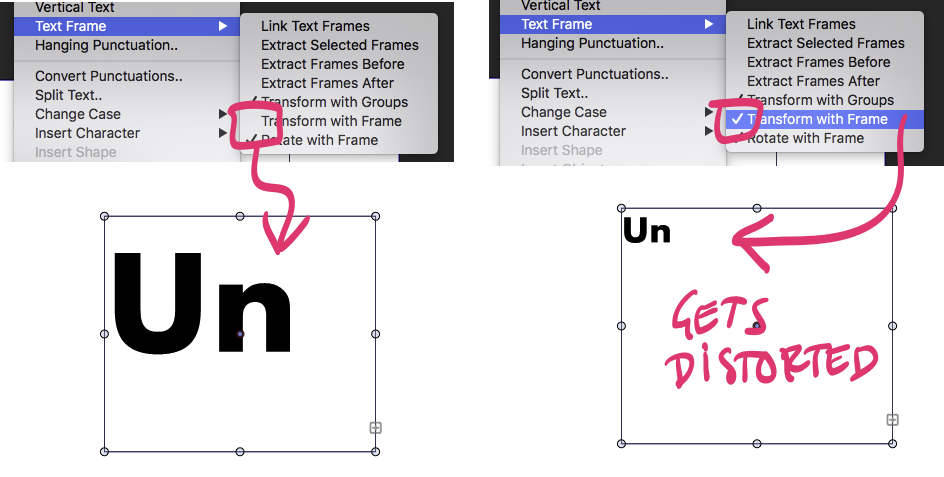
• Mouse drag to highlight empty live text space

    2
    1
    0 Votes
    2 Posts
    3k Views
    VectorStylerV
    @Boldline This seems to be a bug.
  • Exit text mode.

    3
    1 Votes
    3 Posts
    4k Views
    VectorStylerV
    @encart I will add the exit with Esc to the backlog.
  • Building a custom color palette in VS for spot color printing

    13
    2
    0 Votes
    13 Posts
    12k Views
    BoldlineB
    @vectoradmin said in Building a custom color palette in VS for spot color printing: For a VS palette type use the Binary or Compact formats. For human readable VS palette use the XML or JSON formats I'm new to all of these considerations. I assume you are referring to the overall file type? In documentation, the available storage modes are briefly discussed; "This can be Compact, Binary, JSON or XML. The Compact storage mode offers the most compact file in terms of size and speed of saving and opening. The Binary storage mode is next in terms of speed and size, but allows a more future proof format. The XML and JSON storage modes allow access to the internal VectorStyler object hierarchy for 3rd parties and external scripts for processing." Could this be expanded upon in the documentation at some point? Is there a reliable source online I could go research? I did some googling but did not find or understand what I was reading. This was not something I was introduced to when I was using Illustrator for example.
  • General question : how to get a sharp end of a stroke object

    4
    3
    0 Votes
    4 Posts
    5k Views
    VectorStylerV
    @PatrickM I will add it there.
  • Panel shadow and border too dark, thick

    5
    0 Votes
    5 Posts
    5k Views
    IngolfI
    @vectoradmin said in Panel shadow and border too dark, thick: @Ingolf It is a macOS thing, but I think it can be removed. But I'm not sure if it can be configured to be smaller. I add this to the backlog. Allright but my priority would be: Lowest Just an observation from a picky user.
  • Is it possible to control the dimming of the isolation mode?

    4
    2
    0 Votes
    4 Posts
    5k Views
    S
    And i set it only from 70% to 25% so i will also regonize if i am in Isolated Mode
  • Trimming Self-Intersecting Points with the node tool ??

    5
    0 Votes
    5 Posts
    5k Views
    S
    @vectoradmin aah, yes, was my assumption too
  • Break Shape Shortcut issue

    6
    0 Votes
    6 Posts
    6k Views
    VectorStylerV
    @Boldline @b77 I add this to the backlog, to check why "C" is not working for node insertion in the "global" shortcut context.
  • System fonts taking over lists

    7
    1
    2 Votes
    7 Posts
    7k Views
    VectorStylerV
    @b77 said in System fonts taking over lists: @vectoradmin Maybe create a limit for any font with the same first word in the name — if it's more than 10(?), display it in a folder. I add this to the backlog.
  • Option to reset stroke width profile for new shapes - location?

    4
    0 Votes
    4 Posts
    5k Views
    VectorStylerV
    @Boldline Yes, will get fixed.
  • 0 Votes
    2 Posts
    3k Views
    VectorStylerV
    @Boldline it seems to be a bug in the selection mode. I will fix that. There is also a need for a (new) selection mode to select all such objects.
  • This topic is deleted!

    1
    0 Votes
    1 Posts
    2 Views
    No one has replied
  • When a boolean operation icon is blue, what does that indicate?

    4
    1
    0 Votes
    4 Posts
    5k Views
    VectorStylerV
    @Boldline said in When a boolean operation icon is blue, what does that indicate?: When a boolean operation icon is blue, what does that indicate? It could be that the selected group has the boolean operation applied to it (same as in AI), or a composite shape is selected that uses the highlighted boolean op. Both are non-destructive, so it is indicated as the active shape composition mode.
  • Editing effects

    2
    0 Votes
    2 Posts
    3k Views
    VectorStylerV
    @Petar_MK Use the "Image Effects" panel to edit effects on the selected objects.
  • 0 Votes
    2 Posts
    4k Views
    VectorStylerV
    @ambros I add this to the backlog, will try to replicate it.
  • Problems with 4K display

    3
    0 Votes
    3 Posts
    3k Views
    P
    Thank you. I did it. These are very nice options to have control on such GUI elements.
  • Set Artboard color using open color palette?

    3
    1
    0 Votes
    3 Posts
    5k Views
    BoldlineB
    @vectoradmin Coming back to this topic again, I understand from your answer, that the artboard options view is modal. Is the color panel also modal? I ask because I wanted to see if a color picker could be available in the artboard options view much like we can use the eyedropper in the color panel to change the color of the background. Edit: I think I now understand what you were eluding to when you said, "when the artboard is selected with the artboard tool, any color selection should do this" If I select the artboard itself with the artboard tool, I can choose a color from any open color palette as well as make any color in the color panel wheel! I'm probably late to the party on this feature, but regardless,, it is awesome! I would still hope we could integrate an eyedropper tool for this function because I often have imported a shirt from the internet and I want the background of the artboard to be that exact shade of shirt color to design over top on. If this can't be added to the artboard options panel because it is modal, could it be a feature in the to-be added artboard options shortcut being added where "create" layer" is currently, or tied in with the artboard editor toolbar icon? I noticed the style picker tool right above it can be selected while the artboard itself is selected and it can be used to pick a color - can we add color sampling from anything in the UI including an imported photo to this?
  • Font size in points

    Moved
    5
    0 Votes
    5 Posts
    5k Views
    M
    Thanks @vectoradmin. That works now.
  • 0 Votes
    7 Posts
    7k Views
    S
    @Boldline thats right
  • Moving Pantones/Spot Colors between palettes

    9
    2
    0 Votes
    9 Posts
    9k Views
    VectorStylerV
    @Boldline said in Moving Pantones/Spot Colors between palettes: could they be added by default in newly created palettes that would accept that format? I will try to do this. Is reg a color that when exported as a pdf or eps file from VS and then opened in other vector programs like Illustrator, Corel, Affinity, etc., it can be recognized as "reg" and print accordingly? Yes, registration colors are supported by both PDF and EPS (or at least PS). If these are not output correctly, then it is a bug.