VectorStyler
    • Categories
    • Unread
    • Recent
    • Tags
    • Popular
    • Register
    • Login
    1. Home
    2. Popular
    Log in to post
    • All Time
    • Day
    • Week
    • Month
    • All Topics
    • New Topics
    • Watched Topics
    • Unreplied Topics

    • All categories
    • M

      list of errors

      Watching Ignoring Scheduled Pinned Locked Moved Bugs in VectorStyler
      46
      1 Votes
      46 Posts
      33k Views
      M

      @VectorStyler The outline effect is fine. I just realized I accidentally turned off the eye icon while operating.[image: 1760625721249-mmexport1760625669307-resized.jpg] By the way, could you help me figure out why this function in my workspace isn’t working?
    • L

      Affinity Designer Now FREE with All features can be used, except for AI.

      Watching Ignoring Scheduled Pinned Locked Moved General Discussion
      46
      -4 Votes
      46 Posts
      22k Views
      T
      @monsterfox I agree with this wholeheartedly. We desperately need VectorStyler tutorials on YouTube. This will also help drive new users to this tool.
    • Devil DinosaurD

      Isometric Drawing Tutorial

      Watching Ignoring Scheduled Pinned Locked Moved Tutorials
      45
      10 Votes
      45 Posts
      125k Views
      B
      @Subpath Yes, indeed. If I look rapidly the two branches of the V one after the other for example, I've the feeling they are not in the same plane. But for many isometric letters and basic shapes, I don't have any issue.
    • M

      Detail Optimizations for Version 1.3

      Watching Ignoring Scheduled Pinned Locked Moved Features and Ideas
      43
      3
      1 Votes
      43 Posts
      3k Views
      VectorStylerV
      @Subpath said in Detail Optimizations for Version 1.3: more useful if they were more flexibly adjustable in size. I will add this to the features list
    • encartE

      Can't grab resize handler when text field is too small,

      Watching Ignoring Scheduled Pinned Locked Moved VectorStyler 1.1 Bugs
      42
      0 Votes
      42 Posts
      131k Views
      F
      @b77 If that approach were taken, I would also suggest adding an option to mimic the Affinity products, which use proportional scaling by default for text and images but not for shapes.
    • 861475_VctSt8

      Japanese

      Watching Ignoring Scheduled Pinned Locked Moved Questions and Support
      40
      0 Votes
      40 Posts
      99k Views
      VectorStylerV
      @ash-f This issue is still an open bug. Will try to fix as soon as possible.
    • S

      Little indicator Sign "°" for Path Sketch Tool to know that a Shape is closed

      Watching Ignoring Scheduled Pinned Locked Moved Features and Ideas
      40
      1
      1 Votes
      40 Posts
      83k Views
      S
      @VectorStyler said in Little indicator Sign "°" for Path Sketch Tool to know that a Shape is closed: @Subpath There are plenty of things to do for 1.2 already, lets return to this later. No Problem, take your time
    • B

      Support a Blob type of vector brush

      Watching Ignoring Scheduled Pinned Locked Moved Features and Ideas
      38
      0 Votes
      38 Posts
      16k Views
      B
      @VectorStyler I'm using the Wacom Movink DTH135 pen tablet display
    • G

      New VS user, help with the interface?

      Watching Ignoring Scheduled Pinned Locked Moved Questions and Support
      36
      1
      0 Votes
      36 Posts
      79k Views
      S
      @Ingolf Looks like a really usefull List. I guess that List is for UI-Design.
    • P

      Interface improvements

      Watching Ignoring Scheduled Pinned Locked Moved Implemented Features
      35
      1 Votes
      35 Posts
      87k Views
      VectorStylerV
      @postdes build 1.0.045 added flat themes on Mac
    • IngolfI

      Usability issue when drawing gradents (.054)

      Watching Ignoring Scheduled Pinned Locked Moved Features and Ideas
      34
      1 Votes
      34 Posts
      51k Views
      b77B
      yes, the Ctrl key is used to switch to Transform Tool Oh…
    • B

      Blend, artefact when changing gradient shape

      Watching Ignoring Scheduled Pinned Locked Moved VectorStyler 1.1 Bugs
      34
      2
      0 Votes
      34 Posts
      51k Views
      VectorStylerV
      @PatrickM Send me the AI files. If they are too large for email, you can send share a dropbox link.
    • ncicN

      The pencil tool doesn't respect the fill and stroke color styling attributes set by the user.

      Watching Ignoring Scheduled Pinned Locked Moved Resolved Issues
      34
      1 Votes
      34 Posts
      64k Views
      ncicN
      @VectorStyler thank you
    • M

      about choice

      Watching Ignoring Scheduled Pinned Locked Moved Questions and Support
      34
      0 Votes
      34 Posts
      50k Views
      M
      @VectorStyler 0_1727698512968_6.vstyler
    • VectorStylerV

      VectorStyler 1.3.001

      Watching Ignoring Scheduled Pinned Locked Moved Announcements and News
      34
      16 Votes
      34 Posts
      13k Views
      VectorStylerV
      @EricP said in VectorStyler 1.3.001: very nice job with the website update, the new little feature gifs and the comparator I had some excellent help there.
    • DanielD

      Intertwine Effect: Where is it?

      Watching Ignoring Scheduled Pinned Locked Moved Questions and Support
      34
      1
      1 Votes
      34 Posts
      7k Views
      S
      @Daniel looks great! Btw. would it be possible to create a thread about this in the tutorial section? That way it would be easier for other users to find.
    • G

      Consider simplifying interface

      Watching Ignoring Scheduled Pinned Locked Moved Implemented Features
      33
      3
      1 Votes
      33 Posts
      68k Views
      K
      @vectoradmin thank you, managing them is much easier now.
    • encartE

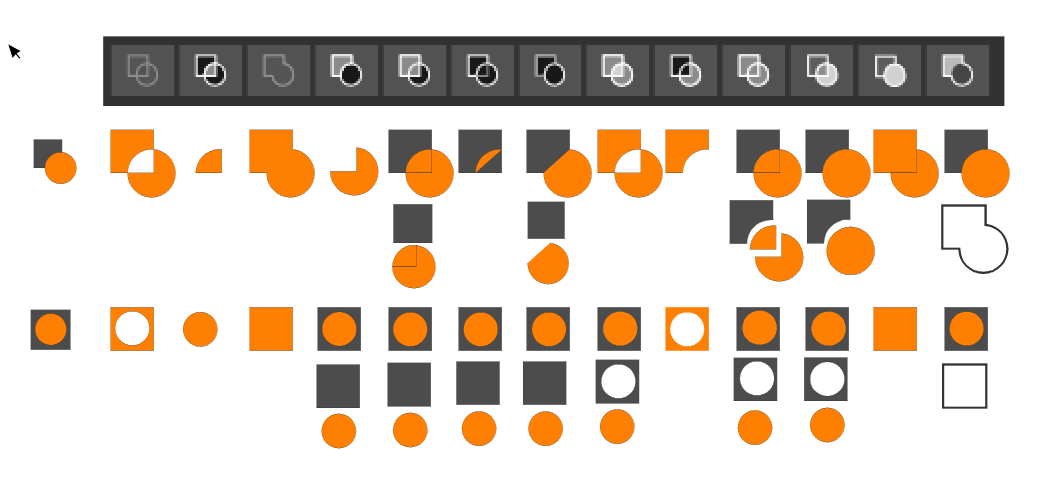
      Your ideas for improvement Boolean operations panel

      Watching Ignoring Scheduled Pinned Locked Moved Implemented Features
      33
      1
      2 Votes
      33 Posts
      73k Views
      b77B
      @vectoradmin Great!
    • B

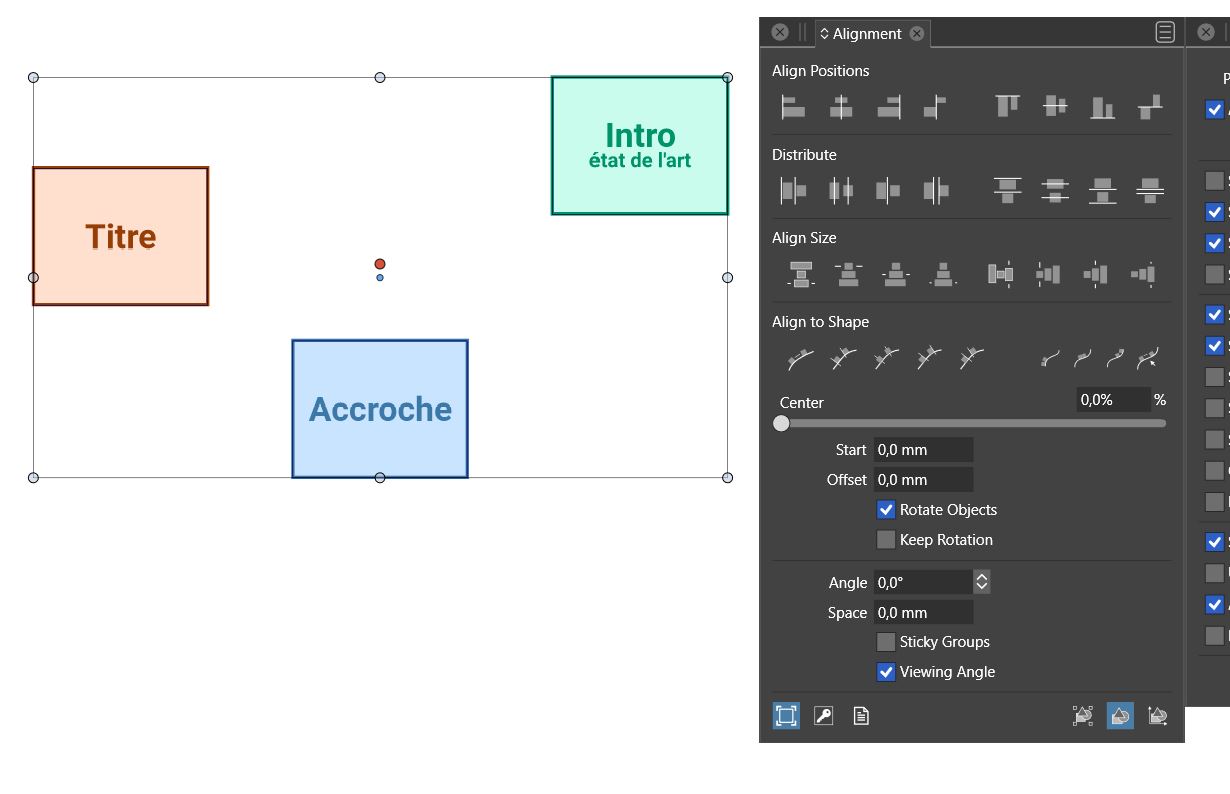
      How to distribute objects with a precise distance between them ?

      Watching Ignoring Scheduled Pinned Locked Moved Questions and Support
      33
      1
      0 Votes
      33 Posts
      53k Views
      B
      I often use alignment in my schemes because I can have a lot of objects per artboard. Nice I can keep alignment options on, thanks for the tip @Boldline Why not just make the "Align selected objects..." functions independent of other parameters (e.g., space) [image: 1644306971211-fb002e19-9443-40a3-bb6a-eebc2f8b2a01-image.png] [image: 1644306985634-f3fd6525-c754-4f1e-914a-e78d2d984104-image.png] since when we want to space the objects by a specific distance, @vectoradmin has implemented adhoc functions? [image: 1644307049270-63b03ac1-17be-49b0-8fbb-810ac7d53f4c-image.png] [image: 1644307061333-38414459-2789-4ed1-8ae9-97a7b93de535-image.png] So, with two clicks, the objects are at the right distance from each other and aligned. Isn't this redundant or am I missing something?
    • BoldlineB

      VS Review on Youtube

      Watching Ignoring Scheduled Pinned Locked Moved General Discussion
      33
      4 Votes
      33 Posts
      60k Views
      debraspicherD
      Not intending to find this user here, I swear. I was doing both searches on YT and on the forum itself because I had been playing around with the idea of doing some tutorials myself. I saw that they were listed here in the search results as I had just peeked at their YT. They had actually posted an intro course of sorts, so I thought I would share it. It's pretty decent for new users and is well-paced: https://www.youtube.com/watch?v=wyzePU3XlRw