Subcategories

  • These features and ideas have been implemented in VS as suggested

    180 Topics
    1k Posts
    VectorStylerV
    @Ayo said in About the Snap feature: Wouldn't it be better to change "Snap to Visible Only" to "Snap to View Extend Only" or shorter "Snap to Viewport Only" or even shorter "Snap to View Only" ? There is a big chance of confusion with the term 'visible' which is mainly linked to the layer system. I added this to the backlog.
  • Add a direct link to the backup file location in the help menu?

    3
    1
    0 Votes
    3 Posts
    4k Views
    BoldlineB
    @VectorStyler Thank you. I was giving this a little more thought. To me, it would also make sense if the settings preset file was also available for direct link. I don't know if the best place for that is in the help menu because the user is more likely to have their own separate custom location for custom settings presets, maybe an option in the settings panel with a direct link to where the file is stored? [image: 1716904218981-df33567b-fa1a-4c91-a259-7ddabc914577-cleanshot-2024-05-28-at-09.47.40.png] [image: 1716904887672-93987ac0-e2cf-485b-92ed-99efbc81d4f1-cleanshot-2024-05-28-at-10.00.51-resized.png]
  • A better way of aligning Shape/Point Text

    2
    1 Votes
    2 Posts
    2k Views
    VectorStylerV
    @William-Kansepa said in A better way of aligning Shape/Point Text: e.g. Align Left to Align Centre, the text shifts and does not maintain x coordinate. The problem is that in VS (as in AI) the text is aligned relative to a text position. This is not possible to change for now, but I will try to find a way to automatically "move" the text when alignment is changed (in some cases).
  • Changing units by typing its symbol

    3
    0 Votes
    3 Posts
    4k Views
    encartE
    Thank you! Works great.
  • Saving node selection

    3
    0 Votes
    3 Posts
    3k Views
    W
    @VectorStyler said in Saving node selection: But the Selection saving for nodes it seems to not work (with the (+) button). I will fix this. @VectorStyler I can confirm that this is now functioning as expected in VS 1.2.0.25. Thank you.
  • "Show Center Mark" option in artboard options?

    3
    1
    1 Votes
    3 Posts
    3k Views
    VectorStylerV
    @Boldline Yes, this is in the features backlog.
  • The emergence of the tool attribute

    3
    1
    1 Votes
    3 Posts
    4k Views
    M
    @VectorStyler The main thing is that the tool attribute bar appears once by clicking in the document, which is quite annoying, and this needs to be eliminated.
  • VS clipboard being overwhelmed

    4
    0 Votes
    4 Posts
    4k Views
    VectorStylerV
    @William-Kansepa I will try to replicate this.
  • use a point to lead the whole

    2
    1
    1 Votes
    2 Posts
    3k Views
    VectorStylerV
    @monsterfox There is no such feature now. Not clear how this would work. What happens if the blue nodes on the left (36) are moved or the line is changed to a curve?
  • 1 Votes
    5 Posts
    6k Views
    BoldlineB
    @William-Kansepa Thanks for explaining your thoughts on this. I agree with you completely. There are several examples like this in VS where the main task itself is a little more complex than it needs to be. VS has so many extra cool features that I don't want to compromise those either. I was asking you for more elaboration because we can all watch the video and pick up different things we like/dislike about the process being demonstrated. There's a value in articulating our own view and adding that to the conversation for improvement. I appreciate what you shared.
  • Curvature tool as a modifier key option to the existing pen tool

    3
    1
    0 Votes
    3 Posts
    3k Views
    BoldlineB
    @VectorStyler Thank you! this will be an awesome improvement. At the risk of beating a dead horse, I would prefer it to NOT be a new tool in and of itself because I think it would be something a user would need occasionally, but not enough to go switch to a dedicated tool to do so. Hence why I was thinking a modifier key option while using the pen tool would suffice. Just my opinion. You would know best what fits the VS scheme!
  • 0 Votes
    2 Posts
    2k Views
    VectorStylerV
    @Boldline Currently the font is not included in the attribute copying. I added this to the feature backlog.
  • Expand the color choosing options for the Bucket Fill Tool

    2
    1
    0 Votes
    2 Posts
    3k Views
    VectorStylerV
    @Boldline said in Expand the color choosing options for the Bucket Fill Tool: So unless I am missing a step, I am unable to preemptively choose the color I want the selected shape to be filled with. I think that changing the color will work after the first bucket fill click. The problem is indeed that selecting the objects will update the current color. I will try to improve this.
  • Regarding the selection-related features

    7
    2 Votes
    7 Posts
    6k Views
    L
    @VectorStyler Thanks. There are two areas for improvement: allowing multiple selections in the preset list overlay and enabling the selected nodes to save presets. https://go.screenpal.com/watch/cZhllAVLiIa
  • Artboard printing / exporting in the order set by the user.

    4
    2
    1 Votes
    4 Posts
    4k Views
    VectorStylerV
    @Harry Not for the export tool, only for printing. I will try to add it for export also.
  • Webpage Font Hard to Read

    8
    1
    0 Votes
    8 Posts
    6k Views
    debraspicherD
    @Teddy Keep critiquing because it will help the development of the UI/UX aspect of the program. Some aspects of application design is subjective to the general user, but with more input across the board, hopefully it becomes a lot clearer to the developer the best path to take for VS.
  • new tool

    5
    0 Votes
    5 Posts
    5k Views
    VectorStylerV
    @monsterfox Got it. I will add this to the feature lists for 1.3
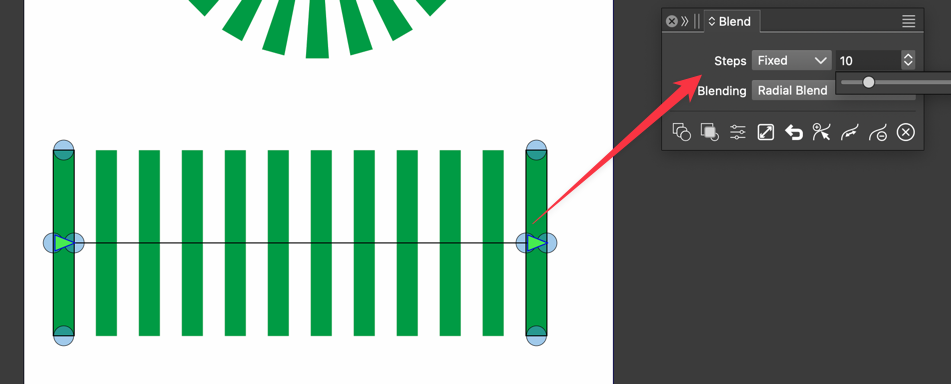
  • Blend Tool needs Split function

    4
    1 Votes
    4 Posts
    4k Views
    IngolfI
    Great, thanks for the input @Li-Xiao and for the effort @VectorStyler !
  • About half-tone

    8
    0 Votes
    8 Posts
    7k Views
    M
    @VectorStyler Look forward to a stronger VS.
  • Quick Adjustment of Swatches

    2
    1
    2 Votes
    2 Posts
    2k Views
    VectorStylerV
    @debraspicher So this would be some sort of ""Palette Editor" view. Yes I think it is possible.
  • Multiple shortcut keys

    8
    0 Votes
    8 Posts
    7k Views
    VectorStylerV
    @monsterfox Sorry, I gave the wrong example (the number keys are fixed). So first remove the "S" shortcut (assigned to the Pattern tool), and then create for example "S X" for some tool and "S Y" for another tool. This should work.