• Constrain VS to Available screen space?

    4
    0 Votes
    4 Posts
    5k Views
    VectorStylerV
    @Boldline This probably works only on the Mac, but horizontal swiping while hovering over the context panel should scroll the content of it.
  • 1.0.047 Custom Character Styles disappear when you exit VS

    Moved
    2
    0 Votes
    2 Posts
    3k Views
    VectorStylerV
    @encart Character styles are stored in the document. There are multiple ways to reuse character styles between documents: create and use a document template containing the styles. export the character styles to a file and import into another document. use character style presets (instead of styles), but these are not linked. link an other document containing the character styles using the Styles -> Document Links command.
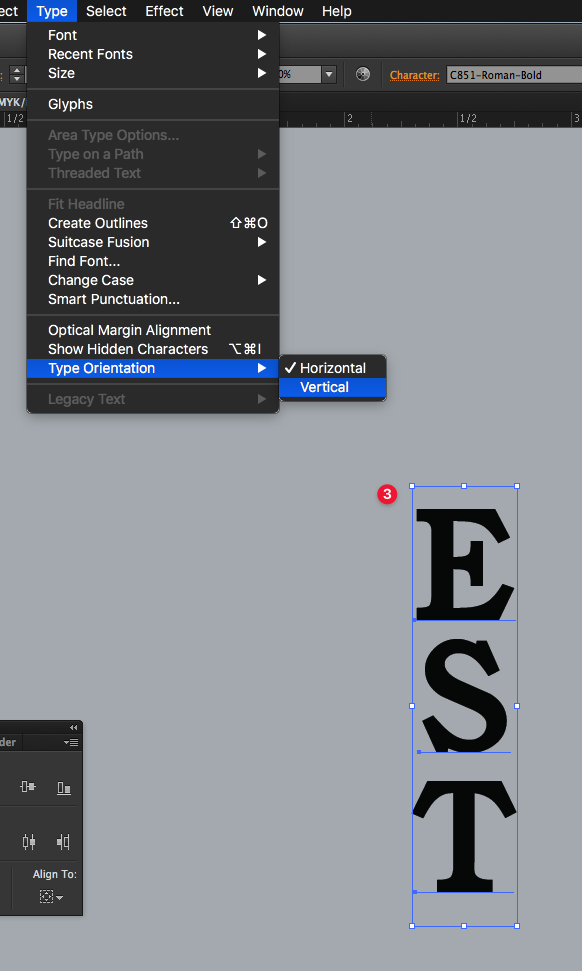
  • Vertical Type Options

    10
    2
    0 Votes
    10 Posts
    11k Views
    VectorStylerV
    @Boldline I will have to find a better default for the "Auto Vertical Roman".
  • Keeping layers closed when editing hierarchy

    3
    0 Votes
    3 Posts
    5k Views
    BoldlineB
    @b77 awesome! thank you
  • Trial - Extension?

    6
    0 Votes
    6 Posts
    7k Views
    M
    I can confirm that performance is far better in the latest version of the app - thanks @vectoradmin Just did a little test on a 1.5m wide banner gradient background… and the responsiveness of the canvas and artboards was great. Brilliant!! Video example
  • Could Stroke panel and Stroke Width Panel be combined?

    2
    0 Votes
    2 Posts
    3k Views
    VectorStylerV
    @Boldline I'm not sure about this one. The Stroke panel is large as it is. The Stroke Width panel contains options used only when editing the width profiles. But these can be docked into one column.
  • Control-V to paste image copied from web into document

    4
    2 Votes
    4 Posts
    5k Views
    VectorStylerV
    @Boldline Added this to the backlog.
  • Import (or Link) a file without specifying the area.

    4
    0 Votes
    4 Posts
    6k Views
    VectorStylerV
    @861475_VctSt I added these to the backlog.
  • Nodes and Handle flicker when cursor is near them

    2
    0 Votes
    2 Posts
    3k Views
    VectorStylerV
    @Boldline Try the Preferences -> Performance -> Hovering Selection check box (first column). You must close and reopen the document after this settings is changed to take effect.
  • Splashscreen

    16
    0 Votes
    16 Posts
    17k Views
    VectorStylerV
    @861475_VctSt It is a mistake.
  • Blend tool revolve option

    2
    0 Votes
    2 Posts
    3k Views
    VectorStylerV
    @STEVED I could not replicate this issue. The Revolve options should work with any blended shapes, with or without a blend spine. If there is a small example file with a blend using a revolve with no effect, please send it to me: csraba at vectorstyler.com Thanks!
  • Node behavior versus other vector apps

    10
    0 Votes
    10 Posts
    10k Views
    b77B
    @Boldline said in Node behavior versus other vector apps: Here I am trying to fill in a section of this butterfly that union-ing it missed. You can see me deleting nodes at the bottom of the negative space that i want to get rid of to close up the hole. As I delete them, the path more or less retains the shape, even though there are no longer nodes there to support it doing so. I would expect it would close the section quickly instead... Yes, I rewatched the butterfly video and what VS is doing upon node deletion compared to AI is trying to keep the resulting segment as similar as possible with the general shape of the previous two segments. If you just want that hole gone quickly, indeed it feels like it's not happening because the app tries to keep the shape similar until the last node is deleted. But as I explained previously, in other situations this is preferable and it also makes sense for manually simplifying a path. ……… I copied the original over to illustrator to see how it handled things - and as I expected, as I deleted each node starting in the same place, there was not a path resembling where the old nodes were anymore. Yes, Illustrator doesn't bother to retain the original shape — it just retracts the Bézier handles under the remaining nodes, resulting in a straight segment replacing the previous two segments. ……… I would expect VS to handle things the same way Illustrator did - if only because it makes sense logically. If the nodes on each side of the deleted node are not cusp nodes, I wouldn't say it makes sense to change them to cusp nodes. But Shift-Delete could do this special straightening of the resulting segment. Or the other behavior (segment approximation), if most users expect straight segments no matter what. If there is something else I missed regarding node deletion, please write again. ……… I don't use AD, so I didn't suggest anything from them. I asked what is AD's behavior when you delete a node. But I just remembered I have AD on the iPad, went and deleted a node there and it results in a "deflated" segment — something in between a straight segment and a good approximation.
  • Unusable true type font ".ttm"

    4
    0 Votes
    4 Posts
    5k Views
    861475_VctSt8
    @vectoradmin (1.0.046) Thanks. I don't know exactly when it started, but it's fixed.
  • Viewing Bookmarked Posts on Forum

    2
    1
    0 Votes
    2 Posts
    3k Views
    VectorStylerV
    @Boldline Go to your profile, click this icon [image: 1630422240056-profile.png] , the menu will contain a bookmarks link.
  • Placing obcjects along the path

    3
    1
    0 Votes
    3 Posts
    5k Views
    VectorStylerV
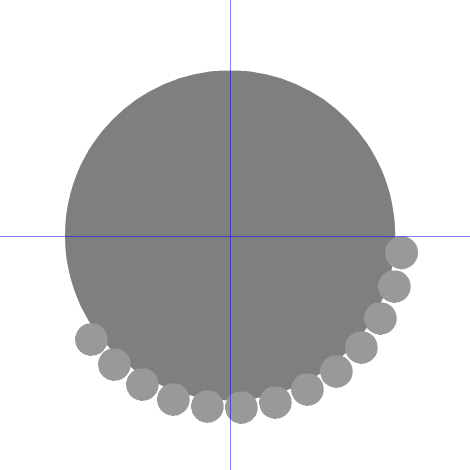
    @encart Or maybe, a proportional pattern brush, created from the small circle and applied on the large one is the best option.
  • Shape builder and outlines works much better

    1
    2 Votes
    1 Posts
    3k Views
    No one has replied
  • Difficulties making a clipping mask

    3
    0 Votes
    3 Posts
    5k Views
    VectorStylerV
    @Boldline There are two ways to do this. One way: as @b77 said, ungroup all black shapes and them combine with Union to create a single clipping shape. Then paste inside, or drag&drop in the layers panel will do the trick. The other way: if you want to keep all the black part editable, leave it as a single group. select the black group and select Object -> Object Options and given a name for the group, and then click on Role and select the Shape role and confirm with OK. now we have a shape style that we can use for clipping the other group. And the shape is obtained ynamically by combined the shapes from the black group. select the red group and in the context panel Shape drop down select the shape name given to the black group. this selects the shape style as the clipping shape of the red group. BTW: these above steps are very VS specific, I send a basic example by email.
  • 0 Votes
    2 Posts
    3k Views
    VectorStylerV
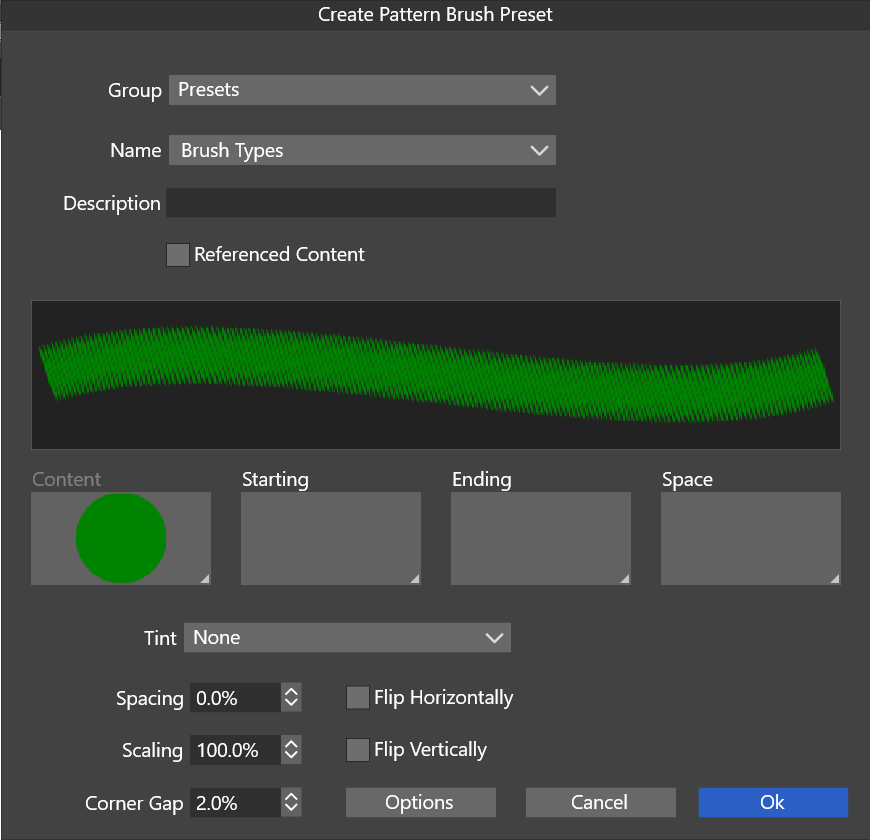
    @Boldline The size of that dot (circle) is also important. By default the pattern brush is stretched to the width of the brush, while the advance along the brush is determined by the size of the content (in this case a dot). Create the patter brush with the settings above, and when it is used on a shape, check the Proportional option in the brush panel. This will stretch the content (dots) proportionally.
  • Back and panel knock out issues

    7
    1
    0 Votes
    7 Posts
    9k Views
    861475_VctSt8
    @vectoradmin (1.0.045) A "Flat" type theme. Thank you very much. I guess it was a lot of work. I was fully satisfied with the functionality of VS, but I felt uncomfortable with the round screen. I guess it's because I've been working with square tools for almost 30 years. The harmony with the gray tone is wonderful, and I feel right at home.
  • 0 Votes
    4 Posts
    6k Views
    VectorStylerV
    @b77 said in What is the preference setting for allowing secondary drag selection of nodes in selected shape?: @vectoradmin Having this disabled by default would make more sense, IMO. Will do so!