Subcategories

  • These features and ideas have been implemented in VS as suggested

    180 Topics
    1k Posts
    VectorStylerV
    @Ayo said in About the Snap feature: Wouldn't it be better to change "Snap to Visible Only" to "Snap to View Extend Only" or shorter "Snap to Viewport Only" or even shorter "Snap to View Only" ? There is a big chance of confusion with the term 'visible' which is mainly linked to the layer system. I added this to the backlog.
  • When making adjustments, hide indicator shapes and other visual noise

    3
    2 Votes
    3 Posts
    4k Views
    VectorStylerV
    @Ingolf Added this to the feature list. I think it is doable in the short term.
  • 1 Votes
    7 Posts
    8k Views
    VectorStylerV
    @Sullyman said in Scroll bar in font selection dropdown closes without allowing a selection to be made: Still having this same issue. Tried to replicate this on both Windows (10) and Mac, but it seems to be working. Before 1.1.024 version, this issue could be replicated. If there is a short recording (I recommend record.it) to help understand what happens and how to replicate it, that would be great. Thanks. I keep this issue open, let me know if you have more info.
  • Paste selected items inside new layer

    2
    1
    3 Votes
    2 Posts
    3k Views
    VectorStylerV
    @Boldline Added to the backlog.
  • Selective alignment

    7
    1
    2 Votes
    7 Posts
    7k Views
    BoldlineB
    @b77 said in Selective alignment: But I get it that you didn't mean this only for text. Examples are welcome. I was more thinking of it for being able to choosing what section of a selection to align. Some designs we create are intentionally off-center - a small bit of text or design extends beyond the rest of the frame - but we don't want that extended part to be a factor in how the overall design is aligned on the artboard. Here is an example from a few months back when I first brought it up. Some of the secondary text extends beyond the main body of the design and if I was selecting the entire design to align, it would be off-center as a result of this
  • 0 Votes
    4 Posts
    5k Views
    VectorStylerV
    @Boldline said in Lower opacity of the design while editing clipped objects instead of full hide: @vectoradmin Interesting. What is supposed to be occurring, a partial opacity drop or no visible change at all (everything stays 100% opacity)? This has nothing to do with isolation mode. What happens is that when dragging the selection, the some of the objects are not redrawn.
  • Zoom to layer / object

    3
    3 Votes
    3 Posts
    4k Views
    VectorStylerV
    @Ingolf Added this to the backlog.
  • Idea, to add Autotext/Numbering to Repeater

    7
    3
    2 Votes
    7 Posts
    8k Views
    S
    @b77 That's right, I had forgotten about this possibility.
  • Streamlining the Repeater User Experience

    4
    2
    1 Votes
    4 Posts
    5k Views
    BoldlineB
    @vectoradmin Thanks for explaining that
  • Allow SHIFT to be pressed first when constraining tangent angle

    2
    0 Votes
    2 Posts
    3k Views
    VectorStylerV
    @Ingolf The main issue there is that holding Shift before mouse click is used to adjust the selection (add / remove to the selected nodes). I have to look into this more, how the two features (selection and angle constrain) could be reconciled under the same key press. BTW: there are cases in VS where it is possible to select multiple control points.
  • Could clipped "hidden" items be less randomly selected?

    8
    0 Votes
    8 Posts
    8k Views
    VectorStylerV
    @Boldline Yes, I hovered there intentionally. I added to the backlog an option to block these. On the other hand, the point of the node tool is to select deep into objects, and that clipped out brick shape is there. I think there is a use case for both (allowing selection of these or not).
  • Breaking Node Handles with ALT while using the Pen Tool

    10
    0 Votes
    10 Posts
    10k Views
    VectorStylerV
    @Victor-Vector I got to fix the right alt issue.
  • Pen Tool: Show Next Segment check option on Context Panel

    13
    2
    1 Votes
    13 Posts
    12k Views
    Victor VectorV
    @vectoradmin Oh brilliant! You called it. Turning "Adjust Node Removal Curvature" on or off, saving preferences, closing VS, reopening VS, trying to delete nodes will respect the previous saved on or off preference. Thanks for troubleshooting the problem, I hope it is a quick fix.
  • Sections for Polygon Shape

    9
    1
    1 Votes
    9 Posts
    10k Views
    S
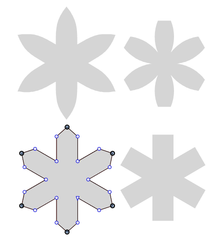
    I am not fixated on a solution. I was thinking about it while I was playing with pattern creation in VS And I like to use Clones for that. With Circles Sections, I do it this way. [image: 1648470388888-symmetrie-1.png] Doing that with (cloned) Polygon Shape Sections would offer the possibility to distribute the pattern and it would keep the Shape editable. [image: 1648470403699-symmetrie-2.png]
  • Exit text editing mode

    8
    1 Votes
    8 Posts
    8k Views
    IngolfI
    @vectoradmin said in Exit text editing mode: @encart Yes, it seems that on Window using Esc does not completely "exit" text editing. Indeed, verified on my Windows 10 machine too.
  • "Lock all Other Layers" option or layer isolation mode

    11
    0 Votes
    11 Posts
    12k Views
    BoldlineB
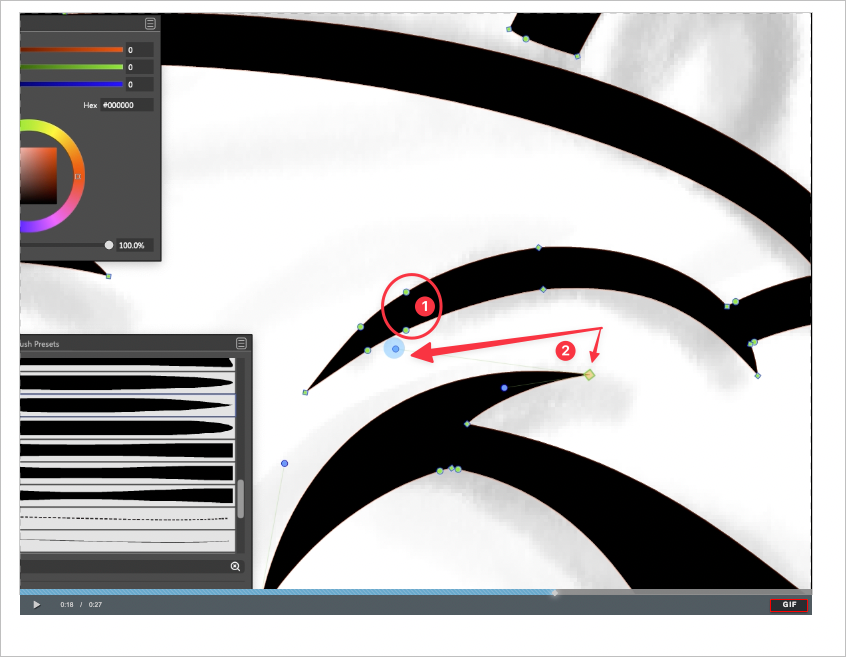
    @vectoradmin For some reason the secondary image did not post in my most recent comment you replied to on here. I'll add it there retroactively to avoid confusion and here as well Right now with this situation, my issue is that sometimes the clipping vector wants to be selected when I am trying to grab things behind it all In the attached image, I was trying to modify the black fill and white stroke (1) but it kept thinking I wanted to select the white box pattern inside the item above (2) [image: 1648339860144-bc0508b4-5531-4bf7-8faf-3b7e1e3732fe-bld-2022-03-25-at-17.04.45-resized.png]
  • Style features ( mega-topic ) ( unimplemented )

    1
    0 Votes
    1 Posts
    3k Views
    No one has replied
  • Application features ( mega-topic ) ( unimplemented )

    1
    1 Votes
    1 Posts
    3k Views
    No one has replied
  • Applying styled group ( accumulated )

    19
    1 Votes
    19 Posts
    23k Views
    VectorStylerV
    @Nils said in Applying styled group: Or should I not overvalue that and just apply separation as I see fit ( everything clone related into one, everything symbol related into another, etc. .. )? Yes.
  • Option to easily flip the height and width with double arrow

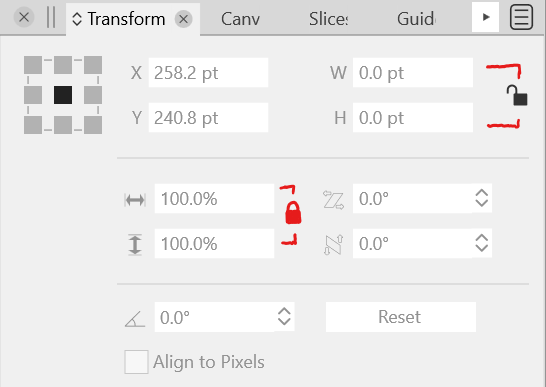
    2
    1
    1 Votes
    2 Posts
    3k Views
    VectorStylerV
    @Boldline Added this to the backlog.
  • 1 Votes
    4 Posts
    5k Views
    VectorStylerV
    @Boldline Added this to the backlog.