VectorStyler
    • Categories
    • Unread
    • Recent
    • Tags
    • Popular
    • Register
    • Login
    1. Home
    2. Popular
    Log in to post
    • All Time
    • Day
    • Week
    • Month
    • All Topics
    • New Topics
    • Watched Topics
    • Unreplied Topics

    • All categories
    • E

      Starry night : is there a way to achieve this with VS ?

      Watching Ignoring Scheduled Pinned Locked Moved Questions and Support
      22
      1
      1 Votes
      22 Posts
      20k Views
      M
      @Li-Xiao 这个操作真的很新奇,好像管理员都没有想到。这个功能我是基本用不上了。工作中没有太适合的场景。现在依然觉得论坛里你玩VS最溜。
    • G

      Distributing nodes equally along a line.

      Watching Ignoring Scheduled Pinned Locked Moved Questions and Support
      21
      0 Votes
      21 Posts
      35k Views
      S
      @Jono me too
    • BoldlineB

      Printing lower opacity object as a halftone seems not to work

      Watching Ignoring Scheduled Pinned Locked Moved Questions and Support
      21
      3
      1 Votes
      21 Posts
      34k Views
      VectorStylerV
      @Dazmondo The repeater has been improved in 1.1.024 to work better with large number of objects.
    • Devil DinosaurD

      Isometric drawing

      Watching Ignoring Scheduled Pinned Locked Moved Tutorials
      21
      5 Votes
      21 Posts
      40k Views
      S
      @Devil-Dinosaur , @Jono You could also use clipping in Clones. Recommend to set the "Isolation Opacity" in View > Display > Display Options lower for a better view. Here the vid Clipping in Clones [image: 1647419310404-clipping-in-clones.png] And the clipping object with "no fill" offers some further possibilities. [image: 1647420649667-1.png] [image: 1647420659413-bildschirminhalt-erfassen-2.png]
    • Victor VectorV

      Font Family Font Weights Missing

      Watching Ignoring Scheduled Pinned Locked Moved VectorStyler 1.1 Bugs
      21
      2
      0 Votes
      21 Posts
      36k Views
      VectorStylerV
      @Victor-Vector Is this problem with the font weights still persists?
    • Victor VectorV

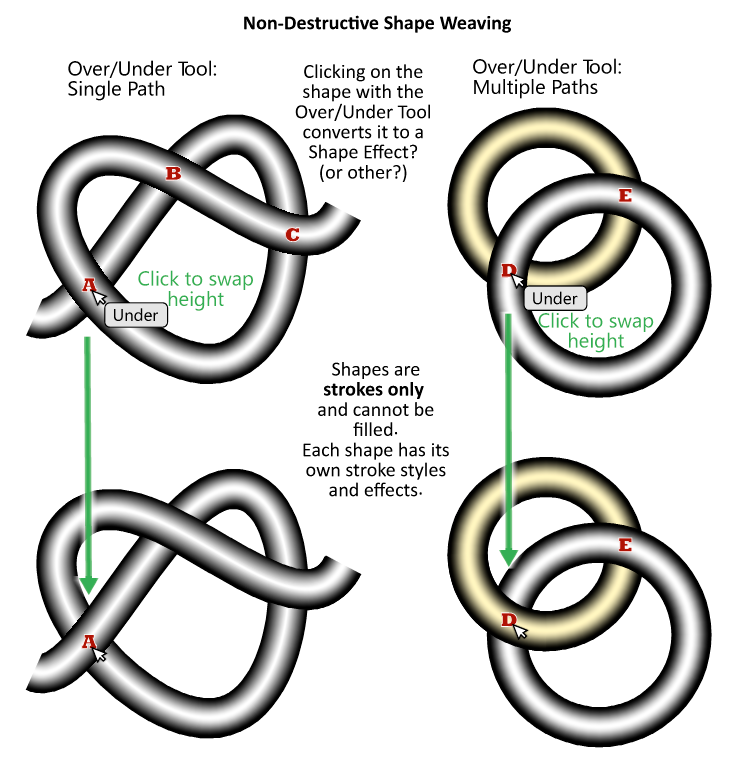
      Shape Weaving – Over-Under Paths

      Watching Ignoring Scheduled Pinned Locked Moved Features and Ideas idea
      21
      1
      3 Votes
      21 Posts
      45k Views
      S
      @Victor-Vector I love this too, VS seems to be an endless box of miracles
    • IgullI

      Nodes invisible when hovering

      Watching Ignoring Scheduled Pinned Locked Moved VectorStyler 1.1 Bugs
      21
      0 Votes
      21 Posts
      32k Views
      b77B
      @Igull Great!
    • IgullI

      Schoolboy Circle Question

      Watching Ignoring Scheduled Pinned Locked Moved Questions and Support
      21
      0 Votes
      21 Posts
      27k Views
      VectorStylerV
      @b77 said in Schoolboy Circle Question: Unfortunately trackpad users are stuck with no access to a context menu with this setting This is why the before / after mouse press differentiation of modifiers allows for covering more use cases.
    • BoldlineB

      Were objects dragged into a VS from outside sources set to be links by default now?

      Watching Ignoring Scheduled Pinned Locked Moved Questions and Support
      21
      1
      0 Votes
      21 Posts
      27k Views
      b77B
      @William-Kansepa Thanks. Maybe 'Embed Linked File' is the right word for this instead of 'Expand'. Besides that, it should help both AI and AD users make the connection. (I'm also not sure the Styles menu is the right location for it)
    • B

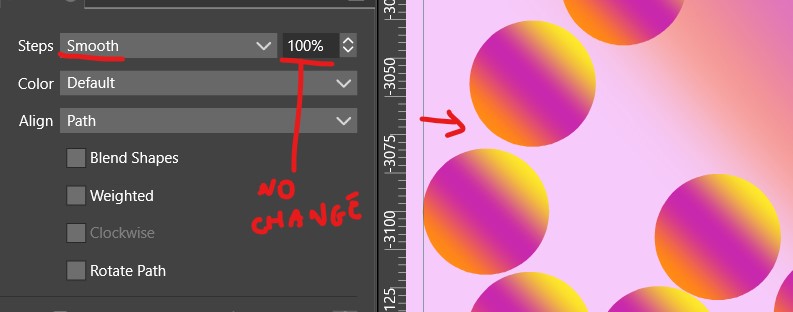
      Blend: smooth is not smooth

      Watching Ignoring Scheduled Pinned Locked Moved VectorStyler 1.1 Bugs st an unoptimal feature
      21
      2
      0 Votes
      21 Posts
      44k Views
      VectorStylerV
      @Pat I will try to fix these crashes.
    • BoldlineB

      Expanding the options for the Path Sketch Tool

      Watching Ignoring Scheduled Pinned Locked Moved Features and Ideas
      21
      1 Votes
      21 Posts
      38k Views
      S
      @pentool said in Expanding the options for the Path Sketch Tool: A little off topic, but the reason I don't like those screen recorders is because they don't scale. If you have a big screen, it won't fit into a 13" laptop screen and have to scroll left/right/up/down sometimes to see what people are doing. Yes, your right a youtube video could be a better choice if you need a full screen record. But often you need just a little area and its fast and it get the job done. (ScreenToGif is a 170 kB Tool ) On window you could scale the contend of a browser a bit via Control Key and the scroll wheel.
    • VectorStylerV

      beta update 1.2.002

      Watching Ignoring Scheduled Pinned Locked Moved VectorStyler 1.2 beta
      21
      5 Votes
      21 Posts
      40k Views
      J
      @VectorStyler I mistakenly set the video private. It is now for public viewing. Please check.
    • S

      Adobe has something new related to 3D-Illustration ...

      Watching Ignoring Scheduled Pinned Locked Moved General Discussion
      21
      6 Votes
      21 Posts
      25k Views
      S
      A nice little Update about MagicaCSG, a nice little SDF Modeler i mentioned in posts above. Even though I don't use it as often these days, I'm still a Patreon supporter of MagicaCSG. It supports now TrueType fonts (.TTF) with the latest Update. This means also you could use Symbol Fonts for creating patterns with the also build in array functions. Here a Example i made [image: 1768989021337-flower-symbol-resized.png] [image: 1768989161709-symbol-font-pattern-resized.png] . . Of course you could also use normal fonts [image: 1768989566864-normal-font-resized.png]
    • AyoA

      Clear all content from the object?

      Watching Ignoring Scheduled Pinned Locked Moved Questions and Support
      21
      1
      0 Votes
      21 Posts
      28k Views
      AyoA
      @VectorStyler said in Clear all content from the object?: Clear Content should clear all content from the object Was wondering if Clear Content isn't the same as Clear object Style.
    • R

      Canva Bought Affinity!

      Watching Ignoring Scheduled Pinned Locked Moved General Discussion
      21
      6 Votes
      21 Posts
      34k Views
      debraspicherD
      Hi, I’ve been paying attention to VS development in passing (thanks, boldline) knowing I’ll likely soon be looking for my next launching pad(s). This was all in fruition pre-Canva acquisition. I’ve returned to Adobe at least for the time being because it’s what I can get back into realistically quickly with my crazy schedule and a very young child. Still, I will never stop checking out alternatives as that is where ultimately I will look for my new home. I am very pleased to see there is a commitment to quality in this community and that’s one of the reasons I keep returning here to check on VS, I think. I’m sure other Affinity users have taken their own notes and are checking out their options as well post-Canva acquisition. I’ve been with Affinity since it emerged on Windows and it made sense to me to switch away from AI to it as I always found AI joyless and painful to use. It also needed too many plugins to do what should’ve been native functionality. Even if its output was superior at the time, I thought I could get by as long as the software was solid and I could work around limitations. However, between participating in betas and analyzing each .x bug release, it became all too clear they are not invested in raising their product to the level of even their own marketing. I’ve had numerous issues with getting quality output from their software, to say the least. I was constantly opening the program and finding new bugs, most of the time right upon starting something very basic in their programs. This chipped away at any benefit of the doubt I would’ve given them in the past. Example: In-program rendering has always been unusable/unreliable: I can open a PNG in Photo straight from its source and Affinity will still find some way to blur or fudge this in the viewport. I don’t know how they managed it, but their software cannot handle a simple 1:1 display of a bitmap opened straight from its file without some sort of display issue occurring. Something even MS Paint can handle. I would question if it was the file being too compressed, but as it turns out, it was often Affinity. Screenshots also had this issue. I can only imagine what it’s done to my perception of my processed RAWs where it would be much more difficult to tell at scale whether I’m seeing a true image at 100% view or not. At least there’s increased pressure in the market for competition. This also gives needed incentive for the market to grow and I think it will also encourage people towards other options such as VS and FOSS, indeed any alternatives. That’s my hope and I don’t think that that’s unrealistic at all. On the bright side, if Canva is where some aspiring designers begin, then they’re already more platform-agnostic than others have been historically. They can still self-educate on their options before settling down on the most obvious choices. Maybe. @Boldline said in Canva Bought Affinity!: The FOSS "Graphite" is interesting - thanks for bringing it to our attention. Same, also. I noticed other people were talking about it on AF. I'm subscribed to their mailing list.

    • B

      Repeater & Symbols - 2 questions

      Watching Ignoring Scheduled Pinned Locked Moved Questions and Support
      21
      2
      0 Votes
      21 Posts
      32k Views
      VectorStylerV
      @Pat said in Repeater & Symbols - 2 questions: indeed the "Preview" feature that doesn't render changes in real time I will try to fix these for the next build.
    • L

      Missing custom style in halftone within the image effects

      Watching Ignoring Scheduled Pinned Locked Moved Features and Ideas
      21
      1 Votes
      21 Posts
      31k Views
      S
      @Li-Xiao In my opinion, the fusion effect is not suitable for replicating something like this. Because it only works well with shapes that are the same size and an contour/outline is needed. [image: 1718259393554-fusion-effect.png]
    • S

      Kind of pattern selection using the Colorize feature

      Watching Ignoring Scheduled Pinned Locked Moved Tutorials
      21
      8
      4 Votes
      21 Posts
      28k Views
      S
      @monsterfox , @VectorStyler . . You can't simply create a color palette and color your shapes with it. There is a little more to do then this Either You need to determine the object order and adjust the colors in your palette to that order. Or create the objects of your Design according to a specific system/order so that the order in which the objects are created are always the same. In addition, the number of shapes in the design must match the number of colors in the color palette. The Shape Builder trick can only be used to a limited extent here, and only with objects that don't overlap. Here is a video where I created a color palette according to the selection order of your design. Here the video
    • E

      New Youtube video : VectorStyler Repeater Basics

      Watching Ignoring Scheduled Pinned Locked Moved Tutorials
      21
      8 Votes
      21 Posts
      8k Views
      E
      New video posted : Color your vector design in vectorstyler https://youtu.be/e5BqIlhPDVw?si=SzJdZePtnPI18W4l [image: 1763918625275-vs-color-effects-resized.png]
    • K

      Flickering canvas on M1

      Watching Ignoring Scheduled Pinned Locked Moved Resolved Issues
      20
      1
      0 Votes
      20 Posts
      20k Views
      VectorStylerV
      @Kyriakos @encart Can the flickering issue be replicated? There is a double buffering enabled for all display types now.