Subcategories

  • These issues have been resolved and closed

    863 Topics
    5k Posts
    VectorStylerV
    @debraspicher I will try to replicate and fix this.
  • Everyone makes mistakes. Help us correct ours. Let us know how to improve VectorStyler.

    10 Topics
    41 Posts
    VectorStylerV
    @jpsimmons Yes, this can be replicated and it is a bug. I will try to fix it for the next build.
  • Everyone makes mistakes. Help us correct ours. Let us know how to improve VectorStyler.
    579 Topics
    3k Posts
    G
    @VectorStyler said in Slow Typing Performance: @gotanidea I'm testing these issues with slow typing performance. The new document has no issue with speed (the old is till slow). What configuration you use for these tests? and which text is edited in the new document. I'm trying to replicate as close as possible. Can you please click the first text box ("Before rigging any character geometry ....") at the top-left region of the new document using the Text Tool, then hold the "a" key? I use: VectorStyler v1.3.001 Windows 11 Home 64-bit AMD Ryzen 7 5800H with Radeon Graphics (16 CPUs) ~3.2GHz 16384MB RAM NVIDIA GeForce RTX 3060 Laptop GPU
  • Bug reports on the 1.2 beta of VectorStyler

    290 Topics
    2k Posts
    L
    There is a workaround that requires using Shape Corner in the Effects panel. However, this only works if all four corners of the rectangle have the same radius. If the corner sizes are inconsistent, Shape Corner doesn't allow for individual corner adjustment, and you have to use the Corner panel instead, which makes this workaround unusable for that scenario. https://youtu.be/akNbqo8wqo8
  • These bugs were posted for 1.2 and should be resolved

    229 Topics
    1k Posts
    W
    Now fixed in VS 1.3.017. Thank you @VectorStyler!
  • Two HSL Options in Color Settings Options

    2
    1
    1 Votes
    2 Posts
    2k Views
    VectorStylerV
    @DMBrown Yes, this is a bug. Will be fixed.
  • node tool

    2
    1
    1 Votes
    2 Posts
    2k Views
    VectorStylerV
    @monsterfox I opened a bug on this.
  • Pencil tool defaults back to a black stroke (instead of "no-stroke")

    12
    1
    1 Votes
    12 Posts
    10k Views
    VectorStylerV
    @Boldline said in Pencil tool defaults back to a black stroke (instead of "no-stroke"): Is that expected? Yes
  • [macOS] External monitor / locking dialog

    2
    1 Votes
    2 Posts
    4k Views
    VectorStylerV
    @jkwchui I opened a bug on this.
  • Can't select Selection tools

    4
    0 Votes
    4 Posts
    4k Views
    B
    Hi sorry I forgot about this for a couple of weeks. It works now. I think my problem was that I didn't realize you had to select the pointer tool before you could click-drag to marquee select. It's resolved, thanks for your help!
  • Inconsistent Dropper Behavior

    2
    1 Votes
    2 Posts
    2k Views
    VectorStylerV
    @debraspicher Yes, this can be replicated here also. When styles are picked from transformed groups or objects, the transformation is not copied. And since these transforms are non-destructive on the stroke, the original stroke attribute will be copied (without the scaling).
  • A Bug

    2
    1 Votes
    2 Posts
    2k Views
    VectorStylerV
    @monsterfox I will try to replicate this (sometimes, errors cannot be replicate and then it is not possible to find what is the root cause).
  • Absolute origin patterns on overlapping artboards don't align

    3
    3
    1 Votes
    3 Posts
    3k Views
    LoginErrorL
    PNG, through the Export Artboards menu.
  • 1 Votes
    2 Posts
    2k Views
    VectorStylerV
    @Li-Xiao I opened a bug on this.
  • 1 Votes
    3 Posts
    3k Views
    VectorStylerV
    @LoginError Yes, this is a known issue. It is caused by anti-aliasing when shapes are touching precisely and there is a different color background, then at the shapes margin this background will become visible. There is no other solution for now the turning off anti-aliasing.
  • Stretch the brush stroke.

    4
    1 Votes
    4 Posts
    3k Views
    L
    @monsterfox 不用担心,1.3就有中文了
  • 1 Votes
    2 Posts
    3k Views
    VectorStylerV
    @Boldline I opened a bug on this.
  • Graphic replacement tool and Repeat panel。

    5
    1
    1 Votes
    5 Posts
    4k Views
    M
    @VectorStyler https://youtu.be/AcYAcNuuG_E?feature=shared It is also a problem of the replacement tool. After using the graphic replacement tool, a clipping group will be generated in the replacement source, and it is hoped that it can be removed.
  • Trim Path

    2
    0 Votes
    2 Posts
    2k Views
    VectorStylerV
    @monsterfox I open a bug on this and will try to replicate it.
  • Panel showing behind tabbed Palette Panel

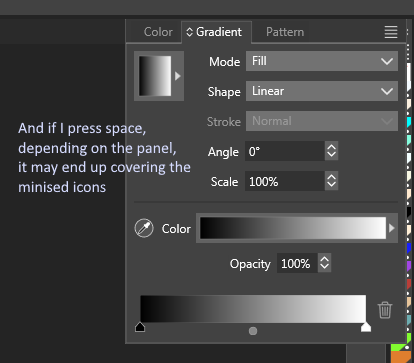
    5
    0 Votes
    5 Posts
    4k Views
    debraspicherD
    @VectorStyler I'm sure you received it, but when I did the reset, the program reopened with a Crash report, so maybe that is a help.
  • Cannot Add Swatches.. or so it appears...

    5
    0 Votes
    5 Posts
    4k Views
    debraspicherD
    @VectorStyler said in Cannot Add Swatches.. or so it appears...: @debraspicher I can only replicate the panel resizing issue. I can add colors to the palette, with a color selected from the color panel first. It is also possible to drag&drop a color from the color panel target knob (top-left fill/stroke thing) into the palette. I also tested this with the attached file. FWIW, I did test/check these methods. They weren't working either.
  • 1 Votes
    14 Posts
    10k Views
    debraspicherD
    @VectorStyler Sorry missed this. It's the result of the Undo/History bug. Sometimes this happens... I will keep recording and eventually I capture it. It's happened a few times. I'm not sure, but my guess would be the Object was originally meant to be a Layer... (I put everything in sublayers, generally) Edit: I wonder if my habit of Shift + {Click} New Layer/Sublayer might also add something not so nice to the History steps/recipe that might cause Objects that were moved around to get lost, as well? It's just a thought.
  • This topic is deleted!

    1
    0 Votes
    1 Posts
    1 Views
    No one has replied
  • Adding swatches to default main color panel has issues

    2
    1 Votes
    2 Posts
    2k Views
    VectorStylerV
    @Boldline I opened a bug on this.
  • 1 Votes
    2 Posts
    3k Views
    VectorStylerV
    @Boldline I will try to fix this for the next build.