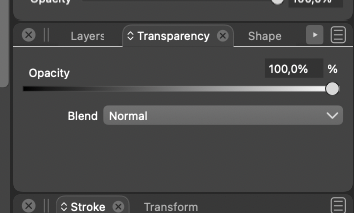
• Wasted screen estate in transparency panel

    Moved
    2
    1
    0 Votes
    2 Posts
    3k Views
    VectorStylerV
    @Ingolf Yes, this happens because the transparency panel is resizable, and will not autosize when the content is changed. I will try to fix this.
  • Exported pdf from VS causes vinyl cutter app crash

    Moved
    6
    0 Votes
    6 Posts
    10k Views
    BoldlineB
    @b77 good idea! I will do that as well as send you the files @vectoradmin
  • Text changes when duplicating multiple text frames at once.

    Moved
    2
    0 Votes
    2 Posts
    4k Views
    VectorStylerV
    @ash-f I will try to replicate this.
  • Traditional Mongolian is not shown properly

    Moved
    8
    1
    0 Votes
    8 Posts
    9k Views
    A
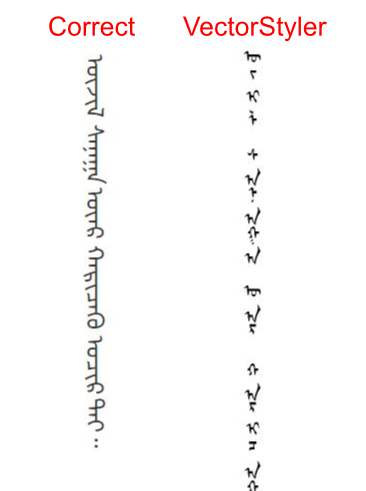
    @vectoradmin Inkscape seems to handle traditional Mogolian properly. It has left to right mode in vertical writing. also it handles continuous character(cursive) automatically by using the OpenType feature. You may be able to refer their code/logic since it's a opensource. [image: 1639082291517-image-2021-12-09-at-12.32.34-pm-resized.jpeg]
  • Dragging object inside other and ungrouping bug

    Moved
    4
    0 Votes
    4 Posts
    5k Views
    VectorStylerV
    @Ingolf I will think of a way to do this.
  • Image Objects Shift during Zoom

    Moved
    7
    0 Votes
    7 Posts
    8k Views
    VectorStylerV
    @Ingolf Thanks for the info. This looks like a bug, I added it to the backlog. One temporary workaround is to uncheck the View -> Display -> Direct Preview Editing option. When disabled, the changes are rendered only after the mouse is released and only an outline preview is shown while the mouse is dragged.
  • Monitor profile not working

    Moved
    11
    1
    0 Votes
    11 Posts
    12k Views
    IngolfI
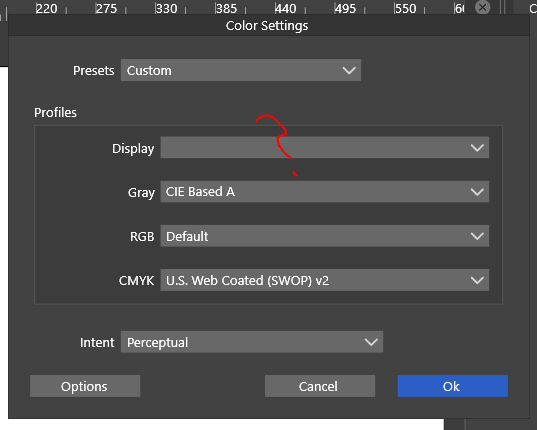
    As my signature suggests, I moved Vectorstyler to macOS and M1 hardware which solved the problem for me: macOS actually comes with a generic monitor color profile for this Eizo monitor, but of course I should use a custom made instead, if available. Which I have. The monitor profile I mentioned above could be imported in macOS Monterey and work flawlessly here as well. So probably a bit of color management support for Windows in the pipeline for VS.
  • Merging/Union Causes Offset path result to disappear in part

    Moved
    3
    1
    0 Votes
    3 Posts
    4k Views
    BoldlineB
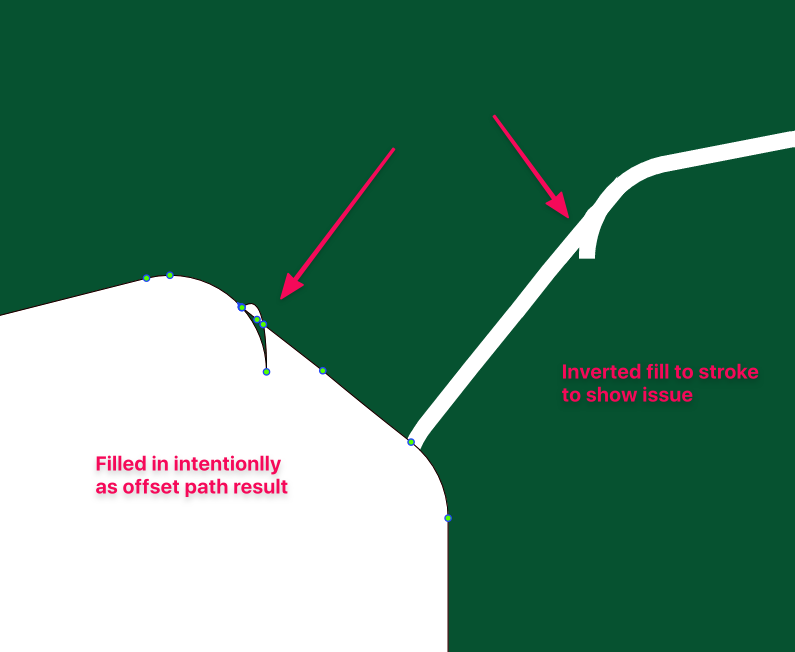
    @vectoradmin You mentioned you found the font - but for the sake of being sure on it's name, it's called "Sports Headline". I can email you an otf file if that helps
  • Reset Panels does not seem to be working

    Moved
    5
    0 Votes
    5 Posts
    7k Views
    BoldlineB
    @vectoradmin Illustrator has an interesting approach that might in some capacity work well in VS when/if you get the opportunity to add it; Illustrator has a few preset panel layouts based on the kind of work people do. I have not used them all to know if they are super helpful, but I have always used the "essentials" panel setup of just the basic needs. Typically when I used Illustrator, by the middle to end of a project, the panels would end up all over the screen in no particular order. I could go click on the tab labeled "essentials" (it would show the name of whatever setup you were using at the time) and then choose to reset everything and it'd all go back to ordered columns of panels with the extras going away completely. There was also the option to create your own custom panel arrangement [image: 1637675831007-f64f2f75-6369-49a4-9ed1-d3e5833a203c-image.png] [image: 1637675679769-fa954eb7-4858-426b-ac55-0da6314f9ff2-image.png]
  • Sluggish UI and object go missing from layers

    Moved
    2
    2
    0 Votes
    2 Posts
    4k Views
    VectorStylerV
    @Boldline I will have to replicate this to see what happens. In some cases with many / complex vectors, the CPU use will jump up, while calculating effects, or rendering for display. Is there a document that could help replicating this (and the name of the font).
  • Tracking Shortcuts revert back to default

    Moved
    5
    1
    0 Votes
    5 Posts
    6k Views
    BoldlineB
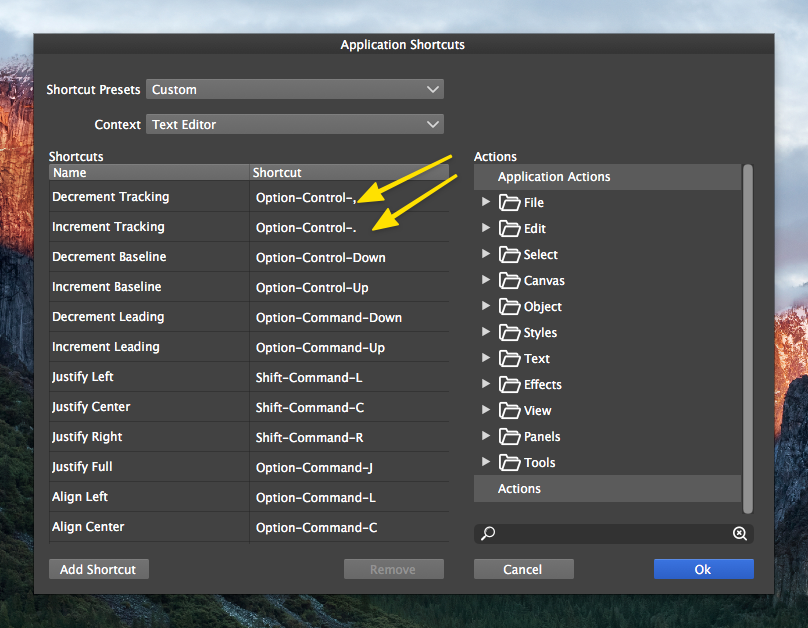
    @vectoradmin Sounds good. Speaking for myself and a number of others, I know because of muscle-memory, tracking edits done by keyboard typically use the option-arrow right/left. So if that is assigned to another option for tracking as you seemed to have suggested a while back, perhaps swapping them? I also realized I did accidentally reset the workspace settings thinking I was resetting panel locations to default. So that would explain why the modified keyboard shortcuts returned to the default
  • Refreshing madness when pointer is outside selected shape area

    Moved
    8
    0 Votes
    8 Posts
    8k Views
    IngolfI
    @vectoradmin said in Refreshing madness when pointer is outside selected shape area: @Ingolf Could not replicate this one. I will open a bug, it might be some configuration issue. I opened the file again now 12 hours later after my computer was turned off for just as long, and I do not see the problem here and now. I will mail you the VS file in relation to the other bug and see if I can trigger it again. Trying on another computer roughly similar to this one didn't reveal the issue either.
  • 0 Votes
    2 Posts
    4k Views
    VectorStylerV
    @PatrickM Tried to replicate this, but could not. If there are some steps, or a short recording (we use https://recordit.co/) it might help.
  • Multiple screen on Mac OSX (Big Sure / Intel)

    Moved
    3
    3
    0 Votes
    3 Posts
    5k Views
    VectorStylerV
    @Olich I will try to replicate this. Does closing / reopening the document help, once the window is on the second screen?
  • Where is my layer ?

    Moved
    6
    1
    0 Votes
    6 Posts
    7k Views
    ambrosA
    create complex document open second complex document copy entire contents (several layers and many objects in document 2) Click on document tab to return to the first document open (in step 1) Paste (Ctrl + v) layers not visible in document. I mean I just tried it, and everything worked perfectly, so it is certainly a sporadic error... Also I have literally just updated the intel and nvidia graphics drivers (new drivers released for both this morning)
  • 0 Votes
    5 Posts
    6k Views
    ambrosA
    Ah OK.. if at point of import I change to 'all fonts' it picks up on the 'global' rule I created earlier. so although it's not recognising the font at point of import i can set up a rule that automatically changes t point of import - which is fine.. (thank you @Boldline ) I can then select all text using the select 'text on path' command and change the point size (As it imports at the wrong size) It's strange though.. I am not sure if this is the intended behaviour ? (it's obviously the setup is designed to cater for some complex setups with specific fonts being allocated to specific documents - but I think the 'import routine' isn't as straightforward as it could be as a result maybe ?
  • This topic is deleted!

    Moved
    1
    0 Votes
    1 Posts
    2 Views
    No one has replied
  • 0 Votes
    7 Posts
    8k Views
    VectorStylerV
    @ambros No problem, support is first
  • This topic is deleted!

    Moved
    17
    0 Votes
    17 Posts
    840 Views
  • Pen tool does not always register

    Moved
    4
    0 Votes
    4 Posts
    6k Views
    VectorStylerV
    @Boldline I think the best so far is just to have the recording. I will try to do the same steps.