VectorStyler
    • Categories
    • Unread
    • Recent
    • Tags
    • Popular
    • Register
    • Login
    1. Home
    2. Popular
    Log in to post
    • All Time
    • Day
    • Week
    • Month
    • All Topics
    • New Topics
    • Watched Topics
    • Unreplied Topics

    • All categories
    • IgullI

      Corner Fulcrum Bug ?

      Watching Ignoring Scheduled Pinned Locked Moved VectorStyler 1.1 Bugs
      26
      0 Votes
      26 Posts
      38k Views
      VectorStylerV
      @b77 said in Corner Fulcrum Bug ?: @VectorStyler If the next build will have changes related to all this, please explain the changes here when it's released. Before I forget: The only change that will be in the next build is that when a free path (not parametric shape) is scaled or rotated and the "Direct Shape Transformation" is enabled (already exists), then instead of adding a "nondestructive" transform to the object, it will just scale the path, leaving the corners "rounded".
    • BoldlineB

      Curvature tool

      Watching Ignoring Scheduled Pinned Locked Moved Features and Ideas
      26
      2 Votes
      26 Posts
      38k Views
      BoldlineB
      @Daniel You've done an awesome job discussing the tools, the Bezigon tool especially! I've learned a ton of information from you on all this and I appreciate your dedication to helping everyone understand better. I'm sure @VectorStyler has a good sense of what you're talking about and when he gets the opportunity to add it, we can go deeper with it and see if there are improvements to be made, etc.
    • AyoA

      Select All Objects while working in the Node Tool

      Watching Ignoring Scheduled Pinned Locked Moved Features and Ideas
      26
      2
      0 Votes
      26 Posts
      38k Views
      L
      @Ayo Sometimes there are different paths to reach the destination. I just chose an additional route. As long as we reach the destination, wouldn't it be better if there's a faster method? For me, I prefer having multiple ways to achieve the same goal. In case one method encounters a bug, I can switch to another method. This is the best approach before the bug is fixed. Of course, everyone has their own way, as long as the goal is achieved. Thank you for your many suggestions. They will make VS even better.
    • P

      Actions file can no longer be opened

      Watching Ignoring Scheduled Pinned Locked Moved Bugs in VectorStyler
      26
      1 Votes
      26 Posts
      35k Views
      VectorStylerV
      @pentool said in Actions file can no longer be opened: The error here is that the edits are not saved immediately to the file. I will find a fix for this for the next build.
    • syllieS

      Recolor woes

      Watching Ignoring Scheduled Pinned Locked Moved Bugs in VectorStyler
      26
      1
      1 Votes
      26 Posts
      31k Views
      S
      @VectorStyler As already said thats only happen when using the Mouse scroll wheel in that Number fields, the arrow keys work expected counting 1, 2, 3° ect
    • A

      Printer marks do not work correctly

      Watching Ignoring Scheduled Pinned Locked Moved Resolved Issues
      25
      2
      0 Votes
      25 Posts
      54k Views
      861475_VctSt8
      @vectoradmin (1.0.041) The basic functions seem to have been fixed. As I mentioned in the previous post, it is better to fix the line widths of marks. Improvement: Each of the following should be set to 0.09mm. -Crop:0.18mm <- too thick -Bleed:0.18mm <- too thick -Resistration:0.02mm <- too thin In actual printing, various data are pasted on the outside of the Artboard as needed depending on the process. However, I think this is sufficient for small office.
    • S

      TIP - Simple Opensource Text/SGVs to 3D-Object Generator

      Watching Ignoring Scheduled Pinned Locked Moved General Discussion
      25
      2
      1 Votes
      25 Posts
      44k Views
      S
      SVG Render Output with a 3D Model with Blenders FreeStyle SVG Exporter (its a Vespa that I modeled once). So you are not restricted to Text only. Again the output of Blenders FreeStyle SVG Exporter is pure Vector and of course loadable in VectorStyler. The Lines are still a bit messy, but that also depends on the resolution of the 3D Model. Here a Screenshot: [image: 1639821185665-vespa-freestyle1.png]
    • BoldlineB

      Can Scaling stokes and effects be on by default? Can we make it easier to switch all child sublayers by editing the setting at the parent level?

      Watching Ignoring Scheduled Pinned Locked Moved Questions and Support
      25
      1
      1 Votes
      25 Posts
      33k Views
      DazmondoD
      @Dazmondo Yes, a few parametric shapes are not "scaled" (rectangle, ellipse). An other way to go around this is to disable the Direct Shape Transformation option in Preferences -> Editing Options 2 (bottom-right corner). Done and working ----
    • DazmondoD

      Weird rulers

      Watching Ignoring Scheduled Pinned Locked Moved VectorStyler 1.1 Bugs
      25
      1
      0 Votes
      25 Posts
      36k Views
      b77B
      @VectorStyler An elegant solution could be to integrate this choice invisibly into a Start Window, where if the user chooses a web size artboard/preset document (say, 960x1600px), it creates it with top-down coordinates.
    • BoldlineB

      Affinity user poll excluded VS as an option!

      Watching Ignoring Scheduled Pinned Locked Moved General Discussion
      25
      1
      4 Votes
      25 Posts
      42k Views
      b77B
      @Subpath Thanks for the Xara mini-video!
    • IgullI

      Manual Kerning ?

      Watching Ignoring Scheduled Pinned Locked Moved Questions and Support
      25
      1 Votes
      25 Posts
      38k Views
      IgullI
      @fde101 said in Manual Kerning ?: a failure to conform to platform standards Yes, I completely agree with you, folks that do that should have their mice (mouses?) taken away from them and forced to use trackpads It really depends on how far back you are prepared to defend these standards - I'd have a wee read of anything that Jef Raskin wrote on the subject. I'm certainly not going to defend anything assumed as a standard currently - I rued the day that apple changed command+m for move to stuff it in the dock Neil
    • S

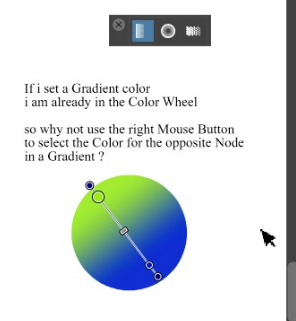
      Right Mousebutton to fill the opposite Node in a Gradient

      Watching Ignoring Scheduled Pinned Locked Moved Features and Ideas
      25
      1
      1 Votes
      25 Posts
      40k Views
      b77B
      @Subpath That's great.
    • T

      Three-finger drag, tap-to-click unreliable (macOS)

      Watching Ignoring Scheduled Pinned Locked Moved VectorStyler 1.1 Bugs
      25
      1 Votes
      25 Posts
      40k Views
      VectorStylerV
      @tudor said in Three-finger drag, tap-to-click unreliable (macOS): Now I've just updated VS on an M1 Mac mini and the bug is still present Does this problem with the trackpad still present?
    • H

      Brush tool doesn't respond on stylus pressure Xp Pen Deco 01 V2 tablet and Win 10

      Watching Ignoring Scheduled Pinned Locked Moved Questions and Support
      25
      0 Votes
      25 Posts
      73k Views
      H
      @VectorStyler Drawing content doesn't matter. This can be replicated with an empty document.
    • IgullI

      More Keyboard Shortcut Conflicts

      Watching Ignoring Scheduled Pinned Locked Moved Questions and Support
      25
      0 Votes
      25 Posts
      32k Views
      b77B
      @Igull
    • AyoA

      On Ruler, guidelines and indicator line styles

      Watching Ignoring Scheduled Pinned Locked Moved Features and Ideas
      25
      0 Votes
      25 Posts
      37k Views
      b77B
      @Ayo said in On Ruler, guidelines and indicator line styles: No smallcapping at all! Agreed.
    • F

      Greyed Menu Items

      Watching Ignoring Scheduled Pinned Locked Moved Bugs in VectorStyler
      25
      1 Votes
      25 Posts
      38k Views
      VectorStylerV
      @fdarnel I still could not replicate this. Also tried on MacOS 15.3.1
    • L

      What tools are efficient for drawing curves In one step?

      Watching Ignoring Scheduled Pinned Locked Moved General Discussion
      25
      1 Votes
      25 Posts
      38k Views
      F
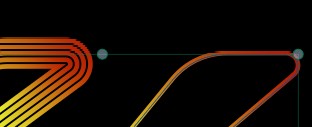
      @Daniel said in What tools are efficient for drawing curves In one step?: Cubic bezier - Has two points, start and end, and four control handles, 2 each. The so called "pen tool". Not quite. Not quite - each segment of a true Cubic Bézier has two control points, one for each end - you often see two control points at a handle because there is one for each of the segments connected to it; if the curve is not closed then the end points will only have one each since there is only one segment coming from them. Curiously, the pen tools in most drawing apps do present a second control handle when manipulating an end point on an open shape, though some of them (such as Affinity Designer) only show it when you are manipulating the one that belongs there. Mathematically that shouldn't be there, which has me wondering what the apps are actually doing when they present one on that end point.
    • W

      Failing to access Windows taskbar

      Watching Ignoring Scheduled Pinned Locked Moved Resolved Issues
      24
      3 Votes
      24 Posts
      47k Views
      VectorStylerV
      @William-Kansepa This problem should be fixed in 1.1.048
    • N

      Align to key object ( accumulated )

      Watching Ignoring Scheduled Pinned Locked Moved VectorStyler 1.1 Bugs
      24
      0 Votes
      24 Posts
      42k Views
      VectorStylerV
      @Nils Yes, changing selection will reset the key object. I will try to find a solution for this.