VectorStyler
    • Categories
    • Unread
    • Recent
    • Tags
    • Popular
    • Register
    • Login
    1. Home
    2. Popular
    Log in to post
    • All Time
    • Day
    • Week
    • Month
    • All Topics
    • New Topics
    • Watched Topics
    • Unreplied Topics

    • All categories
    • 861475_VctSt8

      Preview

      Watching Ignoring Scheduled Pinned Locked Moved Questions and Support
      28
      3 Votes
      28 Posts
      41k Views
      VectorStylerV
      @Pat I managed to replicate the preview issue in Windows 11. It seems that the Windows 10 preview solution does not work on Windows 11 file explorer. Not sure yet what causes this issue.
    • BoldlineB

      Best solution for breaking apart merge results

      Watching Ignoring Scheduled Pinned Locked Moved Questions and Support
      28
      0 Votes
      28 Posts
      60k Views
      BoldlineB
      @b77 lol yes we can agree on that for sure! The stacking order should be reversed regardless. I'd hope there's a way to retain colors as well. Those two edits tot he tool and I thin it will be in great condition The "Break apart" is a really awesome tool that I plan to use a lot in my work inside VS. I don't think we have to only choose one way to do this task - with the blessing of @vectoradmin both options could be available. Merging a fill shape behind a vector with open spaces already "cuts" into the fill shape - now we just need a way to ungroup that merged result (see pic below) [image: 1634944978914-bd512c44-784a-4a9b-8926-eaf9415f9649-image-resized.png]
    • BoldlineB

      Using keyboard shortcut to "Save As" Causes Immediate Crash of VS

      Watching Ignoring Scheduled Pinned Locked Moved Resolved Issues
      28
      0 Votes
      28 Posts
      51k Views
      BoldlineB
      @Jono I think we've figured out the issue for now. thanks for your help!
    • F

      Mesh gradient editor

      Watching Ignoring Scheduled Pinned Locked Moved Resolved Issues
      28
      1
      0 Votes
      28 Posts
      47k Views
      S
      @vectoradmin Doesnt work also on Win. Only not on Line. Double click inside the mesh work.
    • B

      I would like to make a brush... a simple brush

      Watching Ignoring Scheduled Pinned Locked Moved Questions and Support
      28
      1
      0 Votes
      28 Posts
      34k Views
      S
      @FanVidder I don't find the basic steps all that complicated. CorelDraw was my main application before VS, i know a few other vector graphic apps too. It took me a while to get used to the new terminology. It might look complicated, and some functions are harder to understand. Just take your time and go step by step. Yes, there aren't many tutorials on YouTube, probably due to the still small user base. I do post tutorials here in the forum from time to time, but I have no interest in dealing with YouTube; it's just too much effort. The best thing to do is search the forum, check out the tutorial section, or simply ask.
    • N

      Cloning issues ( mega-topic ) ( partially unfixed )

      Watching Ignoring Scheduled Pinned Locked Moved VectorStyler 1.1 Bugs
      28
      1 Votes
      28 Posts
      50k Views
      N
      @vectoradmin Hey, please check out my last comment on this mega-topic. It isn't the files. I've replicated this with the default files. It's the shape effects panel being active as I described above. This is 100% the cause.
    • IngolfI

      Corner rounding algorithm

      Watching Ignoring Scheduled Pinned Locked Moved Features and Ideas
      28
      0 Votes
      28 Posts
      40k Views
      IgullI
      @VectorStyler said in Corner rounding algorithm: @Igull The problem in this example with the corner is the retracted handles. If the control point overlaps the node, then the corner at that node cannot be edited. I will try to fix this ASAP. Didn't we have an issue with something similar earlier this year - bounding box showing when editing using the shape editor ? Neil
    • 861475_VctSt8

      VS startup time

      Watching Ignoring Scheduled Pinned Locked Moved Questions and Support
      28
      0 Votes
      28 Posts
      35k Views
      VectorStylerV
      @Harry said in VS startup time: Where are the temporary files located in Windows? It is up to the operating system to serve the temporary file locations and this may vary between versions. VS will still clean the temporary files, but it does so after crashes, and not at startups. With normal exit, VS will not leave temporary files.
    • P

      Dealing with colors

      Watching Ignoring Scheduled Pinned Locked Moved Features and Ideas
      27
      0 Votes
      27 Posts
      53k Views
      P
      Yes, thank you.
    • S

      New user, i stuck with a simple thing

      Watching Ignoring Scheduled Pinned Locked Moved Questions and Support
      27
      1
      0 Votes
      27 Posts
      49k Views
      S
      @vectoradmin , thanks a lot already downloaded
    • b77B

      How to get the interpolated states of blends between shape variations to generate correctly

      Watching Ignoring Scheduled Pinned Locked Moved Questions and Support
      27
      1 Votes
      27 Posts
      38k Views
      S
      Unfortunalty only for Windows Can recommend "ScreenToGif" Utility for converting single frames into a Gif-Animation. Also very useful for Screen recording. Video ScreentoGif
    • J

      Image Effects

      Watching Ignoring Scheduled Pinned Locked Moved VectorStyler 1.1 Bugs
      27
      0 Votes
      27 Posts
      39k Views
      J
      @VectorStyler Sorry I mean Offset to shadow and angle to control the direction of glow.
    • H

      Brush "live" randomization / variation

      Watching Ignoring Scheduled Pinned Locked Moved Features and Ideas
      27
      2
      1 Votes
      27 Posts
      42k Views
      S
      @b77, @Harry, @VectorStyler Hi As a source for inspiration, for modulate Strokes, the painting program Black Ink came to mind. "Black Ink" uses a kind of controller nodes to modulate brushes to set and control random strokes and has a node system for layers. [image: 1670593437191-black-ink-1.png] Here are some videos Video about the Brush Controllers: Black Ink Brush Controllers Video about Black Inks Layer Nodes: Black Ink Layer Nodes Scattering a Brush may also be interesting her a Video about it Scattering a Brush with Controllers
    • IgullI

      3D Help

      Watching Ignoring Scheduled Pinned Locked Moved Questions and Support
      27
      1 Votes
      27 Posts
      35k Views
      IgullI
      @fde101 said in 3D Help: @Igull not sure about the demo version, but I have a paid license of Art Text 4, and I can just drag a PDF exported from VS into the Art Text window and it loads it as a 2D shape. I can then right-click and convert to 3D after which an option to set the extrusion depth becomes available in the properties area on the right. Mmm, tried a number of PDFs all of which dragged across, but didn't show on the artboard (or only showed the bounding box - and you couldn't right click to create 3d)- seems extremely slow and very unstable (tried it on an M2 this afternoon - a bit faster, but same results) - may be something to do with the demo version. But all it has is a TRIAL watermark, everything else is supposed to work according to the info. It's probably fine for doing text and minimal 3D objects I think - might be too much heavy lifting to move all my bits around. Thanks for the info, I'll keep the trial, might find other uses for it ! Neil
    • A

      Search feature in palettes

      Watching Ignoring Scheduled Pinned Locked Moved Implemented Features
      26
      1
      0 Votes
      26 Posts
      49k Views
      VectorStylerV
      @Boldline The grey box indicates a color group header. Colors from ASE are organized in groups. I will look into the registration color import issue.
    • N

      Editing issues ( mega-topic ) ( partially unfixed )

      Watching Ignoring Scheduled Pinned Locked Moved VectorStyler 1.1 Bugs
      26
      1 Votes
      26 Posts
      43k Views
      b77B
      @Nils Keep in mind some are just usability issues, where user input is needed — see my last post here, for instance: https://www.vectorstyler.com/forum/topic/1835/how-do-i-selectively-edit-the-height-of-some-of-the-text-on-a-path
    • BoldlineB

      Pen tool often gives me an overextended section when I try to click on the last node placed

      Watching Ignoring Scheduled Pinned Locked Moved Resolved Issues
      26
      1
      0 Votes
      26 Posts
      42k Views
      BoldlineB
      @vectoradmin Awesome! thank you for helping me solve that problem!!! it works so much better now
    • IngolfI

      Usability bullseye

      Watching Ignoring Scheduled Pinned Locked Moved General Discussion
      26
      1
      1 Votes
      26 Posts
      43k Views
      IngolfI
      I believe that several meters of sea rise will teach the masses again to think three-dimensionally.
    • b77B

      Align single object to the artboard without enabling the special button for that

      Watching Ignoring Scheduled Pinned Locked Moved Features and Ideas
      26
      1 Votes
      26 Posts
      38k Views
      IgullI
      @b77 said in Align single object to the artboard without enabling the special button for that: Any drawbacks to this simple solution? Yes, that sounds like a plan Neil
    • B

      How to apply effects to other objects?

      Watching Ignoring Scheduled Pinned Locked Moved Questions and Support
      26
      1
      0 Votes
      26 Posts
      35k Views
      VectorStylerV
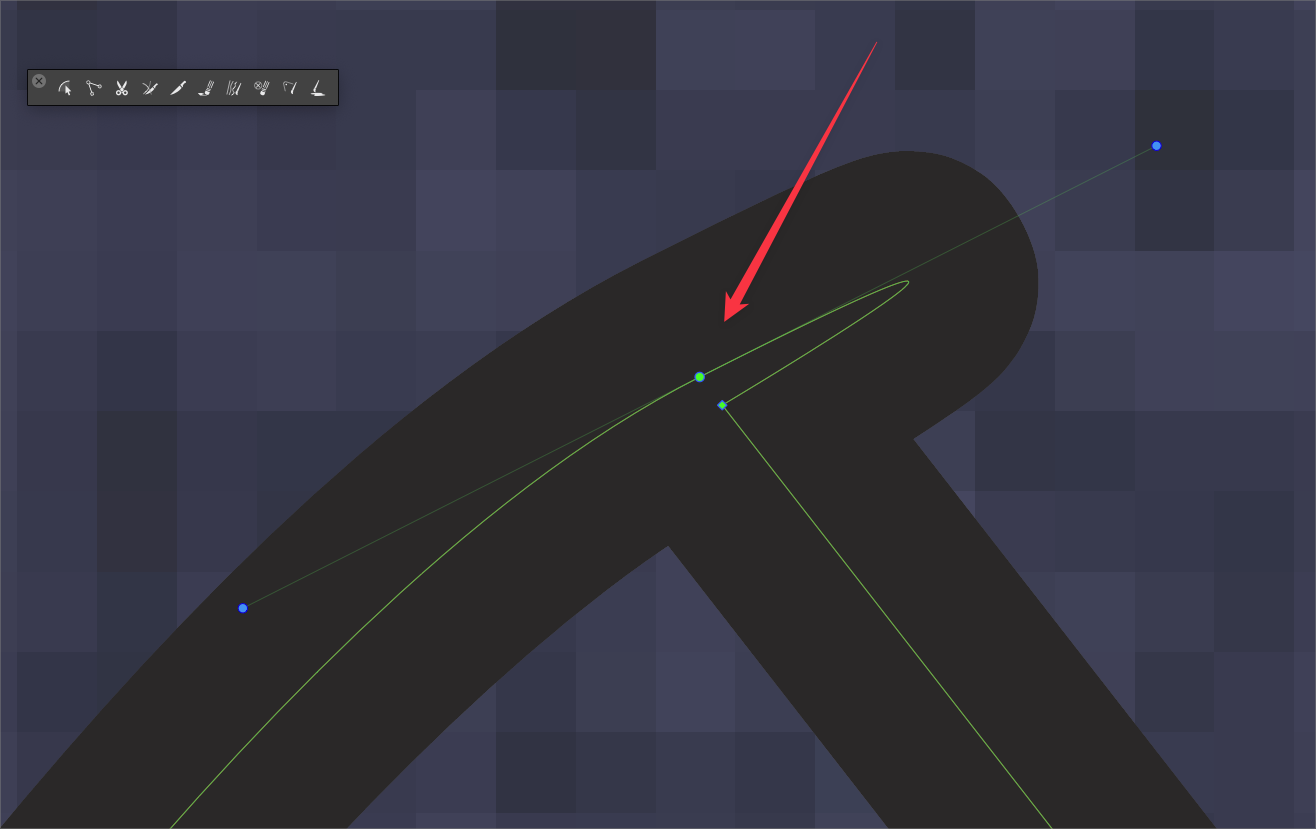
      @Pat said in How to apply effects to other objects?: I think there is still enough space to get sharp pointed edges but no way by modulating the miter limit... another way ? The blunt corners are caused by open paths. At the highlighted locations, the nodes overlap, but the paths are actually open. Use the Node tool and the command in the context panel to connect the nodes.