• Is there an option to align based on live text settings?

    12
    1
    0 Votes
    12 Posts
    10k Views
    b77B
    @Boldline said in Is there an option to align based on live text settings?: the horizontal alignment could utilize the end of the baseline in factoring where the live text ends. If some fonts are not set up this way, so be it.... alignment would work like is does currently anyway You're right, I agree and I guess it can be done.
  • Should the shift key restrain the pen tool to a straight line?

    2
    0 Votes
    2 Posts
    3k Views
    VectorStylerV
    @Boldline The Control key does that (after the mouse is pressed).
  • Keep Shape Selected ?

    3
    0 Votes
    3 Posts
    3k Views
    IgullI
    @VectorStyler said in Keep Shape Selected ?: After drawing a shape, it should stay selected (but there is no highlight indicating this). If you set the fill color the fill should be changed. Ah, that's a bit confusing then I did notice that after the shape had been created, if you hit V for the transform tool, the shape then became selected - which is a really odd arrangement ? It would certainly be good if the method that AI uses was worked out, it's quite intuitive (for my purposes at least, YMMV as they say ) Neil
  • Seeing objects in composite

    3
    0 Votes
    3 Posts
    3k Views
    IngolfI
    @VectorStyler said in Seeing objects in composite: @Ingolf Not clear what you are looking for. Is this in the Layers panel? I assume the composite group is a group with the Composite shape operation. Yep. My memory perhaps confuse things, I might just have performed a 'Break apart' on the composite but the thumbnails in the layers panel where generic. It looked different. The composite was just two shapes as a composite union.
  • Will VS support Chinese interface in the future?

    3
    2 Votes
    3 Posts
    3k Views
    M
    @VectorStyler THANKS!
  • Divide Question

    8
    2
    0 Votes
    8 Posts
    6k Views
    IgullI
    @Boldline Yes, AI divides then removes the trimming path "tool" and groups the resultant parts - all you need to do then is ungroup. TBH, I'm happier the way that VS does it, means you don't have to make a copy of the tool before using it Further, VS doesn't group the resultant parts, so no need to ungroup - win win Neil
  • Flip Horizontal/Vertical Question

    7
    0 Votes
    7 Posts
    6k Views
    IgullI
    @VectorStyler said in Flip Horizontal/Vertical Question: @Ingolf Added this to the backlog. I will try to solve it ASAP. Neil
  • Disclosure triangle on a path

    8
    1
    0 Votes
    8 Posts
    7k Views
    chillywillyC
    Thanks for the solution! I don't have it anymore since I removed it, but next time it happens I'll know what to do.
  • Display Preview Issue

    3
    0 Votes
    3 Posts
    3k Views
    IgullI
    @VectorStyler Ah, I just checked the original AI file and it seems you are correct in what you say - it really didn't click as AI draws the 'outline' (display preview) in black no matter what layer you are on (unless there is an AI preference that has been permanently changed on mine for 40 years ) - it doesn't use the layer colour ? Neil
  • Can the history panel be paused?

    2
    0 Votes
    2 Posts
    2k Views
    VectorStylerV
    @Boldline If turned off, the history will be still recorded because it is needed for undo / redo, but it will not save it into the file when the document is saved. Besides disabling the store option, also reduce the "History Limit" field to 1, to reduce how much history is recorded.
  • Speeding up the workflow in VS

    2
    0 Votes
    2 Posts
    3k Views
    VectorStylerV
    @Boldline said in Speeding up the workflow in VS: they all literally take a second or two before they register I think this could be a bug. And the force quit too. The 1.7 - 2 GB RAM usage seems normal on M1. Should start out around 800MB and then gradually accumulates some caches. But this does not affect the performance (caching actually improves it). Some other thing might cause this. I add this to the backlog.
  • add a background shape/color

    3
    0 Votes
    3 Posts
    3k Views
    chillywillyC
    Thank you so much!
  • Document Units

    6
    0 Votes
    6 Posts
    5k Views
    IgullI
    @VectorStyler
  • Option to distort vector and raster?

    11
    0 Votes
    11 Posts
    8k Views
    VectorStylerV
    @Dazmondo said in Option to distort vector and raster?: I'm assuming that would rasterise all the vectors on output? Yes.
  • Transforming multiple objects at once

    20
    1
    0 Votes
    20 Posts
    16k Views
    VectorStylerV
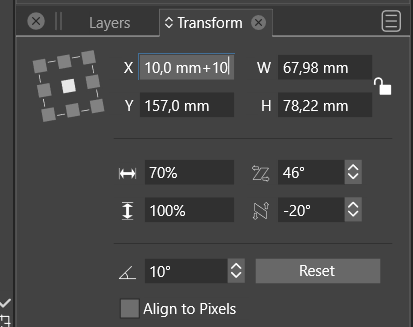
    @b77 said in Transforming multiple objects at once: There's no 'Transform Each' option in the Transform panel I think a Transform Each option would make sense in the Transform panel, but disabled by default. This would solve the problem of selecting the w/h also, not just scaling or rotating that can be done by the modal views. I will try to have this in 1.2
  • EPS file reopens with missing text

    eps text
    4
    0 Votes
    4 Posts
    7k Views
    B
    @VectorStyler I tested with two font types: Times New Roman OTF and Zapfino TTF. Same result with both. Then I loaded the page with a mix of OTF and TTF from various foundries and none of the fonts imported back into VS from the EPS file.
  • Transformed fill

    10
    0 Votes
    10 Posts
    8k Views
    VectorStylerV
    @b77 said in Transformed fill: Are you saying that this means another special command is needed for this, or that making 'Transform Content' do this properly is not that easy I think the Shape select tool (context panel buttons when Transform tool is active), that currently only works with composite shapes could be adapted to work with regular shapes also and make all changes on the shape only not the whole object and its content.
  • Editing the Clipping Mask

    15
    0 Votes
    15 Posts
    12k Views
    S
    @b77 said in Editing the Clipping Mask: @Subpath It doesn't at this time, but I suggested in the other thread that it should work for clipping containers. ah, ok have read your post about it
  • 1 Votes
    10 Posts
    8k Views
    VectorStylerV
    @Boldline said in Could VS check color information to see if the color already exists in the main palette before adding it?: Should this concern me? They are just labels, so no concern. I think this is just the name of the palette, and in the first case it uses the file name, the second the palette name stored inside the palette. I have to look into this to have them the same.
  • Extend and Trim ?

    16
    1
    0 Votes
    16 Posts
    14k Views
    IgullI
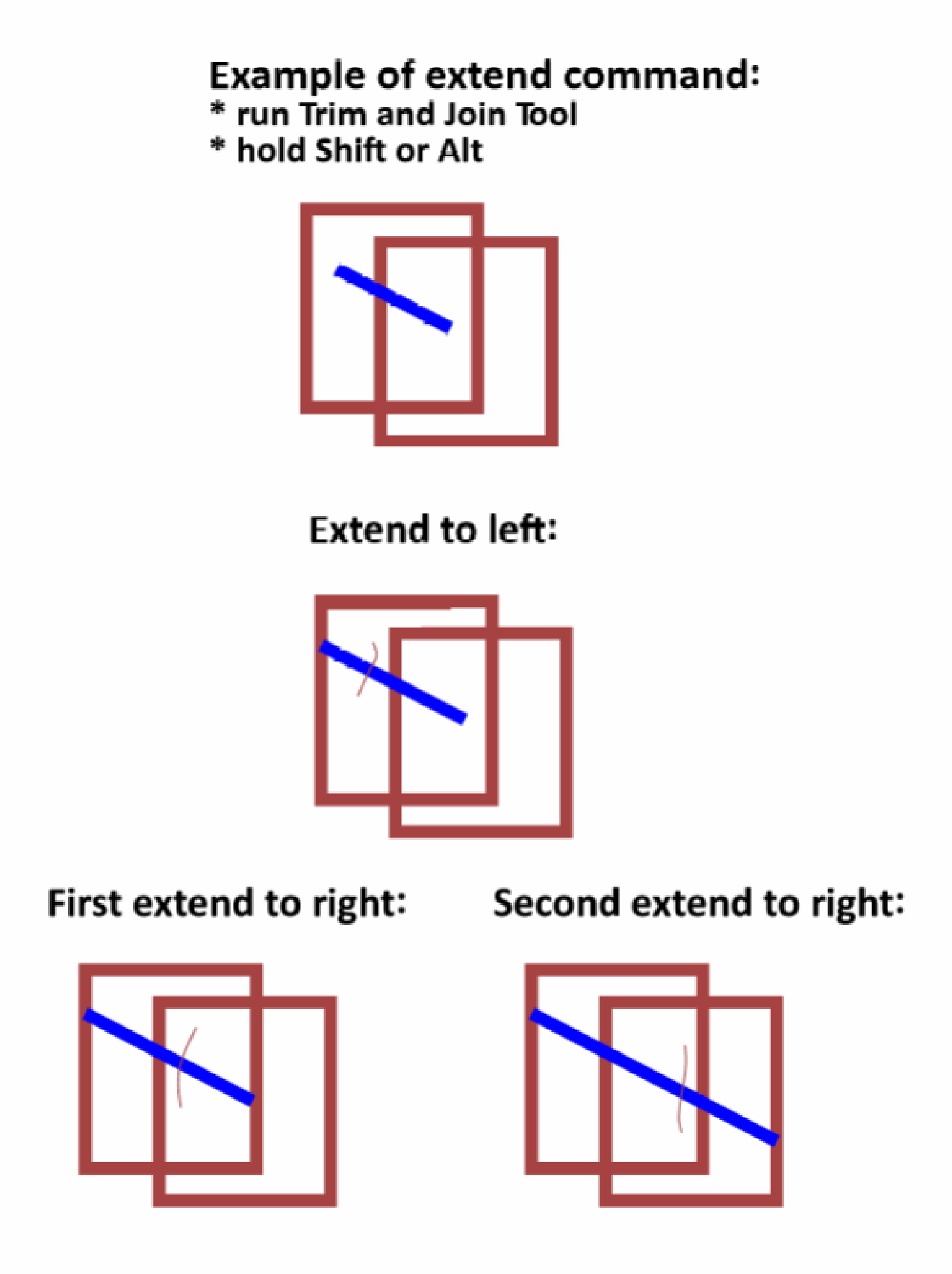
    @VectorStyler Thanks, that sounds like a better solution ! Neil